Original Source
- Original title: Issues.
- Original author: Thisisntworking
- Original date: February 20, 2016
- Source thread: https://forums.rpgmakerweb.com/threads/issues.57237/
- Source forum path: Game Development Engines > Legacy Engine Support > RPG Maker MV Support
Summary
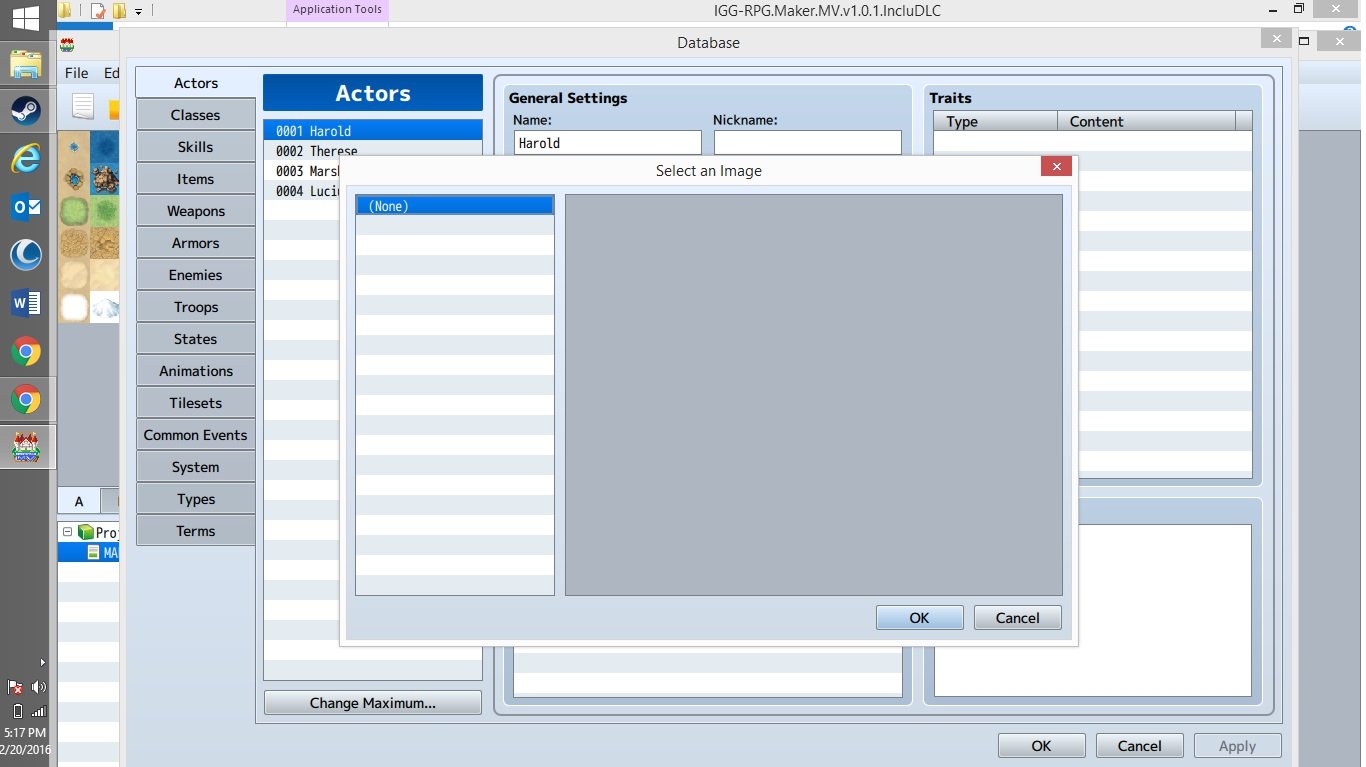
So this has been happening since I even first got the game, none of the image files pop up for ANYTHING! Doors, characters, enemies, etc.. All the files are in the right places too. I watched some videos on how to import characters and such, and it always took the user right to the location of what they're trying to find, but it does not for me. I'm getting EXTREMELY aggravated with this. So if anyone can please tell me or recommend ways to fix this issue? { "lightbox_close": "Close", "lightbox_next": "Next",
Archived First Post
Protected download
Downloads / Referenced Files
Log in, then follow the RPG Maker Developers Group to see these download links.
Log in to downloadReferenced Images / Attachments
Creator Claims / Removal
If you are the original creator and want this listing reassigned, edited, or removed, join BMMPlay and contact the moderators with proof that matches the original RPG Maker Web profile, linked GitHub, itch.io page, or another public creator identity.
Replies (0)
No replies yet.
Topic Summary
Loading summary...