




public

Rpg Maker Developers Group

Simple enough for a child, powerful enough for a developer

2 Followers

Is it possible to make part of one generator part match the color of something else in another?

BMM Archive · July 15, 2026

Preserved forum archive. This topic stores the original first post and locally mirrored RPG Maker Web attachments when available. It is posted by the BMMPlay archive account, not by the original creator.

Original Source

  • Original title: Is it possible to make part of one generator part match the color of something else in another?
  • Original author: EonRising
  • Original date: February 7, 2016
  • Source thread: https://forums.rpgmakerweb.com/threads/is-it-possible-to-make-part-of-one-generator-part-match-the-color-of-something-else-in-another.56415/
  • Source forum path: Game Development Engines > Legacy Engine Support > RPG Maker MV Support

Summary

I know that title is kind of confusing without context so lemme explain! I'm currently in the middle of making assets to create an anthropomorphic snake, and it's coming out really well so far (I've only done the face images, not the movement sprites yet). Anyways, I currently have two kinds of hair (one is just a marking on the forehead, the other is a cobra hood) and I have them set up so that the markings and the underside of the hood (which is listed as eyebrows right now)...

Archived First Post

I know that title is kind of confusing without context so lemme explain!


I'm currently in the middle of making assets to create an anthropomorphic snake, and it's coming out really well so far (I've only done the face images, not the movement sprites yet).


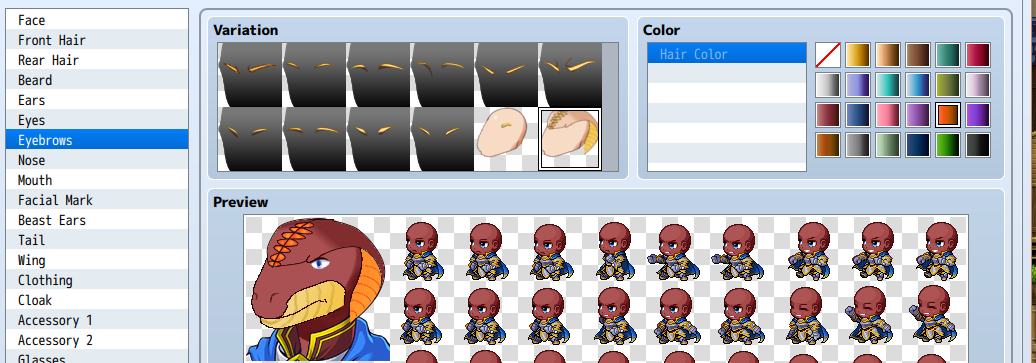
Anyways, I currently have two kinds of hair (one is just a marking on the forehead, the other is a cobra hood) and I have them set up so that the markings and the underside of the hood (which is listed as eyebrows right now) change to the designated hair color, which has a really cool effect!  Protected downloadProtected download


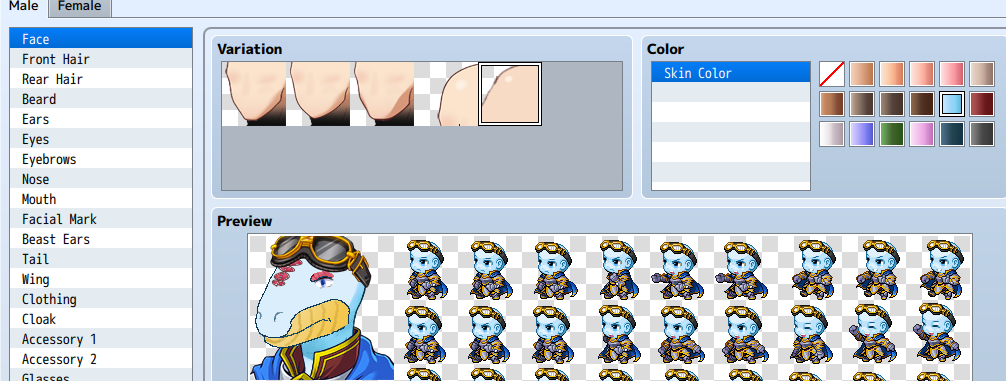
The problem I'm now facing is the tan part on the mouth. I had been hoping that just adding "m003" to the file would allow it to change to the current hair color, but that just brings up my loading wheel for an eternity without actually showing the mouth part. 


Is there any way around this? Or will I have to list his mouth as hair?


While I'm on the subject, you may notice that his mouth scales cut off quite abruptly. Is there a way I can edit the "body" from within the generator?

Downloads / Referenced Files

Log in to download

Log in, then follow the RPG Maker Developers Group to see these download links.

Log in to download

Referenced Images / Attachments

snake wip1.png
snake wip1.png
snake wip2.png
snake wip2.png
Creator Claims / Removal

If you are the original creator and want this listing reassigned, edited, or removed, join BMMPlay and contact the moderators with proof that matches the original RPG Maker Web profile, linked GitHub, itch.io page, or another public creator identity.

#039#rpg-maker-archive#mv-support

Replies (0)

No replies yet.

0 replies 1 view

Log in to reply.

User Avatar