

Trouble With Switch Events
BMM_Archive · July 15, 2026

Original Source
- Original title: Trouble With Switch Events
- Original author: Nisshoku
- Original date: February 3, 2016
- Source thread: https://forums.rpgmakerweb.com/threads/trouble-with-switch-events.56222/
- Source forum path: Game Development Engines > Legacy Engine Support > RPG Maker MV Support
Summary
Alright, so I have been spending literally 3 days trying to figure out how to solve this problem, and I have as of yet had no luck. What I have, is a room with 11 switches on the wall, when the player activates the 4 correct switches, the path forward opens. I already know how to make it so that the path will open when the right switches are pressed, the issue I can't solve, is the actual graphic of the switch. The end result I...
Archived First Post
What I have, is a room with 11 switches on the wall, when the player activates the 4 correct switches, the path forward opens. I already know how to make it so that the path will open when the right switches are pressed, the issue I can't solve, is the actual graphic of the switch.
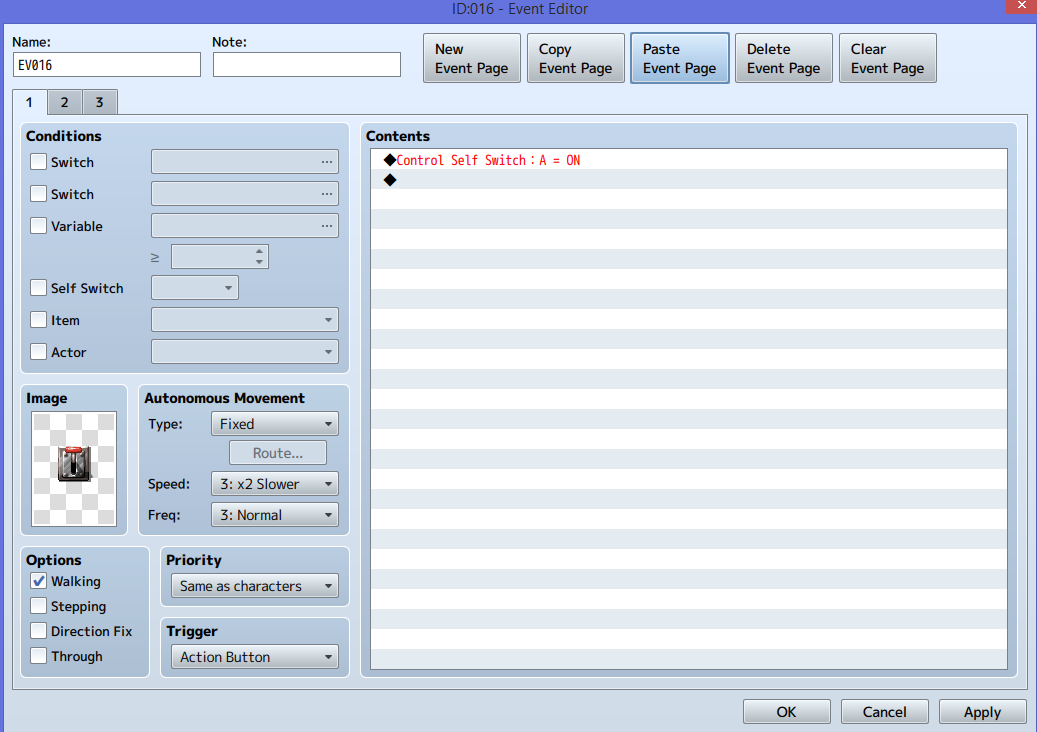
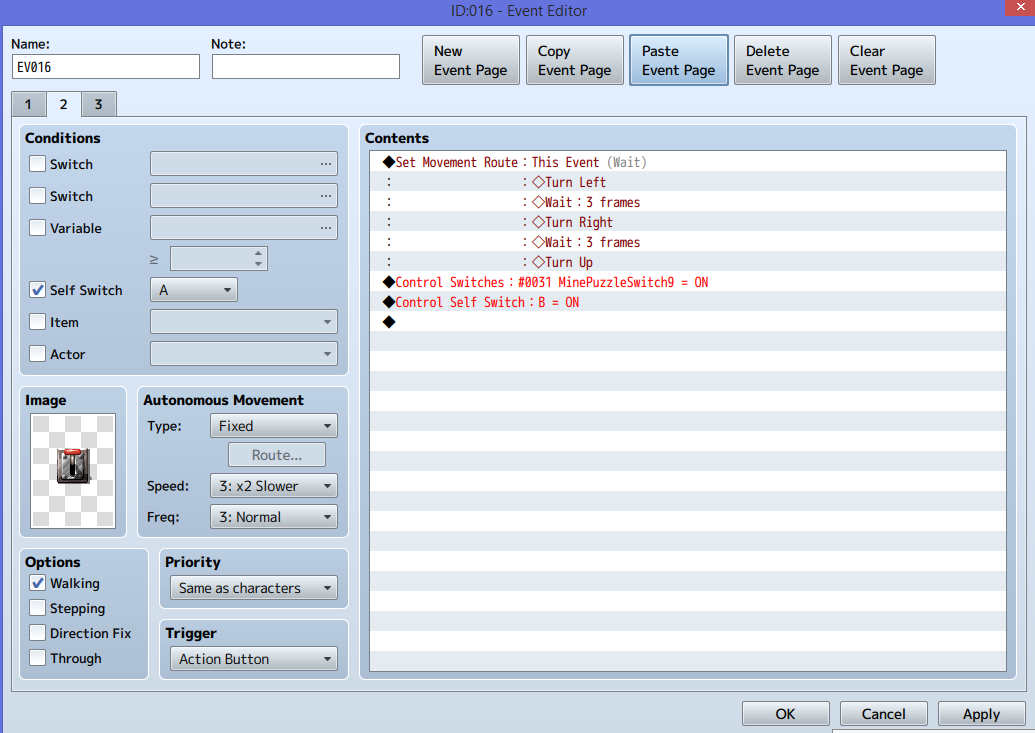
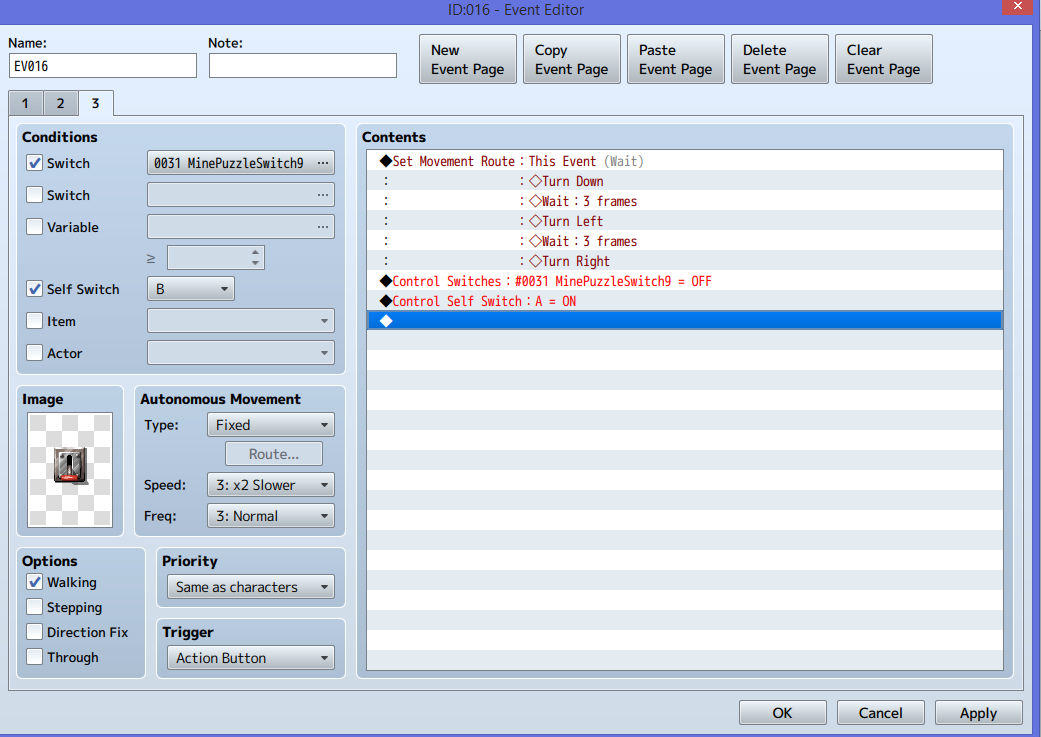
The end result I want, is when the player activates a switch, the switch looks as if it's in the on (downward) position, and then if they activate the switch again, it makes the graphic move back to the off (upward) position. This is easy enough to switch the graphics using separate event pages. Easily enough, I managed to get the switch into the on position, but when I set up the second event page to have it turn off, and you go to press the switch, it just resets the animation of turning the switch on, and stays in the downward position.
If anyone knows how I can fix this issue, I would greatly appreciate it. I have included screenshots of my event. As you can see, I added in an event page that activates a self switch. I did this, because using just two event pages, I could not get the event to switch back and forth, the reason being that both pages need to have either a switch, or self switch activated to switch to that page. But you also can't activate an event if those other switches aren't on, basically making me create a separate event to achieve this.
I would simply like it all to be in one event, switch is down when on, and up when off. I also have 11 switches created, that turn on and off when the events are turned on and off respectively.
Downloads / Referenced Files
RPG Maker Web attachments are mirrored locally when available. Other external links remain hosted by their original creator or third-party service.
- Local mirror: 17730-30993a477525271b1c18f329965b6f90.png
SHA-256:782f5ae1c7724178236bf4e00b66841760b3e83071b287b517c19c19d41486db
Original attachment URL: https://forums.rpgmakerweb.com/attachments/screenshot_2-png.30794/ - Local mirror: 17731-0d61f210ad200a38018513b431d081cf.png
SHA-256:7c2d4c2614c8490e314d0b6c976f899196e41bf63aa19d9dddab11156aa6a212
Original attachment URL: https://forums.rpgmakerweb.com/attachments/screenshot_3-png.30795/ - Local mirror: 17732-3d0beef697b7b10be0a57eeb4727d23c.png
SHA-256:a9c4d00b598578cd5139dd3055bb8360cd33f7d5281173a5bfd541e98702f8cb
Original attachment URL: https://forums.rpgmakerweb.com/attachments/screenshot_4-png.30796/
Referenced Images / Attachments
Creator Claims / Removal
If you are the original creator and want this listing reassigned, edited, or removed, join BMMPlay and contact the moderators with proof that matches the original RPG Maker Web profile, linked GitHub, itch.io page, or another public creator identity.
Replies (0)
No replies yet.
Topic Summary
Loading summary...