

[Glitch] RPGMV Showing increased graphic sizes with extra pixels.
BMM_Archive · July 15, 2026

Original Source
- Original title: [Glitch] RPGMV Showing increased graphic sizes with extra pixels.
- Original author: Rex Tenebris
- Original date: January 6, 2016
- Source thread: https://forums.rpgmakerweb.com/threads/glitch-rpgmv-showing-increased-graphic-sizes-with-extra-pixels.54367/
- Source forum path: Game Development Engines > Legacy Engine Support > RPG Maker MV Support
Summary
[copy/paste from this topic: http://forums.rpgmakerweb.com/index.php?/topic/53567-glitch-rpgmv-showing-increased-graphic-sizes-with-extra-pixels/ , to see the attached files please refer to this topic, thank you!] Spoiler *I was not sure where to report this glitch, also I'm not 100% sure if is a glitch of MV itself, so please move this topic if required. Also, I'm not sure if this problem has been reported before. Yesterday I increased the faces and icon sizes on my game by 200%, and using YEP_CoreEngine I changed the default icon size to 64px and the face size to 288px.
Archived First Post
Yesterday I increased the faces and icon sizes on my game by 200%, and using YEP_CoreEngine I changed the default icon size to 64px and the face size to 288px.
However, the faces and icons were displaying an extra pixel on some sides.
Right-Click and open on new window/tab.
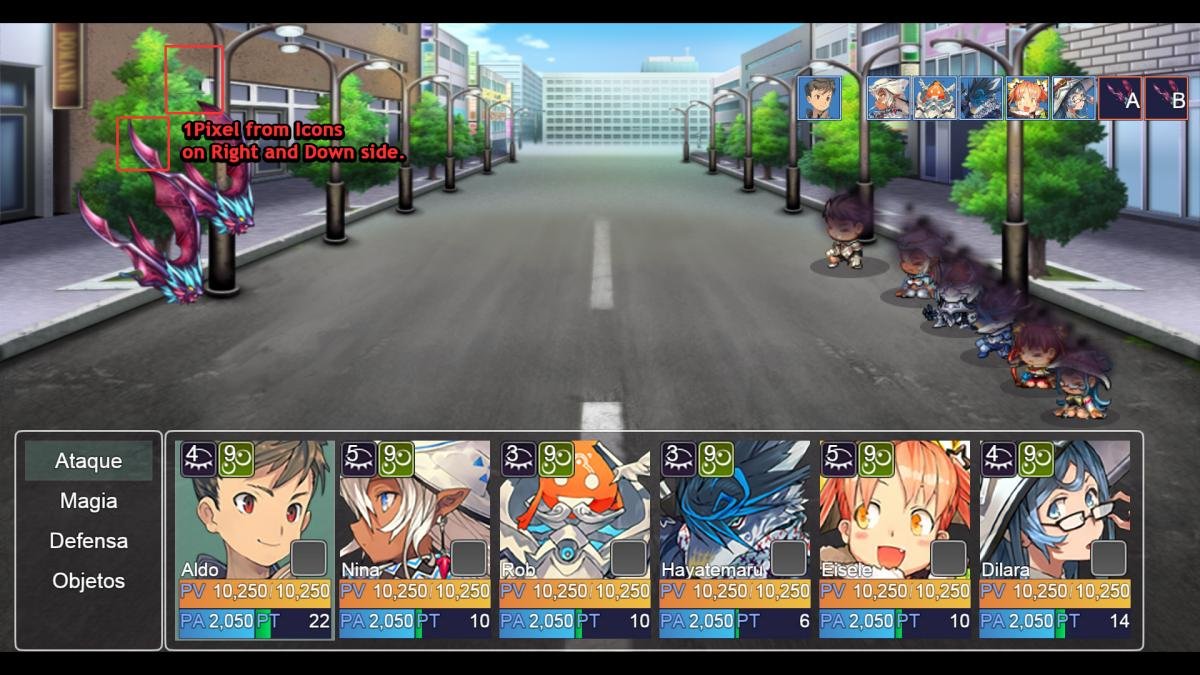
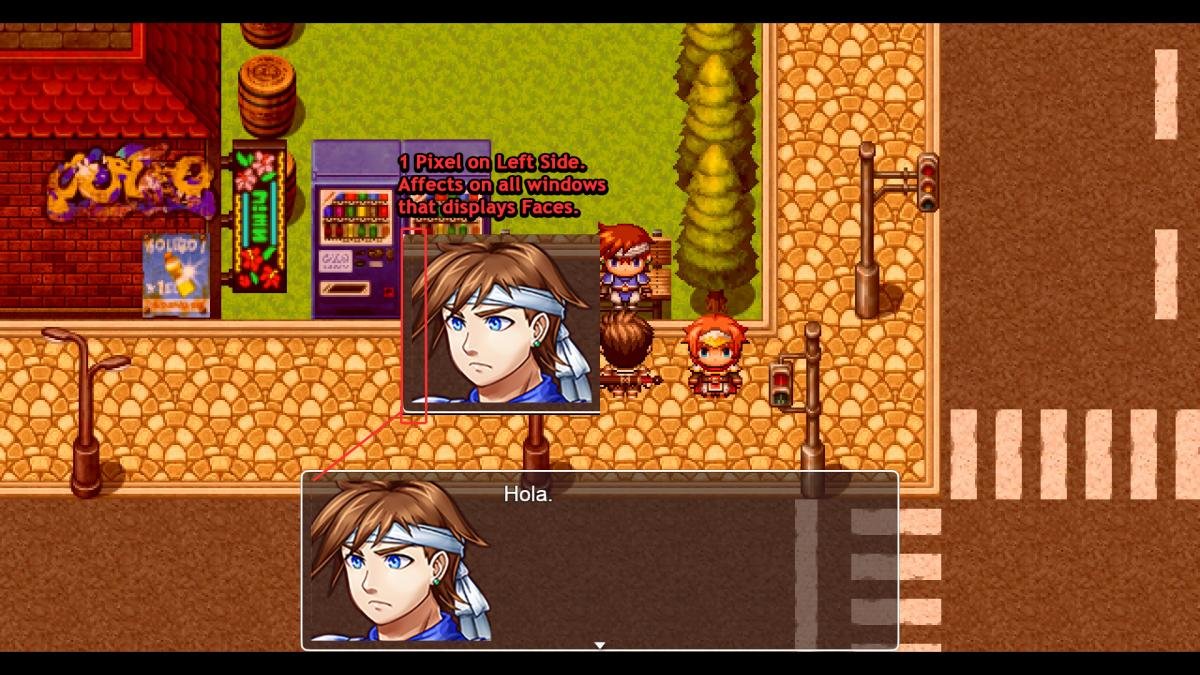
And I thought that this issue was caused by other plugins, so I tested it on a new project too containing ONLY YEP_CoreEngine.js (to change the default size) and YEP_MessageCore (for change the message rows), but the issue is still there, you can see it on the Menu.
Right-Click and open on new window/tab.
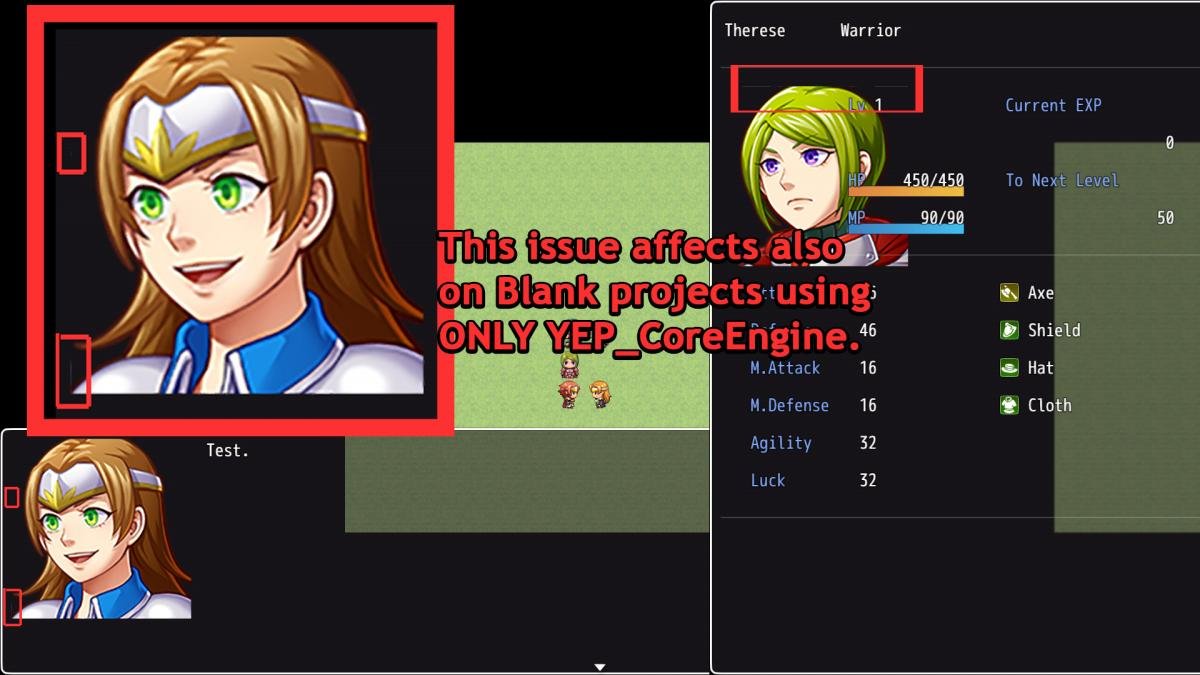
This is not only affecting on Faces and Icons, even if you increase the size of a graphic by the use of a command function or notes rather than increasing the size of the image file (such as Map Zoom or Sprite Zoom), the graphics displays extra pixels from the next image of the set, and considering that I seen this issue using different plugins such as MBS_MapZoom (displaying 1 extra pixel on events and characters when zooming ~x1.5~1.9), doubling the Battle Sprite Size of actors (code snippet by Jeremy Cannady), etc, I'm at least 90% sure that this is a bug of RPG Maker MV itself.
I also did some tests like using 60px icons instead of 64px, and as I thought the problem persists, if it were a problem of YEP_CoreEngine these extra pixels shouldn't be displayed also on other plugins that zooms the graphics and where YEP_CoreEngine does nothing on them.
I hope that this issue can be fixed soon.
EDIT: The forum resized the images, for see the highlighted areas, please hold Ctrl and Scroll Up with the Mouse.
I asked to Yanfly to take a look to that topic and he said that this bug is not caused by Core Engine, it is a bug of MV itself. His answer was:
So I'm opening the topic here as he suggested. I hope that someone can provide an unofficial snippet or something for temporally fix this issue, as I said this does not affect only to images that were really resized but also to any image that are resized by scripts, so far I noticed that this affects to Battle Sprites, Character Sprites, Facesets and Icons.This is NOT something caused by the Core Engine. That's a bug with the default RPG Maker MV source code. You'll have to bring this to MV Reports: http://forums.rpgmak...9-rpg-maker-mv/
Thank you in advance.
Downloads / Referenced Files
RPG Maker Web attachments are mirrored locally when available. Other external links remain hosted by their original creator or third-party service.
- Local mirror: 15782-c554a9950e4d942cc5165235257247e8.jpg
SHA-256:1dc5e1d6d0a0437928e9b271a095c066430dfd2396975ad68584c7a549c0db8e
Original attachment URL: https://forums.rpgmakerweb.com/attachments/problem1-jpg.27625/ - Local mirror: 15783-ed74ccb678cdfa9ef9d09296173bfb8e.jpg
SHA-256:78efb85b3fb3844e04d110df15a85e634e1e4021d688dce1faa8932622a03a2a
Original attachment URL: https://forums.rpgmakerweb.com/attachments/problem2-jpg.27626/ - Local mirror: 15784-3073377ebae37cd7fbbd10f3ed6198ea.jpg
SHA-256:9fac876137c641552c9030958883a05d1a1b71256fd68a8f5365105eefd847e6
Original attachment URL: https://forums.rpgmakerweb.com/attachments/problem3-jpg.27627/
Referenced Images / Attachments
Creator Claims / Removal
If you are the original creator and want this listing reassigned, edited, or removed, join BMMPlay and contact the moderators with proof that matches the original RPG Maker Web profile, linked GitHub, itch.io page, or another public creator identity.
Replies (0)
No replies yet.
Topic Summary
Loading summary...