So I'm fairly new to RPG maker VX ace and I have a question.
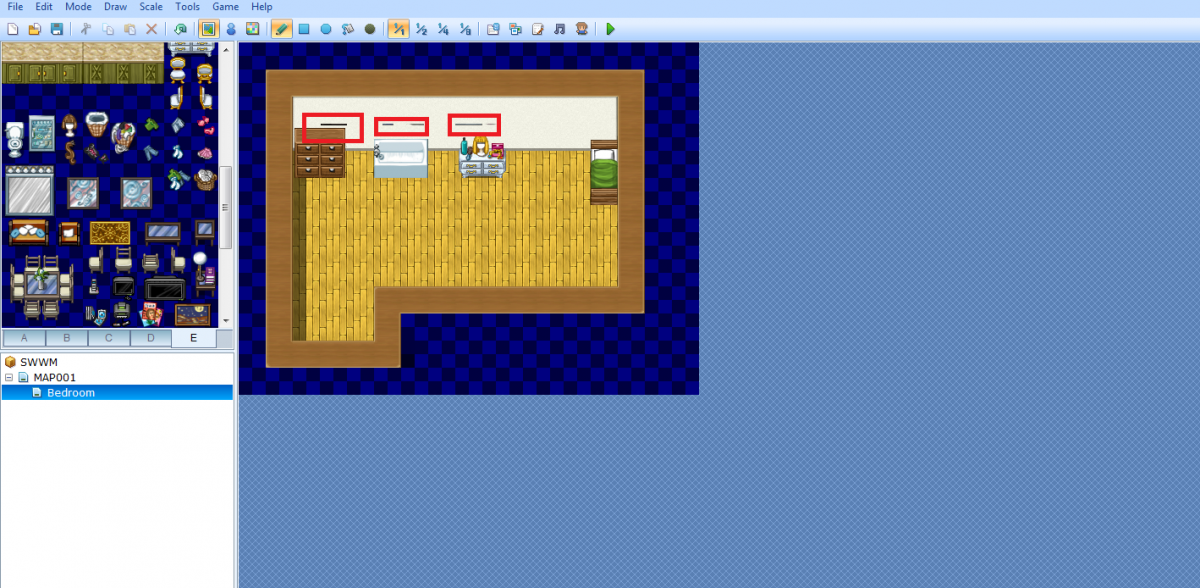
I installed some modern tiles (and this issue isn't just with the modern tiles, it's with pretty much every custom tileset that I use) and i've found that when i want to make a map, some of the tiles overlap each other.
If you don't understand, I have a picture:
http://imgur.com/4QxqriX
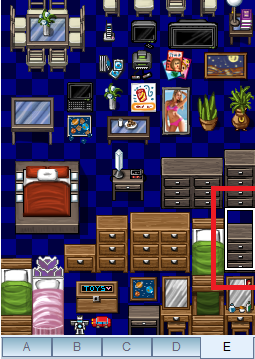
The 3 highlighted parts are the problem. When I add the tiles in, the bottom of the tile above it will be included too because the box I highlight with is too big. I have another image:
http://imgur.com/jAEKqnd
Is there a way to fix this? I'ts really annoying me since it makes my maps look weird. Thanks.
(Also, sorry if I posted this in the wrong place. I'm still new.)
Protected download
Protected download



 Playstation DualSense Charging Station
Dock-style charging station for keeping two DualSense controllers ready between sessions.
View on Amazon
Playstation DualSense Charging Station
Dock-style charging station for keeping two DualSense controllers ready between sessions.
View on Amazon