public

Rpg Maker Developers Group

Simple enough for a child, powerful enough for a developer

2 Followers

layer order of skill animation

BMM Archive · July 15, 2026

Preserved forum archive. This topic stores the original first post and locally mirrored RPG Maker Web attachments when available. It is posted by the BMMPlay archive account, not by the original creator.

Original Source

  • Original title: layer order of skill animation
  • Original author: doranikofu
  • Original date: December 8, 2015
  • Source thread: https://forums.rpgmakerweb.com/threads/layer-order-of-skill-animation.52503/
  • Source forum path: Game Development Engines > Legacy Engine Support > RPG Maker MV Support

Summary

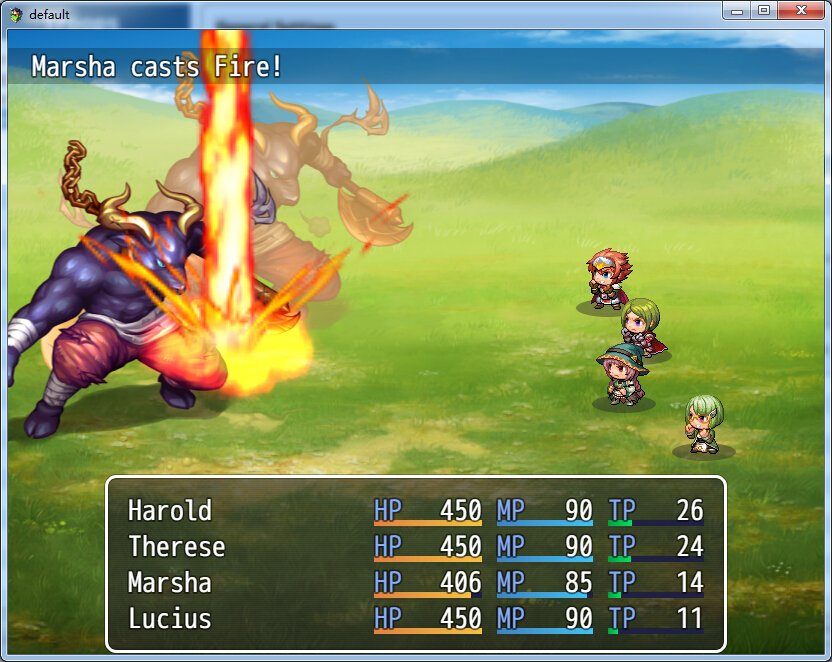
maybe I missed something but I noticed that when playing skill animation in SV battle, the animation is always above all battlers (which does not make much sense) for example: { "lightbox_close": "Close",
Archived First Post

maybe I missed something but I noticed that when playing skill animation in SV battle, the animation is always above all battlers (which does not make much sense)

for example:

Protected download

supposedly the fire should be behind the bottom enemy sprite, but is showing above everything.

I heard there is no easy global z axis control in MV, but this is more like a ‘bug' for displaying skill animations.

I was trying to add shadow to the enemy and encountered similar issues. For actors, the shadow and actor image were drawn in order with addchild function but the enemy sprites do not have that structure natively.

Is there going to be a plugin/update to solve this? Looks like the structure of the battler image/animaition scripts need to be changed to show everything correctly?

Downloads / Referenced Files

Log in to download

Log in, then follow the RPG Maker Developers Group to see these download links.

Log in to download

Referenced Images / Attachments

QQ截图20151208144706.jpg
Creator Claims / Removal

If you are the original creator and want this listing reassigned, edited, or removed, join BMMPlay and contact the moderators with proof that matches the original RPG Maker Web profile, linked GitHub, itch.io page, or another public creator identity.

#rpg-maker-archive#mv-support

Replies (0)

No replies yet.

0 replies 1 view

Log in to reply.

User Avatar


