


Temporarily Disable Key/button inputting?
BMM_Archive · July 15, 2026

Original Source
- Original title: Temporarily Disable Key/button inputting?
- Original author: VoltraK
- Original date: July 29, 2015
- Source thread: https://forums.rpgmakerweb.com/threads/temporarily-disable-key-button-inputting.42984/
- Source forum path: Game Development Engines > Legacy Engine Support > RPG Maker VXAce Support
Summary
I searched high and low and couldn't find anything already in the program or any scripts that could fix it this. I'm trying to make an event using unskippable text boxes and map scrolling at the same time. It worked perfectly, until I realized if I hit a certain key, it fast-forwards the text, ultimately ruining my script in the end, since the text NEEDS to be displayed for the exact amount of time I had already placed it for in order to make the event run without flaw. Is...


Archived First Post
I'm trying to make an event using unskippable text boxes and map scrolling at the same time. It worked perfectly, until I realized if I hit a certain key, it fast-forwards the text, ultimately ruining my script in the end, since the text NEEDS to be displayed for the exact amount of time I had already placed it for in order to make the event run without flaw.
Is there any way I can temporarily make all buttons disabled, or a script that can allow me to do so?
Or alternatively a way I can rewrite this script to work as I wish it to that I did not previously think of?
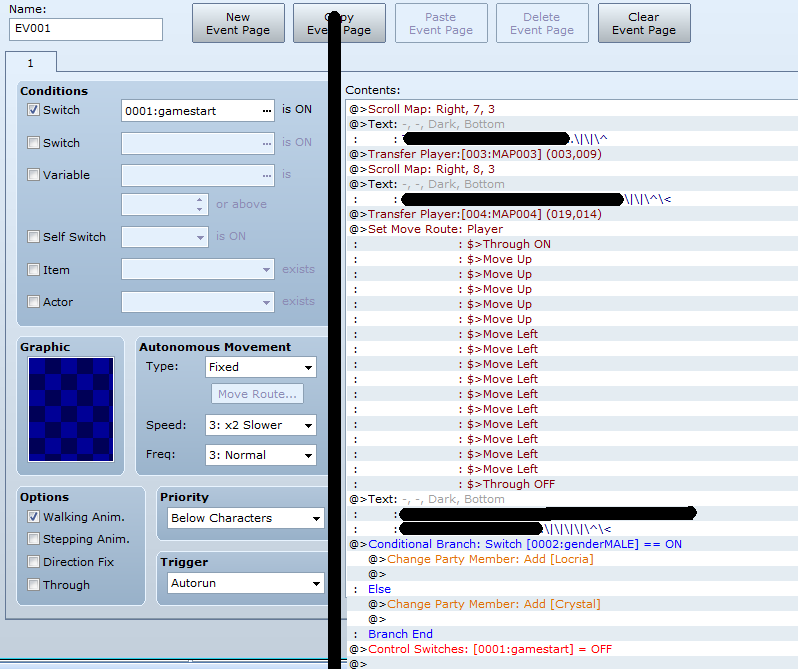
I'm currently using scroll map/move player route commands alongside text boxes using "\|" and "\^", if that information helps anyone understand my motive and/or problem.
I'll add a picture of the event as well since that might help.
Protected download
Downloads / Referenced Files
Log in, then follow the RPG Maker Developers Group to see these download links.
Log in to downloadReferenced Images / Attachments
Creator Claims / Removal
If you are the original creator and want this listing reassigned, edited, or removed, join BMMPlay and contact the moderators with proof that matches the original RPG Maker Web profile, linked GitHub, itch.io page, or another public creator identity.
Replies (0)
No replies yet.
Topic Summary
Loading summary...
