Preserved forum archive. This topic stores the original first post and locally mirrored RPG Maker Web attachments when available. It is posted by the BMMPlay archive account, not by the original creator.
Original Source
Original title: Problem with playing my exported game
Source forum path: Game Development Engines > Legacy Engine Support > RPG Maker VXAce Support
Summary
Hello Forum. I am currently working on a little game and, just for testing, I exported it as an .exe (With "Encrypted Package" and "Include RTP Files" marked as YES). When I executed the .exe, everything seemed just fine. The custom title screen was there, and the menu worked perfectly. Then I entered the game, and the screen turned white. The text boxes I put in the game were there (Intro sequence), but the graphics and the player weren't. In the playtest inside RPG Maker, everything worked flawless, until I...
Archived First Post
Hello Forum.
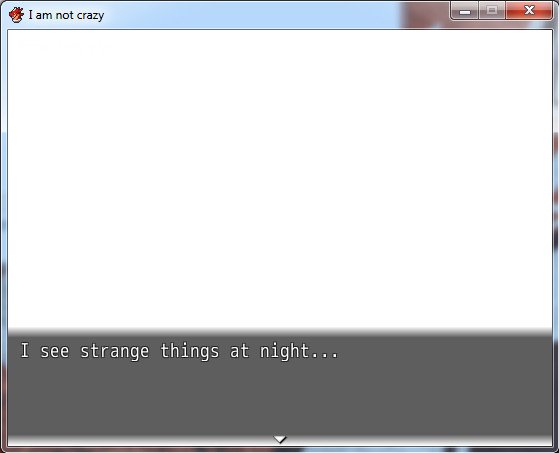
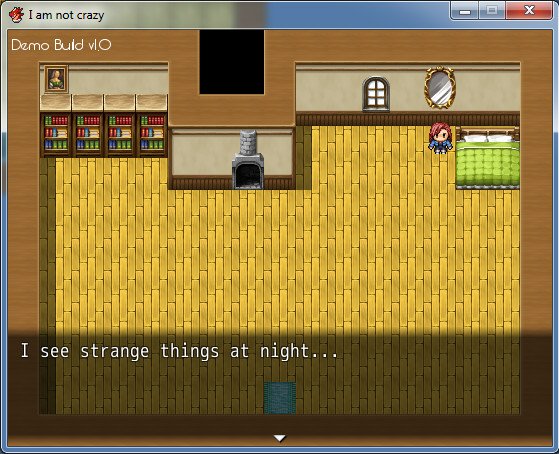
I am currently working on a little game and, just for testing, I exported it as an .exe (With "Encrypted Package" and "Include RTP Files" marked as YES). When I executed the .exe, everything seemed just fine. The custom title screen was there, and the menu worked perfectly. Then I entered the game, and the screen turned white. The text boxes I put in the game were there (Intro sequence), but the graphics and the player weren't. In the playtest inside RPG Maker, everything worked flawless, until I exported it. Can someone please help me?
That's how it shouldn't be:
Protected download
And this is how it should be:
Protected download
Downloads / Referenced Files
Log in to download
Log in, then follow the RPG Maker Developers Group to see these download links.
If you are the original creator and want this listing reassigned, edited, or removed, join BMMPlay and contact the moderators with proof that matches the original RPG Maker Web profile, linked GitHub, itch.io page, or another public creator identity.






 Amazon Fire TV 50-Inch 4-Series 4K UHD Smart TV
4K smart TV with Fire TV built in for streaming, games, and living room viewing.
View on Amazon
Amazon Fire TV 50-Inch 4-Series 4K UHD Smart TV
4K smart TV with Fire TV built in for streaming, games, and living room viewing.
View on Amazon