


Adding an extra window to the menu
BMM_Archive · July 15, 2026

Original Source
- Original title: Adding an extra window to the menu
- Original author: Pondis
- Original date: July 23, 2015
- Source thread: https://forums.rpgmakerweb.com/threads/adding-an-extra-window-to-the-menu.42732/
- Source forum path: Game Development Engines > Legacy Engine Support > RPG Maker VXAce Support
Summary
This might need a bit of explaining, so bear with me. I am counting days in my game which is working now and I display them just under the currency in the gold window with a script edit. It works great in the menu, but when in a shop the gold window gets pushed under what I think is the status window. Now my three solutions here are to either hide the day on the shop screen some how, or resize the command and status windows which is probably easier...


Archived First Post
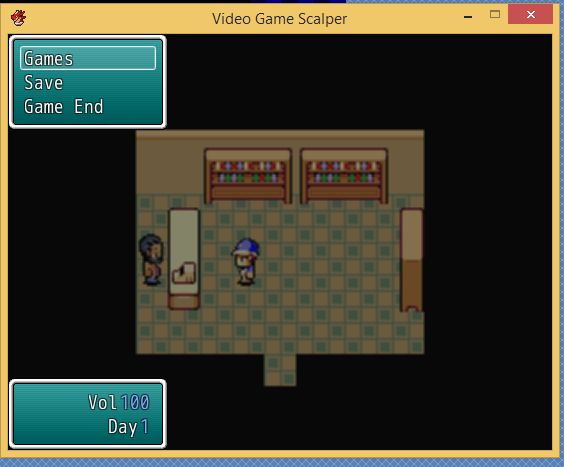
I am counting days in my game which is working now and I display them just under the currency in the gold window with a script edit.
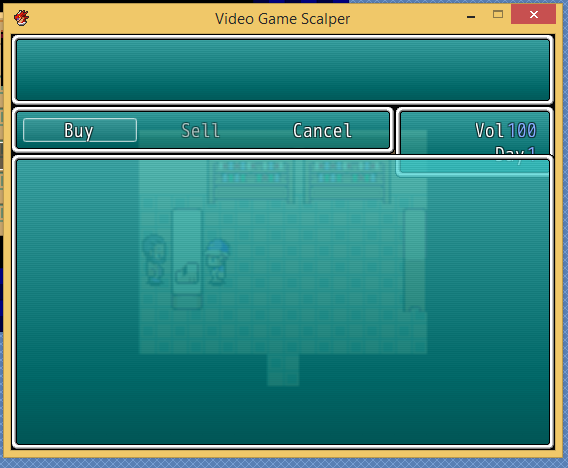
It works great in the menu, but when in a shop the gold window gets pushed under what I think is the status window.
Now my three solutions here are to either hide the day on the shop screen some how, or resize the command and status windows which is probably easier or add a new box the same size as the currency box just above on the main menu and not call it any where else.
Does any one have an idea how I could do any of these things?
Thanks
Protected download
Protected download
Downloads / Referenced Files
Log in, then follow the RPG Maker Developers Group to see these download links.
Log in to downloadReferenced Images / Attachments
Creator Claims / Removal
If you are the original creator and want this listing reassigned, edited, or removed, join BMMPlay and contact the moderators with proof that matches the original RPG Maker Web profile, linked GitHub, itch.io page, or another public creator identity.
Replies (0)
No replies yet.
Topic Summary
Loading summary...
