

Making Text Box Stay Onscreen with Loop Points
BMM_Archive · July 15, 2026

BMM_Archive
Preserved forum archive. This topic stores the original first post and locally mirrored RPG Maker Web attachments when available. It is posted by the BMMPlay archive account, not by the original creator.
Original Source
- Original title: Making Text Box Stay Onscreen with Loop Points
- Original author: TheShiningAbsol
- Original date: December 1, 2015
- Source thread: https://forums.rpgmakerweb.com/threads/making-text-box-stay-onscreen-with-loop-points.51938/
- Source forum path: Game Development Engines > Legacy Engine Support > RPG Maker MV Support
Summary
Hey, all. Hoping you can help me with a bit of an issue. Minor, perhaps, but it's been bugging me. So the problem is that when I use the loop command for dialogue options, the text box disappears before the choices come up. { "lightbox_close": "Close",
Archived First Post
Hey, all. Hoping you can help me with a bit of an issue. Minor, perhaps, but it's been bugging me.
So the problem is that when I use the loop command for dialogue options, the text box disappears before the choices come up.
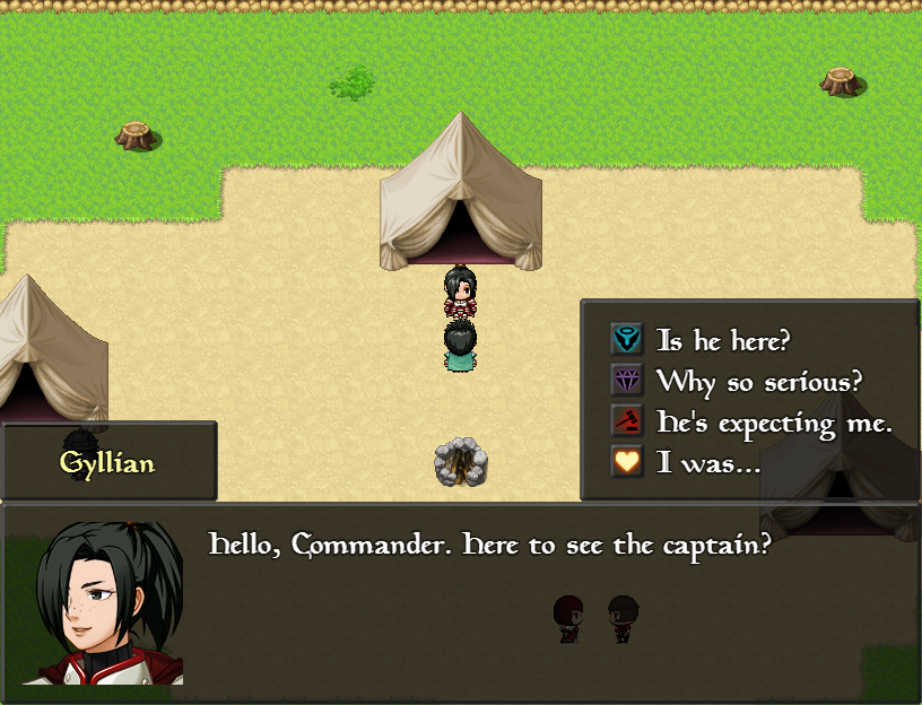
This is the typical response tree, where the dialogue box is still onscreen.
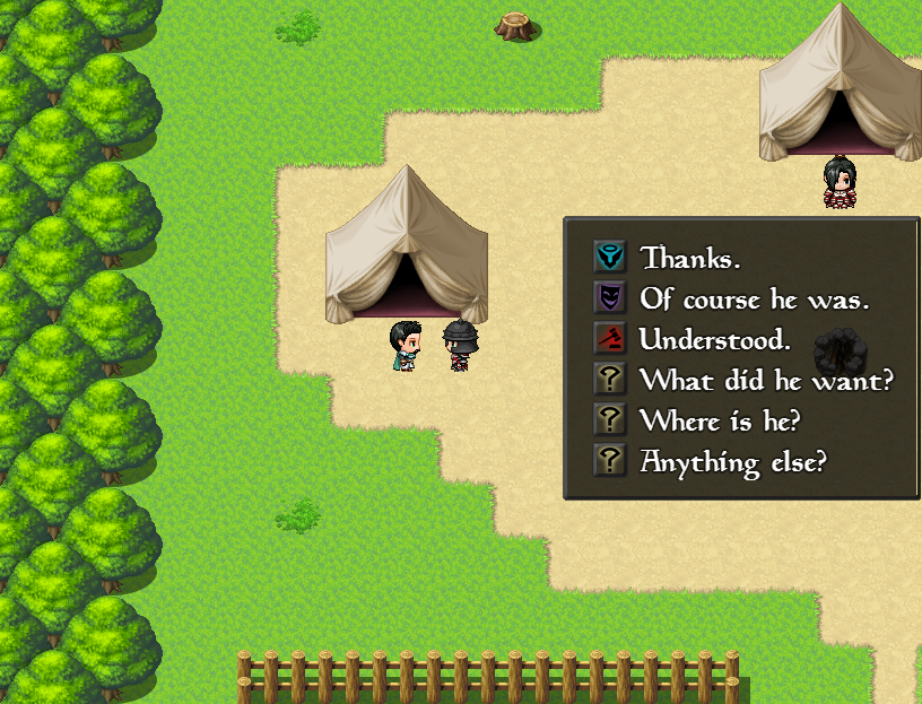
And here is one where I set a loop point right before the choices.
Is there a way to go about getting the text box to stay up? I need the loop points so that all of the investigate options will loop back to the choices. And setting the loop point before the text box is a no-go, because then it pops up after you ask a question which doesn't work conversationally 99% of the time. Any suggestions would be appreciated.
So the problem is that when I use the loop command for dialogue options, the text box disappears before the choices come up.
This is the typical response tree, where the dialogue box is still onscreen.
And here is one where I set a loop point right before the choices.
Is there a way to go about getting the text box to stay up? I need the loop points so that all of the investigate options will loop back to the choices. And setting the loop point before the text box is a no-go, because then it pops up after you ask a question which doesn't work conversationally 99% of the time. Any suggestions would be appreciated.
Downloads / Referenced Files
RPG Maker Web attachments are mirrored locally when available. Other external links remain hosted by their original creator or third-party service.
- Local mirror: 15192-ae73ec7e3105cbc9ba4014be8b052c78.png
SHA-256:1ec8b471b1a00d7b163a1d28ce8c6be8f7bb590ba63a62aeaa4c38d53a689764
Original attachment URL: https://forums.rpgmakerweb.com/attachments/noloop-png.26816/ - Local mirror: 15193-64aa698e5e6c4ad35de598713f0fb4da.png
SHA-256:f3e251cb5d3202759ab99ba7fe218dc353198e833ce9d3ea5cc35f939a4af2ba
Original attachment URL: https://forums.rpgmakerweb.com/attachments/withloop-png.26817/
Referenced Images / Attachments
Creator Claims / Removal
If you are the original creator and want this listing reassigned, edited, or removed, join BMMPlay and contact the moderators with proof that matches the original RPG Maker Web profile, linked GitHub, itch.io page, or another public creator identity.
Replies (0)
No replies yet.
0
replies
15
views
Topic Summary
Loading summary...