Preserved forum archive. This topic stores the original first post and locally mirrored RPG Maker Web attachments when available. It is posted by the BMMPlay archive account, not by the original creator.
Original Source
- Original title: Non-Combat Menu
- Original author: mjshi
- Original date: February 6, 2016
- Source thread: https://forums.rpgmakerweb.com/threads/non-combat-menu.56344/
- Source forum path: Game Development Engines > RPG Maker Javascript Plugins > JS Plugin Releases (RMMV)
Summary
A wild MV port appears! Non-Combat Menu v1.04 (MV) by mjshi- OK for use in all projects with credit Get it here! (direct link)
Archived First Post
A wild MV port appears!
Introduction
Well, it was going to happen someday. So why not now?
Introducing a sleek, minimalist menu for all your non-combat game needs! Be it survival horror, mystery, point-and-click... the non-combat menu is here for you.
Features
Configurable:
- Configure what can be shown on the menu and what they will be called.
- Configure whether or not to have a gold window, where the window should be, and how wide
- Change what the item menu shows
- Change where the item description box will go
Updates:
- Compatibility edit for Yanfly Item Core. updated to 1.0b
- Added support for backgrounds. updated to 1.01
- Added support for calling common events from the menu. updated to 1.02
- Fixed the common event call to actually support multiple common events. updated to 1.02a
- Integrated the pluginCMD addon onto the main plugin. updated to 1.03
- Added icon and text alignment support updated to 1.04
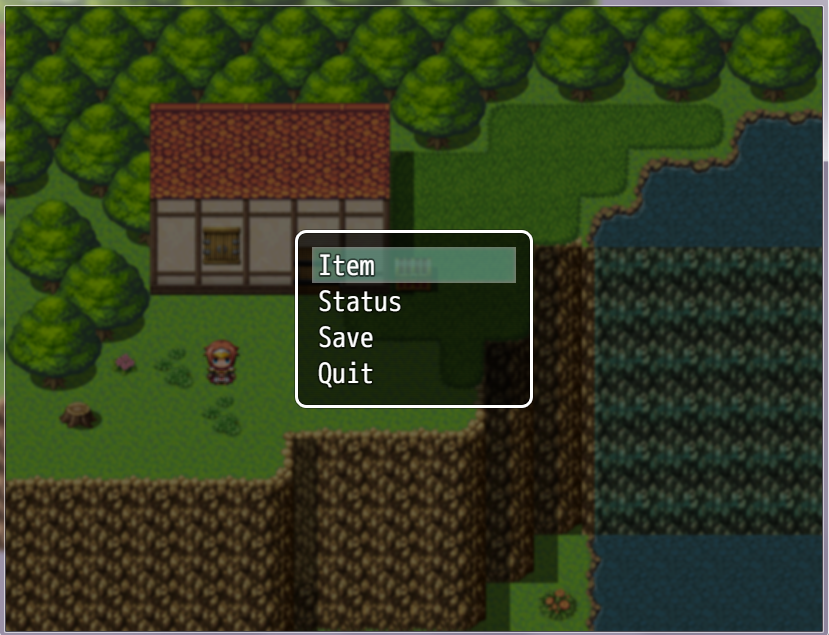
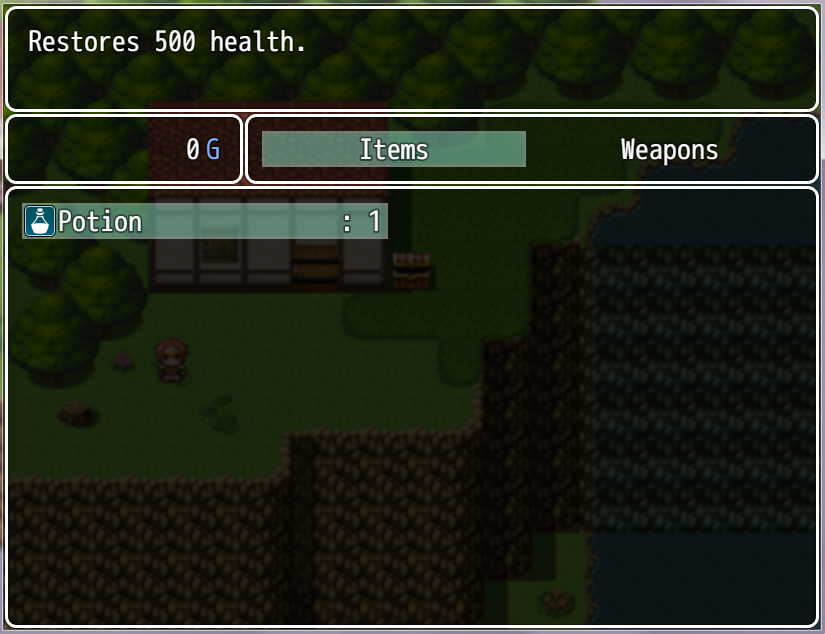
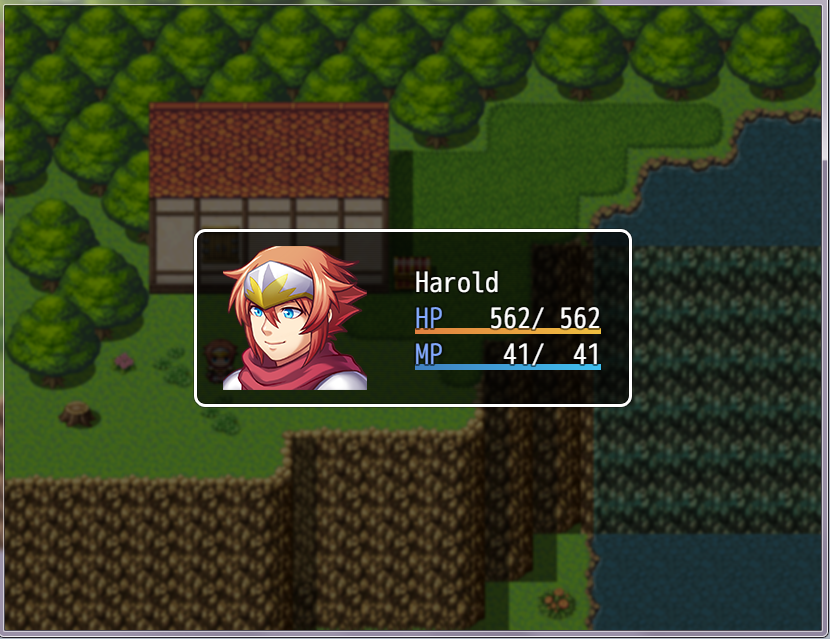
Screens
(Blank project with some mapping for eye candy)
How to Use
Drag the file into your plugins folder, then configure to your heart's content.
Place below Yanfly Item Core if you have it.
Addons
PluginCMD addon Allows for plugin commands to be opened from the menu (thus allowing the implementation of other plugin scenes)
Status OUTDATED, works for 1.02 and below. For 1.03+, this addon's functionality has already been added to the main plugin and thus isn't needed.
View attachment NonCombatMenu_PluginCMD.js
Item Only addon Skips the menu and jumps straight to the items screen
Status up to date
View attachment NonCombatMenu_ItemOnly.js
Remove HP/MP from Status addon Removes the HP/MP/bar from the streamlined status screen.
Status up to date
View attachment 46753
Credit
mjshi
Non-Combat Menu v1.04 (MV)
by mjshi- OK for use in all projects with credit
Get it here! (direct link)
by mjshi- OK for use in all projects with credit
Get it here! (direct link)
Introduction
Well, it was going to happen someday. So why not now?
Introducing a sleek, minimalist menu for all your non-combat game needs! Be it survival horror, mystery, point-and-click... the non-combat menu is here for you.
Features
Configurable:
- Configure what can be shown on the menu and what they will be called.
- Configure whether or not to have a gold window, where the window should be, and how wide
- Change what the item menu shows
- Change where the item description box will go
Updates:
- Compatibility edit for Yanfly Item Core. updated to 1.0b
- Added support for backgrounds. updated to 1.01
- Added support for calling common events from the menu. updated to 1.02
- Fixed the common event call to actually support multiple common events. updated to 1.02a
- Integrated the pluginCMD addon onto the main plugin. updated to 1.03
- Added icon and text alignment support updated to 1.04
Screens
(Blank project with some mapping for eye candy)
Protected download
Protected download
Protected download
Protected download
Protected download
How to Use
Drag the file into your plugins folder, then configure to your heart's content.
Place below Yanfly Item Core if you have it.
Addons
PluginCMD addon Allows for plugin commands to be opened from the menu (thus allowing the implementation of other plugin scenes)
Status OUTDATED, works for 1.02 and below. For 1.03+, this addon's functionality has already been added to the main plugin and thus isn't needed.
View attachment NonCombatMenu_PluginCMD.js
Item Only addon Skips the menu and jumps straight to the items screen
Status up to date
View attachment NonCombatMenu_ItemOnly.js
Remove HP/MP from Status addon Removes the HP/MP/bar from the streamlined status screen.
Status up to date
View attachment 46753
Credit
mjshi
Features Mentioned
- Configurable:
- Configure what can be shown on the menu and what they will be called.
- Configure whether or not to have a gold window, where the window should be, and how wide
- Change what the item menu shows
- Change where the item description box will go
- Updates:
- Compatibility edit for Yanfly Item Core. updated to 1.0b
- Added support for backgrounds. updated to 1.01
- Added support for calling common events from the menu. updated to 1.02
- Fixed the common event call to actually support multiple common events. updated to 1.02a
- Integrated the pluginCMD addon onto the main plugin. updated to 1.03
- Added icon and text alignment support updated to 1.04
- Screens
- (Blank project with some mapping for eye candy)
- Spoiler
- "lightbox_close": "Close",
- "lightbox_next": "Next",
- "lightbox_previous": "Previous",
Downloads / Referenced Files
Log in to download
Log in, then follow the RPG Maker Developers Group to see these download links.
Log in to downloadLicense / Terms Note
by mjshi- OK for use in all projects with credit Get it here! (direct link) Introduction Well, it was going to happen someday. So why not now?

Referenced Images / Attachments
Creator Claims / Removal
If you are the original creator and want this listing reassigned, edited, or removed, join BMMPlay and contact the moderators with proof that matches the original RPG Maker Web profile, linked GitHub, itch.io page, or another public creator identity.
Replies (0)
No replies yet.
0
replies
1
view
Topic Summary
Loading summary...