public

Rpg Maker Developers Group

Simple enough for a child, powerful enough for a developer

2 Followers

"Set Move Route" Command Not Working

BMM Archive · July 15, 2026

Preserved forum archive. This topic stores the original first post and locally mirrored RPG Maker Web attachments when available. It is posted by the BMMPlay archive account, not by the original creator.

Original Source

  • Original title: "Set Move Route" Command Not Working
  • Original author: TeamContinent
  • Original date: July 10, 2015
  • Source thread: https://forums.rpgmakerweb.com/threads/set-move-route-command-not-working.42141/
  • Source forum path: Game Development Engines > Legacy Engine Support > RPG Maker VXAce Support

Summary

Hi! I am new to posting this forum (I've visited it many times though!), just pushing that out. Anyway, my project is going just fine, quite smoothly actually, until I ran into this issue. The scene I am trying to make with an event set to autorun (like a cutscene), and what happens in the cutscene

Archived First Post

Hi!

I am new to posting this forum (I've visited it many times though!), just pushing that out.

Anyway, my project is going just fine, quite smoothly actually, until I ran into this issue.

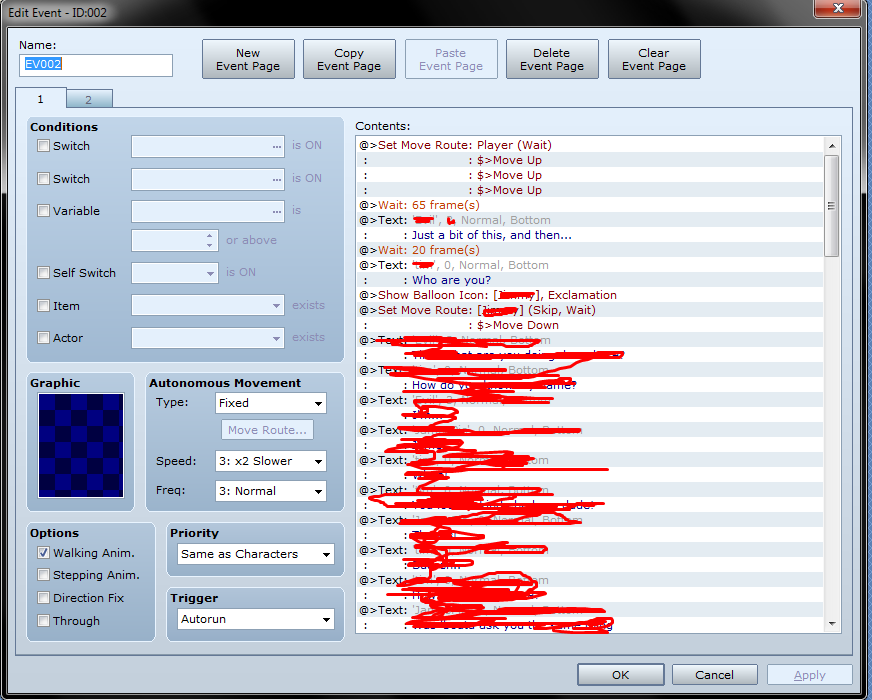
The scene I am trying to make with an event set to autorun (like a cutscene), and what happens in the cutscene
is the player creeps up on another NPC who is facing the opposite side. I set the move route of the player

to go up a few times. This works in playtesting just fine. When I set the move route of the NPC event (I made sure it was the exact one),

during playtesting, it is frozen. It will not move. I even tried adding "skip if cannot move", and even that didn't do anything. The game

is waiting for the NPC event to move down (to face the player). The screenshot shows what the event looks like.

Am I doing something wrong here? A rookies mistake or something? I can't quite spot what's not allowing the NPC to move.

Thanks! Protected download

Downloads / Referenced Files

Log in to download

Log in, then follow the RPG Maker Developers Group to see these download links.

Log in to download

Referenced Images / Attachments

Screenshot_6.png
Screenshot_6.png
Creator Claims / Removal

If you are the original creator and want this listing reassigned, edited, or removed, join BMMPlay and contact the moderators with proof that matches the original RPG Maker Web profile, linked GitHub, itch.io page, or another public creator identity.

#039#rpg-maker-archive#vxace-support

Replies (0)

No replies yet.

0 replies 1 view

Log in to reply.

User Avatar