Preserved forum archive. This topic stores the original first post and locally mirrored RPG Maker Web attachments when available. It is posted by the BMMPlay archive account, not by the original creator.
Original Source
- Original title: SEK_AllMembersFight
- Original author: SEK
- Original date: June 13, 2016
- Source thread: https://forums.rpgmakerweb.com/threads/sek_allmembersfight.63492/
- Source forum path: Game Development Engines > RPG Maker Javascript Plugins > JS Plugin Releases (RMMV)
Summary
SEK_AllMembersFight - v 2.0 By SEK Introduction With this plugin you can set a limit to the members in battle. When someone dies, the next avaliable one joins.
Archived First Post
SEK_AllMembersFight - v 2.0
By SEK
Introduction
With this plugin you can set a limit to the members in battle. When someone dies, the next avaliable one joins.
Features
-Limit the number of fighting members.
-Make an enemy appear when one dies.
-Make an actor appear when one dies.
-Show animation on change.
-Activate/deactivate with plugin commands.
-Change animation with plugin commands.
-Use items and skills on not fighting members.
Plugin Commands:
•amf on - Activates the plugin
•amf off - Deactivates the plugin
•amf showon - Shows an animation when a unit appears
•amf showoff - Doesn't show an animation when a unit appears
•amf show x - Sets the animation to x
For enemy troops:
If you want the enemy to work like actors, you need to hide them
by making them appear in the middle of the fight.
To do this, you need to open your database, go to the troop page
and right click on the enemies you want to hide for every troop.
This possibility can be turned off because it could cause problems
in battles with event-appearing enemies.
Simply use the plugin commands:
•amf eon - to activate this plugin for enemies
•amf eoff - to deactivate this plugin for enemies
It could also be cool to only have this possibility only on enemies,
to do that, you can use the plugin commands:
•amf aon - to activate this plugin for actors
•amf aoff -to deactivate this plugin for actors
•amf ion -to use items and skills on not fighting members
•amf ioff -to prevent using items and skills on not fighting members
Screenshots/Video
Update
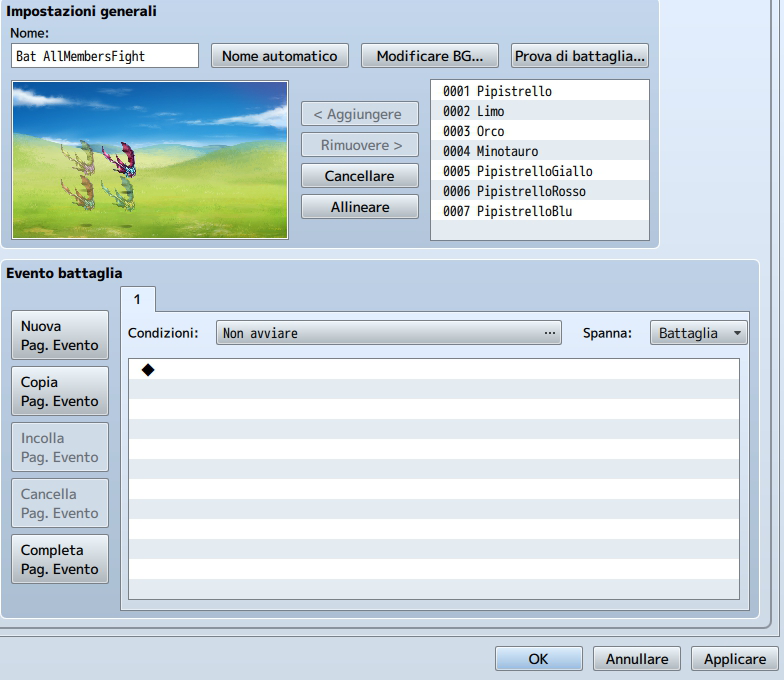
How to set troops:
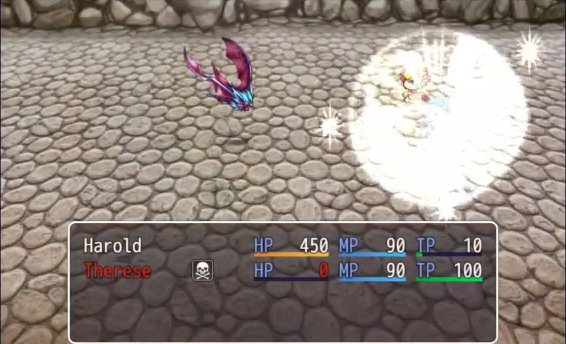
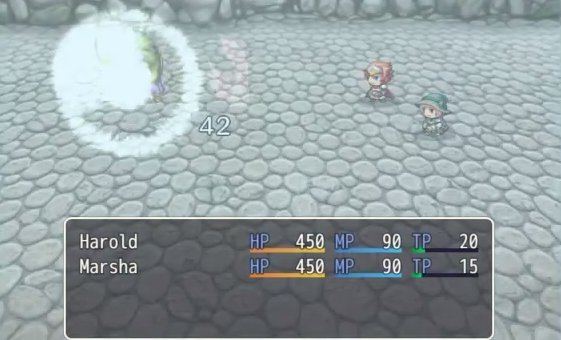
When a member dies, another one appears with an animation:
The same happens when an enemy dies an there's an hidden one
You can use items and skills on not fighting members
How to Use
Plug & Play
Demo
Not needed
Plugin
Right click here to save the plugin
Credit and Thanks
- SEK
- Chaos Avian (for suggesting the animation feature)
- Minun (for suggesting the use of this plugin with enemies)
- kovak (for giving the idea starting from SABS)
Author's Notes
Even if I try my best, I might not be able to help with issues.
You are free to use this plugin. If you do use it, I'd like to have my name and my plugin's name included in credits.
By SEK
Introduction
With this plugin you can set a limit to the members in battle. When someone dies, the next avaliable one joins.
Features
-Limit the number of fighting members.
-Make an enemy appear when one dies.
-Make an actor appear when one dies.
-Show animation on change.
-Activate/deactivate with plugin commands.
-Change animation with plugin commands.
-Use items and skills on not fighting members.
Plugin Commands:
•amf on - Activates the plugin
•amf off - Deactivates the plugin
•amf showon - Shows an animation when a unit appears
•amf showoff - Doesn't show an animation when a unit appears
•amf show x - Sets the animation to x
For enemy troops:
If you want the enemy to work like actors, you need to hide them
by making them appear in the middle of the fight.
To do this, you need to open your database, go to the troop page
and right click on the enemies you want to hide for every troop.
This possibility can be turned off because it could cause problems
in battles with event-appearing enemies.
Simply use the plugin commands:
•amf eon - to activate this plugin for enemies
•amf eoff - to deactivate this plugin for enemies
It could also be cool to only have this possibility only on enemies,
to do that, you can use the plugin commands:
•amf aon - to activate this plugin for actors
•amf aoff -to deactivate this plugin for actors
•amf ion -to use items and skills on not fighting members
•amf ioff -to prevent using items and skills on not fighting members
Screenshots/Video
Update
How to set troops:
Protected download
When a member dies, another one appears with an animation:
Protected download
The same happens when an enemy dies an there's an hidden one
Protected download
You can use items and skills on not fighting members
How to Use
Plug & Play
Demo
Not needed
Plugin
Right click here to save the plugin
Credit and Thanks
- SEK
- Chaos Avian (for suggesting the animation feature)
- Minun (for suggesting the use of this plugin with enemies)
- kovak (for giving the idea starting from SABS)
Author's Notes
Even if I try my best, I might not be able to help with issues.
You are free to use this plugin. If you do use it, I'd like to have my name and my plugin's name included in credits.
Features Mentioned
- Limit the number of fighting members.
- Make an enemy appear when one dies.
- Make an actor appear when one dies.
- Show animation on change.
- Activate/deactivate with plugin commands.
- Change animation with plugin commands.
- Use items and skills on not fighting members.
- Plugin Commands:
- amf on - Activates the plugin
- amf off - Deactivates the plugin
- amf showon - Shows an animation when a unit appears
- amf showoff - Doesn't show an animation when a unit appears
- amf show x - Sets the animation to x
- For enemy troops:
- If you want the enemy to work like actors, you need to hide them
- by making them appear in the middle of the fight.
- To do this, you need to open your database, go to the troop page
- and right click on the enemies you want to hide for every troop.
Downloads / Referenced Files
Log in to download
Log in, then follow the RPG Maker Developers Group to see these download links.
Log in to downloadLicense / Terms Note
Credit and Thanks - SEK - Chaos Avian (for suggesting the animation feature) - Minun (for suggesting the use of this plugin with enemies)
Referenced Images / Attachments
Creator Claims / Removal
If you are the original creator and want this listing reassigned, edited, or removed, join BMMPlay and contact the moderators with proof that matches the original RPG Maker Web profile, linked GitHub, itch.io page, or another public creator identity.
Replies (0)
No replies yet.
0
replies
1
view
Topic Summary
Loading summary...