

Large Sprites, Star Passability, and suggestions for how to fix them
BMM_Archive · July 15, 2026

Original Source
- Original title: Large Sprites, Star Passability, and suggestions for how to fix them
- Original author: Dachimotsu
- Original date: November 12, 2015
- Source thread: https://forums.rpgmakerweb.com/threads/large-sprites-star-passability-and-suggestions-for-how-to-fix-them.50269/
- Source forum path: Game Development Engines > Legacy Engine Support > RPG Maker MV Support
Summary
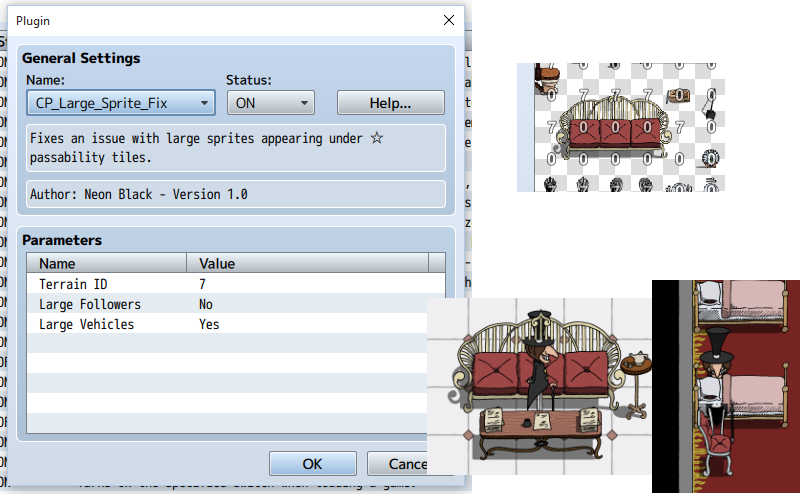
Attached is an image showing what issues I'm having and the settings I'm using. My game uses taller, sometimes wider sprites. Pictured is a character who is 2.5 tiles tall (hat included). Also pictured is that very hat going through the top of a nearby couch, and his body hiding under some sheets. Many people have complained about this bug, and it is generally believed that it's caused by having too many "star passability" tiles in one place. On the left side of the image, you will see the settings...
Archived First Post
My game uses taller, sometimes wider sprites. Pictured is a character who is 2.5 tiles tall (hat included). Also pictured is that very hat going through the top of a nearby couch, and his body hiding under some sheets. Many people have complained about this bug, and it is generally believed that it's caused by having too many "star passability" tiles in one place.
On the left side of the image, you will see the settings for CP_Large_Sprite_Fix, a plugin included with the program that's supposed to fix this issue by tagging the star tiles with a terrain tag of 7 in the tileset editor (see top-right of the image). While this does seem to fix some of the tiles, it does not fix all of them.
Now, I am not a programmer, but I will do my best to describe how I think this issue can be easily solved.
Basically, it uses the same concept as the Large Sprite Fix plugin, only instead of having one terrain tag, you'll have two.
The first will make its respective tile always appear above the entire sprite (used for bridges or tree leaves in the foreground).
The second will make its respective tile only appear above the sprite if the sprite's "anchor" (bottom-centermost point) is IN the same ROW as the tile itself OR higher.
If this plugin could be edited or re-made to do exactly as I've described, by giving the developer total control over the way each star tile works, I believe it should bypass this issue entirely.
Downloads / Referenced Files
RPG Maker Web attachments are mirrored locally when available. Other external links remain hosted by their original creator or third-party service.
- Local mirror: 14574-e93dd39f8ccfc4df9cfd25003e1ac814.png
SHA-256:5ff2b0d254ba9107919e90f1ee11506b6546f2ac38dc9228be3f4c3f232f12b5
Original attachment URL: https://forums.rpgmakerweb.com/attachments/star-pass-png.25960/
Referenced Images / Attachments
Creator Claims / Removal
If you are the original creator and want this listing reassigned, edited, or removed, join BMMPlay and contact the moderators with proof that matches the original RPG Maker Web profile, linked GitHub, itch.io page, or another public creator identity.
Replies (0)
No replies yet.
Topic Summary
Loading summary...