


Instructions In Title Screen Menu Help.
BMM_Archive · July 15, 2026

Preserved forum archive. This topic stores the original first post and locally mirrored RPG Maker Web attachments when available. It is posted by the BMMPlay archive account, not by the original creator.
Original Source
- Original title: Instructions In Title Screen Menu Help.
- Original author: Zarsla
- Original date: June 22, 2015
- Source thread: https://forums.rpgmakerweb.com/threads/instructions-in-title-screen-menu-help.41461/
- Source forum path: Game Development Engines > Legacy Engine Support > RPG Maker VXAce Support
Summary
So I edit the base scripts found in RPG Maker VX Ace as shown in the spoiler below. Spoiler Window Title Command Lines 31-40 #--------------------------------------------------------------------------


Archived First Post
So I edit the base scripts found in RPG Maker VX Ace as shown in the spoiler below.
What I need help with is the instructions part. (The options part works fine.) What I want to do is when the person picks the instructions is run a common event that's the instructions of my game.
Oh and before I go here's a list of scripts that I'm using:
Auto-Bacup VX ACE by Wortana
Keyboard Manger by
ATS series
Theo Allen's VX style Choices
Khas Awseome Lighting Effects
Yanfly's Save Engine and Adjust Limits
Galv's Save Engine Confirmation Add On
Falaco Pearl ABS V3 with Party Hud Addon
and this which, I use to edit the title and title menu:
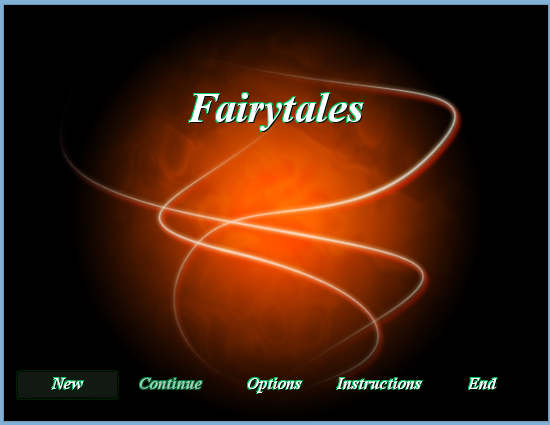
And I attached a thumbnail of what my screen looks like.
Thanks in advance.
~Zarsla
Protected download
Window Title Command Lines 31-40
#--------------------------------------------------------------------------
# * Create Command List
#--------------------------------------------------------------------------
def make_command_list
add_command(Vocab::new_game, :new_game)
add_command(Vocab::continue, :continue, continue_enabled)
add_command("Options", ptions)
add_command("Instructions", :instructions)
add_command(Vocab::shutdown, :shutdown)
end
and
Scene Title lines 88-98, 106-117
#--------------------------------------------------------------------------
# * Create Command Window
#--------------------------------------------------------------------------
def create_command_window
@command_window = Window_TitleCommand.new
@command_window.set_handlernew_game, methodcommand_new_game))
@command_window.set_handlercontinue, methodcommand_continue))
@command_window.set_handleroptions, methodcommand_options))
@command_window.set_handlerinstructions, methodcommand_instructions))
@command_window.set_handlershutdown, methodcommand_shutdown))
end
#--------------------------------------------------------------------------
# * [OPTIONS] Command
#--------------------------------------------------------------------------
def command_options
SceneManager.call(Scene_System)
end
#--------------------------------------------------------------------------
# * [iNSTRUCTIONS] Command
#--------------------------------------------------------------------------
def command_instructions
SceneManger.call(Scene_Instruction)
end
#--------------------------------------------------------------------------
# * Create Command List
#--------------------------------------------------------------------------
def make_command_list
add_command(Vocab::new_game, :new_game)
add_command(Vocab::continue, :continue, continue_enabled)
add_command("Options", ptions)
add_command("Instructions", :instructions)
add_command(Vocab::shutdown, :shutdown)
end
and
Scene Title lines 88-98, 106-117
#--------------------------------------------------------------------------
# * Create Command Window
#--------------------------------------------------------------------------
def create_command_window
@command_window = Window_TitleCommand.new
@command_window.set_handlernew_game, methodcommand_new_game))
@command_window.set_handlercontinue, methodcommand_continue))
@command_window.set_handleroptions, methodcommand_options))
@command_window.set_handlerinstructions, methodcommand_instructions))
@command_window.set_handlershutdown, methodcommand_shutdown))
end
#--------------------------------------------------------------------------
# * [OPTIONS] Command
#--------------------------------------------------------------------------
def command_options
SceneManager.call(Scene_System)
end
#--------------------------------------------------------------------------
# * [iNSTRUCTIONS] Command
#--------------------------------------------------------------------------
def command_instructions
SceneManger.call(Scene_Instruction)
end
Oh and before I go here's a list of scripts that I'm using:
Auto-Bacup VX ACE by Wortana
Keyboard Manger by
ATS series
Theo Allen's VX style Choices
Khas Awseome Lighting Effects
Yanfly's Save Engine and Adjust Limits
Galv's Save Engine Confirmation Add On
Falaco Pearl ABS V3 with Party Hud Addon
and this which, I use to edit the title and title menu:
class Scene_Title < Scene_Base
#--------------------------------------------------------------------------
# * Draw Game Title
#--------------------------------------------------------------------------
alias my_draw_game_title draw_game_title
def draw_game_title
@foreground_sprite.bitmap.font.size = 69
@foreground_sprite.bitmap.font.color = Color.new(255, 255, 255, 255)
@foreground_sprite.bitmap.font.out_color = Color.new(0, 200, 100, 255)
@foreground_sprite.bitmap.font.bold = true
@foreground_sprite.bitmap.font.italic = true
@foreground_sprite.bitmap.font.shadow = true
@foreground_sprite.bitmap.font.name = "Times New Roman"
my_draw_game_title
end
def update_placement
#---
if @foreground_sprite.bitmap != -1
self.x = @foreground_sprite.bitmap
else
self.x = (Graphics.width*1.0 - width) / 2
end
#---
if @foreground_sprite.bitmap != -1
self.y = @foreground_sprite.bitmap
else
self.y = (Graphics.height * 2.9 - height) / 2
end
#---
end
end
#--------------------------------------------------------------------------
# * Draw Game Title Window
#--------------------------------------------------------------------------
module PC27
module CustomTitle
Font_Name = "Times New Roman"
Bold = true
Italic = true
Shadow = true
Outline = true
Size = 20
Color = 0 # Text color (the same you use in messages)
Out_Color = [0, 200, 100, 255] # Outline Color [red, blue, green, alpha]
end
end
class Window_TitleCommand < Window_Command
def initialize
super(0, 0)
update_placement
select_symbolcontinue) if continue_enabled
self.openness = 0
self.opacity = 0
open
end
def window_width
return 544
end
def line_height
return 30
end
def window_height
return line_height + 5 * standard_padding
end
def update_placement
self.x = 0 + (Graphics.width * 0) / 2
self.y = 0 + (Graphics.height * 1.7) / 2
end
def col_max
return 5
end
def spacing
return 1
end
def alignment
return 1
end
alias pc27_title_window_draw_all_items draw_all_items
def draw_all_items
set_custom_options
pc27_title_window_draw_all_items
end
def set_custom_options
contents.font.name = PC27::CustomTitle::Font_Name
contents.font.bold = PC27::CustomTitle::Bold
contents.font.italic = PC27::CustomTitle::Italic
contents.font.shadow = PC27::CustomTitle::Shadow
contents.font.outline = PC27::CustomTitle:utline
contents.font.size = PC27::CustomTitle::Size
contents.font.out_color.set(*PC27::CustomTitle:ut_Color)
end
def normal_color
text_color(PC27::CustomTitle::Color)
end
end
#--------------------------------------------------------------------------
# * Draw Game Title
#--------------------------------------------------------------------------
alias my_draw_game_title draw_game_title
def draw_game_title
@foreground_sprite.bitmap.font.size = 69
@foreground_sprite.bitmap.font.color = Color.new(255, 255, 255, 255)
@foreground_sprite.bitmap.font.out_color = Color.new(0, 200, 100, 255)
@foreground_sprite.bitmap.font.bold = true
@foreground_sprite.bitmap.font.italic = true
@foreground_sprite.bitmap.font.shadow = true
@foreground_sprite.bitmap.font.name = "Times New Roman"
my_draw_game_title
end
def update_placement
#---
if @foreground_sprite.bitmap != -1
self.x = @foreground_sprite.bitmap
else
self.x = (Graphics.width*1.0 - width) / 2
end
#---
if @foreground_sprite.bitmap != -1
self.y = @foreground_sprite.bitmap
else
self.y = (Graphics.height * 2.9 - height) / 2
end
#---
end
end
#--------------------------------------------------------------------------
# * Draw Game Title Window
#--------------------------------------------------------------------------
module PC27
module CustomTitle
Font_Name = "Times New Roman"
Bold = true
Italic = true
Shadow = true
Outline = true
Size = 20
Color = 0 # Text color (the same you use in messages)
Out_Color = [0, 200, 100, 255] # Outline Color [red, blue, green, alpha]
end
end
class Window_TitleCommand < Window_Command
def initialize
super(0, 0)
update_placement
select_symbolcontinue) if continue_enabled
self.openness = 0
self.opacity = 0
open
end
def window_width
return 544
end
def line_height
return 30
end
def window_height
return line_height + 5 * standard_padding
end
def update_placement
self.x = 0 + (Graphics.width * 0) / 2
self.y = 0 + (Graphics.height * 1.7) / 2
end
def col_max
return 5
end
def spacing
return 1
end
def alignment
return 1
end
alias pc27_title_window_draw_all_items draw_all_items
def draw_all_items
set_custom_options
pc27_title_window_draw_all_items
end
def set_custom_options
contents.font.name = PC27::CustomTitle::Font_Name
contents.font.bold = PC27::CustomTitle::Bold
contents.font.italic = PC27::CustomTitle::Italic
contents.font.shadow = PC27::CustomTitle::Shadow
contents.font.outline = PC27::CustomTitle:utline
contents.font.size = PC27::CustomTitle::Size
contents.font.out_color.set(*PC27::CustomTitle:ut_Color)
end
def normal_color
text_color(PC27::CustomTitle::Color)
end
end
Thanks in advance.
~Zarsla
Protected download
Downloads / Referenced Files
Log in to download
Log in, then follow the RPG Maker Developers Group to see these download links.
Log in to downloadReferenced Images / Attachments
Creator Claims / Removal
If you are the original creator and want this listing reassigned, edited, or removed, join BMMPlay and contact the moderators with proof that matches the original RPG Maker Web profile, linked GitHub, itch.io page, or another public creator identity.
Replies (0)
No replies yet.
0
replies
6
views
Topic Summary
Loading summary...
