
public

Rpg Maker Developers Group

Simple enough for a child, powerful enough for a developer

2 Followers

"Pixelated" Pictures/Portraits

BMM Archive · July 15, 2026

Preserved forum archive. This topic stores the original first post and locally mirrored RPG Maker Web attachments when available. It is posted by the BMMPlay archive account, not by the original creator.

Original Source

  • Original title: "Pixelated" Pictures/Portraits
  • Original author: Koshin68
  • Original date: June 11, 2015
  • Source thread: https://forums.rpgmakerweb.com/threads/pixelated-pictures-portraits.41059/
  • Source forum path: Game Development Engines > Legacy Engine Support > RPG Maker VXAce Support

Summary

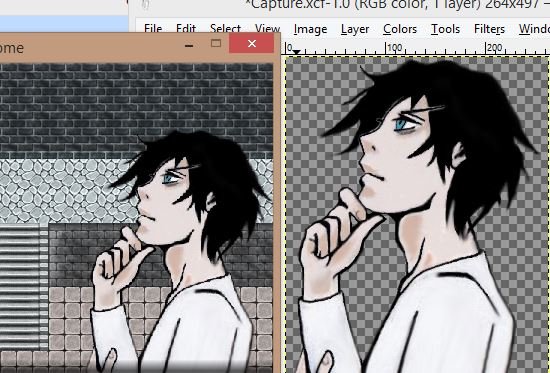
Hey! This is my first time posting so if this is the wrong place to ask this please be patient with me! I've put about 70 hours in tinkering with VX Ace and decided it's time to make a serious game with my own art. The only problem is, when I upload my portraits as pictures they become pixelated - and they are not that pixelated when I look at them in GIMP. I'm not sure whats happening, but how do I fix that? I'm a bit of a perfectionist...

Archived First Post

Hey! This is my first time posting so if this is the wrong place to ask this please be patient with me!

I've put about 70 hours in tinkering with VX Ace and decided it's time to make a serious game with my own art. The only problem is, when I upload my portraits as pictures they become pixelated - and they are not that pixelated when I look at them in GIMP. I'm not sure whats happening, but how do I fix that? I'm a bit of a perfectionist so it's driving me nuts.

I've attached a picture of my character portrait in-game and in GIMP to show what I mean. It's very noticeable in his hands, throat, and the hair under his eye in the picture to the left (in-game). 

To get my character like this I've drawn him by hand, inked him, scanned him, touched him up in gimp and softened the edges with a smudge tool. 

Thanks for reading!

*** SOLVED

I meant to post, but I'm not sure it went through! 

Thank you for the suggestions. I figured out that the problem was I used the "zoom" function in the "Show picture" window and in doing so pixelated it from the zooming. All fixed!

Thanks again

Protected download

Downloads / Referenced Files

Log in to download

Log in, then follow the RPG Maker Developers Group to see these download links.

Log in to download

Referenced Images / Attachments

help.JPG
help.JPG
Creator Claims / Removal

If you are the original creator and want this listing reassigned, edited, or removed, join BMMPlay and contact the moderators with proof that matches the original RPG Maker Web profile, linked GitHub, itch.io page, or another public creator identity.

#039#rpg-maker-archive#vxace-support

Replies (0)

No replies yet.

0 replies 1 view

Log in to reply.

User Avatar