

Editing the "Upper Layer"
BMM_Archive · July 15, 2026

Original Source
- Original title: Editing the "Upper Layer"
- Original author: Caiterz
- Original date: November 6, 2015
- Source thread: https://forums.rpgmakerweb.com/threads/editing-the-upper-layer.49588/
- Source forum path: Game Development Engines > Legacy Engine Support > RPG Maker MV Support
Summary
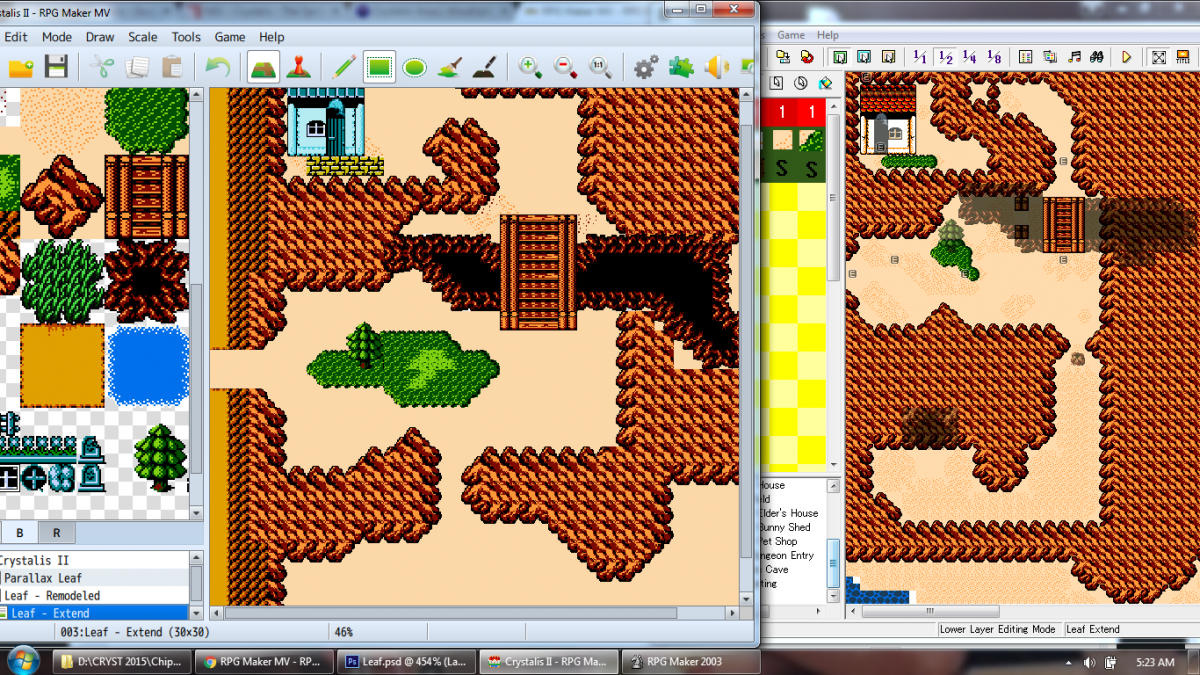
Hiya! I'm trying to port my game over from 2k3.... and I'm a bit at a loss as to how I update the "Upper Layer" nowadays... There's only "Image layer" and "Event layer" on MV... As you can see in my attached picture, the black "Cavern" is on the upper layer in 2k3... but it's just on the "Image Layer" of MV. So say I have the under layer all said and done just fine... and I make the cavern, but later i decide I want to move it to...
Archived First Post
There's only "Image layer" and "Event layer" on MV...
As you can see in my attached picture, the black "Cavern" is on the upper layer in 2k3... but it's just on the "Image Layer" of MV.
So say I have the under layer all said and done just fine... and I make the cavern, but later i decide I want to move it to the left 1 square.
How would I edit ONLY the Cavern and not disturb the base layer underneath?
As it stands right now, if i want to change the upper layer, I have to erase BOTH layers first, then put the bottom layer again... then the top layer again and hope I dont mess it up...
It's pretty inconvenient!
Thanks for any help! :3 <3
Downloads / Referenced Files
RPG Maker Web attachments are mirrored locally when available. Other external links remain hosted by their original creator or third-party service.
- Local mirror: 14365-70b4728600d1bd42871822c1b5a424a6.png
SHA-256:61cc05dc0ef136b460c536c34242de24c957fc2508d101f8277dd1571a579901
Original attachment URL: https://forums.rpgmakerweb.com/attachments/halp-png.25645/
Referenced Images / Attachments
Creator Claims / Removal
If you are the original creator and want this listing reassigned, edited, or removed, join BMMPlay and contact the moderators with proof that matches the original RPG Maker Web profile, linked GitHub, itch.io page, or another public creator identity.
Replies (0)
No replies yet.
Topic Summary
Loading summary...