Preserved forum archive. This topic stores the original first post and locally mirrored RPG Maker Web attachments when available. It is posted by the BMMPlay archive account, not by the original creator.
Original Source
Original title: Using Scripts in IF statments (Conditional Branches).
Source forum path: Game Development Engines > Legacy Engine Support > RPG Maker MV Support
Summary
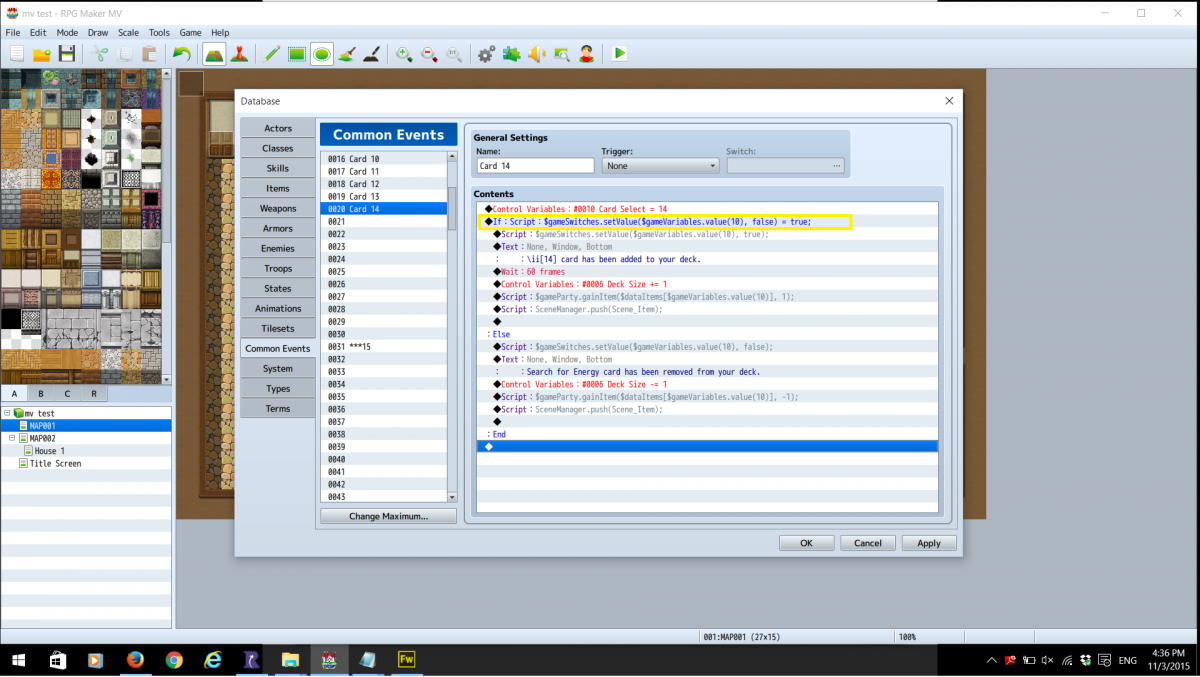
How do i use a script in a Conditional Branch? I tired a few different things but my JS is far to rusty. The pictured section is in a yellow box is my latest attempt. Thanks.
Archived First Post
How do i use a script in a Conditional Branch?
I tired a few different things but my JS is far to rusty.
The pictured section is in a yellow box is my latest attempt.
Thanks.
Downloads / Referenced Files
RPG Maker Web attachments are mirrored locally when available. Other external links remain hosted by their original creator or third-party service.
Local mirror:14216-a06258d7774f741a4498f39734324ca6.png SHA-256: f6887f5188d056cb28bf3b4bcb14f4d81eaed45a2fcbe904ce7322ecb46600bb Original attachment URL: https://forums.rpgmakerweb.com/attachments/if-script-question-png.25448/
Referenced Images / Attachments
if script question.png
Creator Claims / Removal
If you are the original creator and want this listing reassigned, edited, or removed, join BMMPlay and contact the moderators with proof that matches the original RPG Maker Web profile, linked GitHub, itch.io page, or another public creator identity.