


Mapping question
BMM_Archive · July 15, 2026

Preserved forum archive. This topic stores the original first post and locally mirrored RPG Maker Web attachments when available. It is posted by the BMMPlay archive account, not by the original creator.
Original Source
- Original title: Mapping question
- Original author: Andynator
- Original date: May 24, 2015
- Source thread: https://forums.rpgmakerweb.com/threads/mapping-question.40331/
- Source forum path: Game Development Engines > Legacy Engine Support > RPG Maker VXAce Support
Summary
Ok gyus. That migth be a very stupid noob-question, but actual i'am really not able to find an answer. So please help. Look at some of the Sample Maps in the VX-ACE-RTP. For exaple the Map CastleiInteriorjF1F Look at the uper left corner ... the room is possibly meant to be an Library.
Archived First Post
Ok gyus. That migth be a very stupid noob-question, but actual i'am really not able to find an answer.
So please help.
Look at some of the Sample Maps in the VX-ACE-RTP. For exaple the Map CastleiInteriorjF1F
Look at the uper left corner ... the room is possibly meant to be an Library.
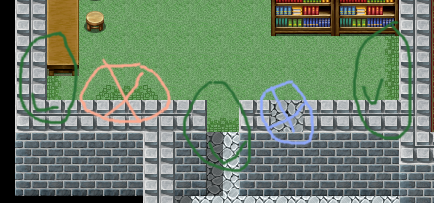
Look at the south edge of the carpet. The Carpet Autotile at this point is somehow formated to NOT break with the Roof-Auto-Tile. But both Autotiles are completely auto formated - what means no Shift-Mapping was used. How can i duplicate this effect?
Shift-Maping does not work, because it would break the auto-Formation of the roof-Tile. Copy and past is not, because a pastet carpet would break with the roof, and a pasted roof would also break the carpets auto-format.
I putted a picture in the post.
The green cicles are marking the effekt i want to duplicate. The blue circle is the result after Shift-Mapping the Roof tile over the carpet. The red circle is the result after copy&past a carpet or roof tile.
so, how this works?
Protected download
So please help.
Look at some of the Sample Maps in the VX-ACE-RTP. For exaple the Map CastleiInteriorjF1F
Look at the uper left corner ... the room is possibly meant to be an Library.
Look at the south edge of the carpet. The Carpet Autotile at this point is somehow formated to NOT break with the Roof-Auto-Tile. But both Autotiles are completely auto formated - what means no Shift-Mapping was used. How can i duplicate this effect?
Shift-Maping does not work, because it would break the auto-Formation of the roof-Tile. Copy and past is not, because a pastet carpet would break with the roof, and a pasted roof would also break the carpets auto-format.
I putted a picture in the post.
The green cicles are marking the effekt i want to duplicate. The blue circle is the result after Shift-Mapping the Roof tile over the carpet. The red circle is the result after copy&past a carpet or roof tile.
so, how this works?
Protected download
Downloads / Referenced Files
Log in to download
Log in, then follow the RPG Maker Developers Group to see these download links.
Log in to downloadReferenced Images / Attachments
Creator Claims / Removal
If you are the original creator and want this listing reassigned, edited, or removed, join BMMPlay and contact the moderators with proof that matches the original RPG Maker Web profile, linked GitHub, itch.io page, or another public creator identity.


Replies (0)
No replies yet.
0
replies
9
views
Topic Summary
Loading summary...
