


VE - Visual Equip problem, and event change up problems.
BMM_Archive · July 15, 2026

Preserved forum archive. This topic stores the original first post and locally mirrored RPG Maker Web attachments when available. It is posted by the BMMPlay archive account, not by the original creator.
Original Source
- Original title: VE - Visual Equip problem, and event change up problems.
- Original author: TheGreatEater
- Original date: May 22, 2015
- Source thread: https://forums.rpgmakerweb.com/threads/ve-visual-equip-problem-and-event-change-up-problems.40246/
- Source forum path: Game Development Engines > Legacy Engine Support > RPG Maker VXAce Support
Summary
So I was just putzing with getting the visual overlay of an item for a character. And regardless of the filename I use. I'm not getting anything. I'm using VE-Visual Equip: Using this function:
Archived First Post
So I was just putzing with getting the visual overlay of an item for a character. And regardless of the filename I use. I'm not getting anything.
I'm using VE-Visual Equip:
Using this function:
<change actor visual> <change event visual>
# settings settings
# </change actor visual> </change event visual>
# This comment call will add a new visual part to the actor or event.
# Add the following values to the info. The ID, must be added, other
# values are optional.
# id: x : actor or event ID
# name: "x" : equip part filename. ("filename")
# index: x : equip part charset index, if using 8 chars charsets. (0-7)
# hue: x : equip part hue. (0-360)
# priority: x : part display priority. (default = 0, can be negative)
[i put down.]
<change actor visual>
id: 2 # and I've tried 002 for the actor.
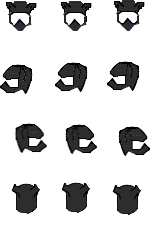
name: "$Ninja helmet Male small.png" # I've even tried removing the .png from it. Still doesn't work.
index: 0 # I'm using a big version of normal sprites.
hue: 0 # I don't want to change any colors.
priority: 0 # says it's the default.
</change actor visual>
Now I'm not going to go into the little tiff I'm getting with the event creator not changing actors. But let's just say I ended up saying saying forget it, I'll just start out with the ninja hoodie.
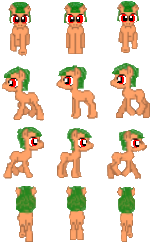
The helmet is attached. But the actor himself is still the same.
What am I doing wrong?
[Didn't know if this is supposed to go to Scripts or Support. Technically it's a script issue I need support with. But at the same time, it's a support problem.]
Also:
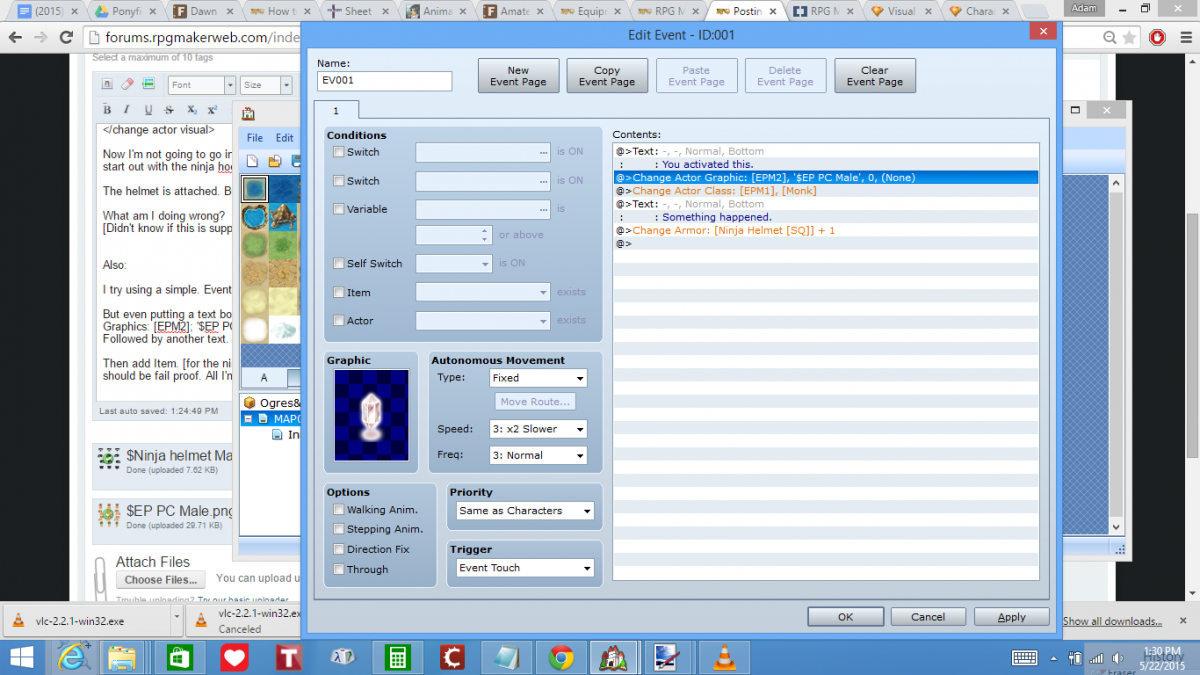
I try using a simple. Event Trigger [touch a crystal, stuff happens so I can focus on fine tuning all the animation, characters and effects.].
But even putting a text box saying it's been activated followed by: Change Actor Class: [EMP1] [Monk] ; or what I was originally doing: Change Actor Graphics: [EPM2]; '$EP PC Male', 0, 'None'.
Followed by another text. "Something is happening".
Then add Item. [for the ninja helmet]. I both don't receive the Ninja Helmet, and my actor stays the same. Even though I get the text pop ups. I mean that should be fail proof. All I'm doing is changing actors, and giving myself One helmet.
Protected download
Protected download
Protected download
I'm using VE-Visual Equip:
Using this function:
<change actor visual> <change event visual>
# settings settings
# </change actor visual> </change event visual>
# This comment call will add a new visual part to the actor or event.
# Add the following values to the info. The ID, must be added, other
# values are optional.
# id: x : actor or event ID
# name: "x" : equip part filename. ("filename")
# index: x : equip part charset index, if using 8 chars charsets. (0-7)
# hue: x : equip part hue. (0-360)
# priority: x : part display priority. (default = 0, can be negative)
[i put down.]
<change actor visual>
id: 2 # and I've tried 002 for the actor.
name: "$Ninja helmet Male small.png" # I've even tried removing the .png from it. Still doesn't work.
index: 0 # I'm using a big version of normal sprites.
hue: 0 # I don't want to change any colors.
priority: 0 # says it's the default.
</change actor visual>
Now I'm not going to go into the little tiff I'm getting with the event creator not changing actors. But let's just say I ended up saying saying forget it, I'll just start out with the ninja hoodie.
The helmet is attached. But the actor himself is still the same.
What am I doing wrong?
[Didn't know if this is supposed to go to Scripts or Support. Technically it's a script issue I need support with. But at the same time, it's a support problem.]
Also:
I try using a simple. Event Trigger [touch a crystal, stuff happens so I can focus on fine tuning all the animation, characters and effects.].
But even putting a text box saying it's been activated followed by: Change Actor Class: [EMP1] [Monk] ; or what I was originally doing: Change Actor Graphics: [EPM2]; '$EP PC Male', 0, 'None'.
Followed by another text. "Something is happening".
Then add Item. [for the ninja helmet]. I both don't receive the Ninja Helmet, and my actor stays the same. Even though I get the text pop ups. I mean that should be fail proof. All I'm doing is changing actors, and giving myself One helmet.
Protected download
Protected download
Protected download
Downloads / Referenced Files
Log in to download
Log in, then follow the RPG Maker Developers Group to see these download links.
Log in to downloadReferenced Images / Attachments
Creator Claims / Removal
If you are the original creator and want this listing reassigned, edited, or removed, join BMMPlay and contact the moderators with proof that matches the original RPG Maker Web profile, linked GitHub, itch.io page, or another public creator identity.
Replies (0)
No replies yet.
0
replies
10
views
Topic Summary
Loading summary...

