Preserved forum archive. This topic stores the original first post and locally mirrored RPG Maker Web attachments when available. It is posted by the BMMPlay archive account, not by the original creator.
Original Source
- Original title: In a fog... Move Picture going right off map. Can it loop?
- Original author: GrandmaDeb
- Original date: May 16, 2015
- Source thread: https://forums.rpgmakerweb.com/threads/in-a-fog-move-picture-going-right-off-map-can-it-loop.40050/
- Source forum path: Game Development Engines > Legacy Engine Support > RPG Maker VXAce Support
Summary
So my kiddos wanted to know how to make it look like their map was burning. Wowa, we have flame maps on our cool site! And here I am the cool RPG making teacher, trying to Demo how to make the flamemap fog move. (Kids use Ace Lite in class. Some have full version at home but all classwork is in Lite)
Archived First Post
So my kiddos wanted to know how to make it look like their map was burning.
Wowa, we have flame maps on our cool site!
And here I am the cool RPG making teacher, trying to Demo how to make the flamemap fog move.
(Kids use Ace Lite in class. Some have full version at home but all classwork is in Lite)
Well, bleh, I can't do it.
I keep getting the fog running off the edge of the map screen. Looks like total fail.
I searched like a good girl.
http://forums.rpgmakerweb.com/index.php?/topic/31309-fog-and-the-like-how-to/?hl=%2Bmove+%2Bpicture#entry304255
http://forums.rpgmakerweb.com/index.php?/topic/36416-evented-weather-system-vxace/?hl=%2Bmove+%2Bpicture#entry361975
http://forums.rpgmakerweb.com/index.php?/topic/4933-simple-fog-event-tutorial-for-rpg-maker-vxace/?hl=+move%20+picture
But I thought you could choose fog graphics that were twice the size of the screen and have a seamless experience when you moved the picture.
I don't know why it would work exactly, but I thought it was supposed to.
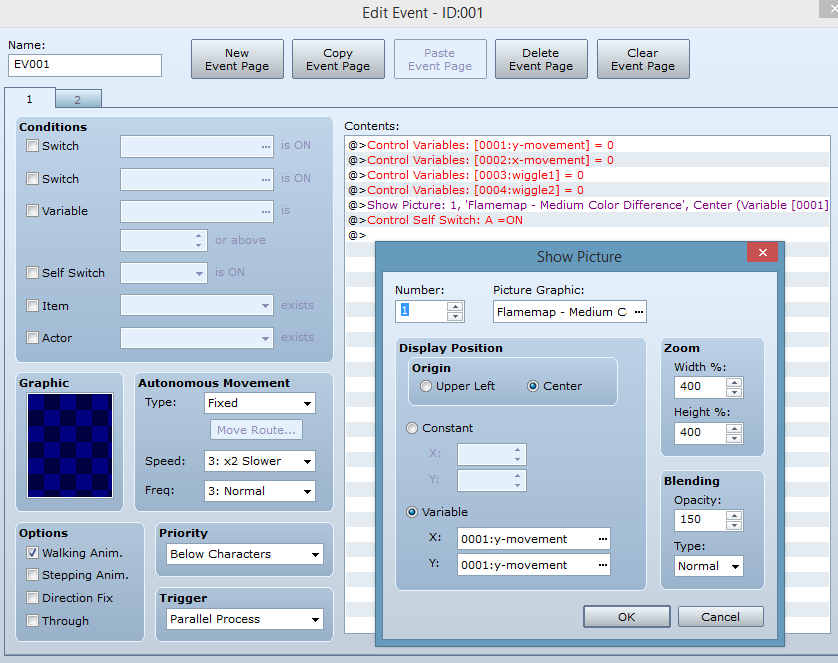
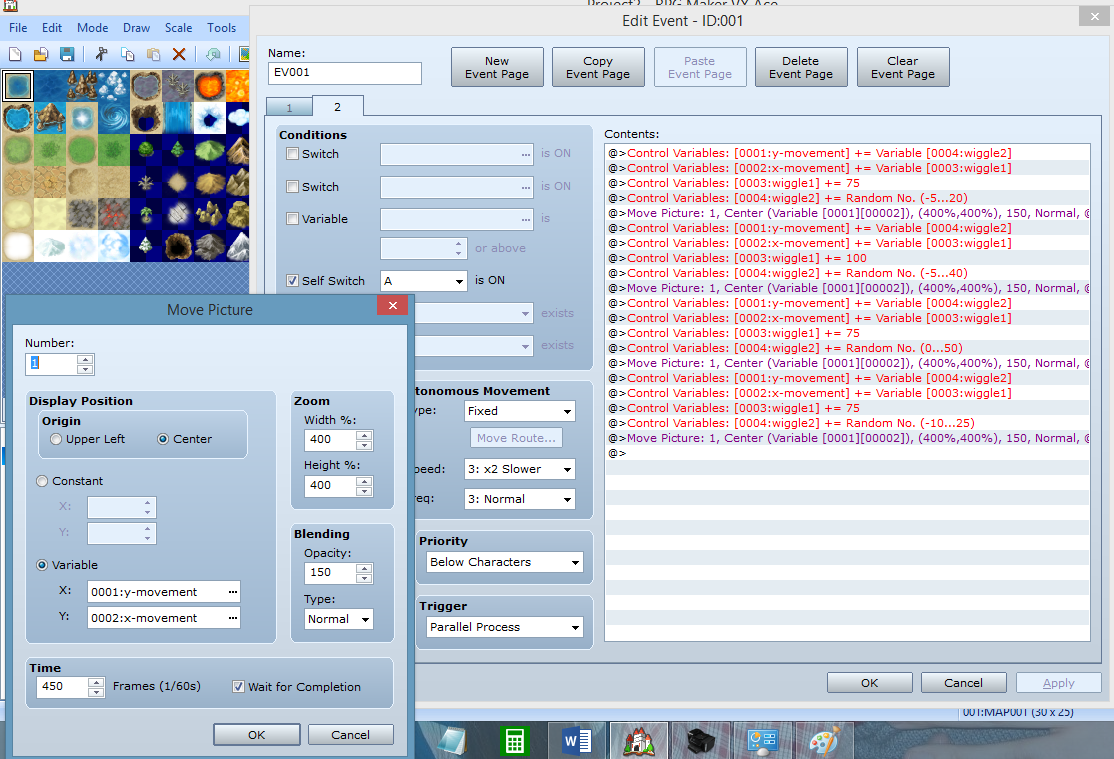
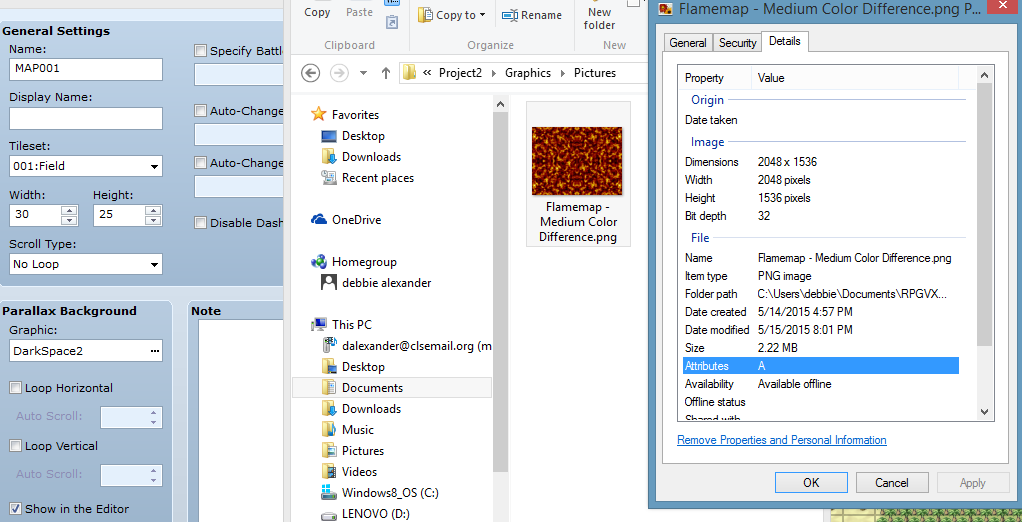
Anyways, here are my event pages and the dimensions of my map and fog:
Protected download
Protected download
Protected download
Is it possible to have them loop around? Did I like not do the math right or something?

Wowa, we have flame maps on our cool site!
And here I am the cool RPG making teacher, trying to Demo how to make the flamemap fog move.
(Kids use Ace Lite in class. Some have full version at home but all classwork is in Lite)
Well, bleh, I can't do it.
I keep getting the fog running off the edge of the map screen. Looks like total fail.
I searched like a good girl.
http://forums.rpgmakerweb.com/index.php?/topic/31309-fog-and-the-like-how-to/?hl=%2Bmove+%2Bpicture#entry304255
http://forums.rpgmakerweb.com/index.php?/topic/36416-evented-weather-system-vxace/?hl=%2Bmove+%2Bpicture#entry361975
http://forums.rpgmakerweb.com/index.php?/topic/4933-simple-fog-event-tutorial-for-rpg-maker-vxace/?hl=+move%20+picture
But I thought you could choose fog graphics that were twice the size of the screen and have a seamless experience when you moved the picture.
I don't know why it would work exactly, but I thought it was supposed to.
Anyways, here are my event pages and the dimensions of my map and fog:
Protected download
Protected download
Protected download
Is it possible to have them loop around? Did I like not do the math right or something?

Downloads / Referenced Files
Log in to download
Log in, then follow the RPG Maker Developers Group to see these download links.
Log in to downloadReferenced Images / Attachments
Creator Claims / Removal
If you are the original creator and want this listing reassigned, edited, or removed, join BMMPlay and contact the moderators with proof that matches the original RPG Maker Web profile, linked GitHub, itch.io page, or another public creator identity.
Replies (0)
No replies yet.
0
replies
1
view
Topic Summary
Loading summary...