






Original Source
- Original title: Tile changes color when moving Up/Down
- Original author: AtmaVegeta
- Original date: April 30, 2015
- Source thread: https://forums.rpgmakerweb.com/threads/tile-changes-color-when-moving-up-down.39468/
- Source forum path: Game Development Engines > Legacy Engine Support > RPG Maker VXAce Support
Summary
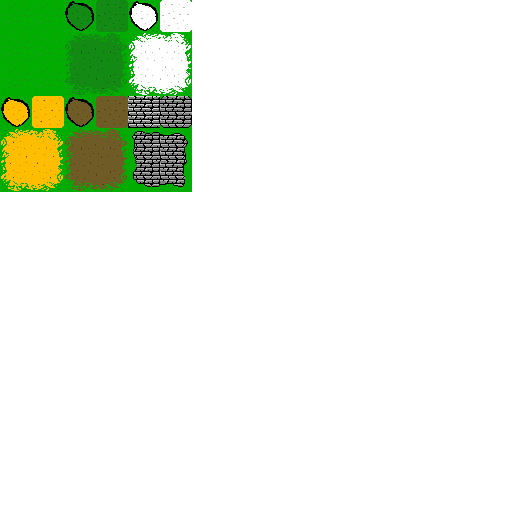
Hi. I'm having a problem with a tileset I made. When I move up/down the lighter color changes to a dark tint (however when I move left/right or near edge of screen and not scrolling it doesn't do it). I've made the tile as a lone tile (in layer and an autotile and it does it both ways. It's suppose to be a paved town road. Here is the image (in autotile format). The top left image has the lighter tint I was using (then I tried making darker for...
Archived First Post
I'm having a problem with a tileset I made. When I move up/down the lighter color changes to a dark tint (however when I move left/right or near edge of screen and not scrolling it doesn't do it).
I've made the tile as a lone tile (in layer and an autotile and it does it both ways. It's suppose to be a paved town road.
Here is the image (in autotile format). The top left image has the lighter tint I was using (then I tried making darker for the autotile and it still does it). (The rest of the tileset works fine, it's just this one tile).
Any ideas? (Hopefully it's clear what the problem is, semi-hard to explain).
Thanks!
EDIT: (I can't reply, currently at max post count for day). I put the autotile on A2 (and when I tried it as just just 1 tile (as shown in the top-left of the autotile, not autotile it was at layer . Both caused this image distortion/color. The TilesetMain-Ground -> A2 / TilesetTown -> B. All other tiles on the sets work fine, it's just this specific one. *On the autotile one I made the shading darker (instead of the lighter look of the top-left tile) and it still does it.
Protected download
Protected download
Protected download
Downloads / Referenced Files
Log in, then follow the RPG Maker Developers Group to see these download links.
Log in to downloadReferenced Images / Attachments
Creator Claims / Removal
If you are the original creator and want this listing reassigned, edited, or removed, join BMMPlay and contact the moderators with proof that matches the original RPG Maker Web profile, linked GitHub, itch.io page, or another public creator identity.
Replies (0)
No replies yet.
Topic Summary
Loading summary...


