

UI is "Zoomed In," Blurry, with Graphical Glitch
BMM_Archive · July 15, 2026

Original Source
- Original title: UI is "Zoomed In," Blurry, with Graphical Glitch
- Original author: fallenlorelei
- Original date: October 27, 2015
- Source thread: https://forums.rpgmakerweb.com/threads/ui-is-zoomed-in-blurry-with-graphical-glitch.47895/
- Source forum path: Game Development Engines > Legacy Engine Support > RPG Maker MV Support
Summary
Hey guys. I just recently bought MV off Steam about... an hour ago. Immediately when I started it up, I noticed that it looked very strange. It looks zoomed in as if the program isn't recognizing my computer's native resolution, and there are also some graphical glitches. Hovering over the large buttons reveals bright green text. I could deal with that, but everything else is so fuzzy and looks terrible. { "lightbox_close": "Close", "lightbox_next": "Next",
Archived First Post
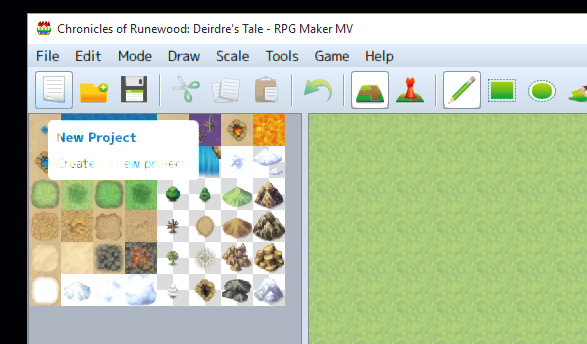
I don't know if this is the "lag" people are mentioning, but I looked around on these forums and also the Steam community and haven't been able to locate a solution. I updated my graphics card - it's strong enough to handle RPG Maker (NVidia GTX 980). Ace doesn't have this problem - it's still crisp and native. Is there a Windows 10 setting somewhere that I'm overlooking?
Comparison of both versions. Both featuring the same default new map size of 17x13
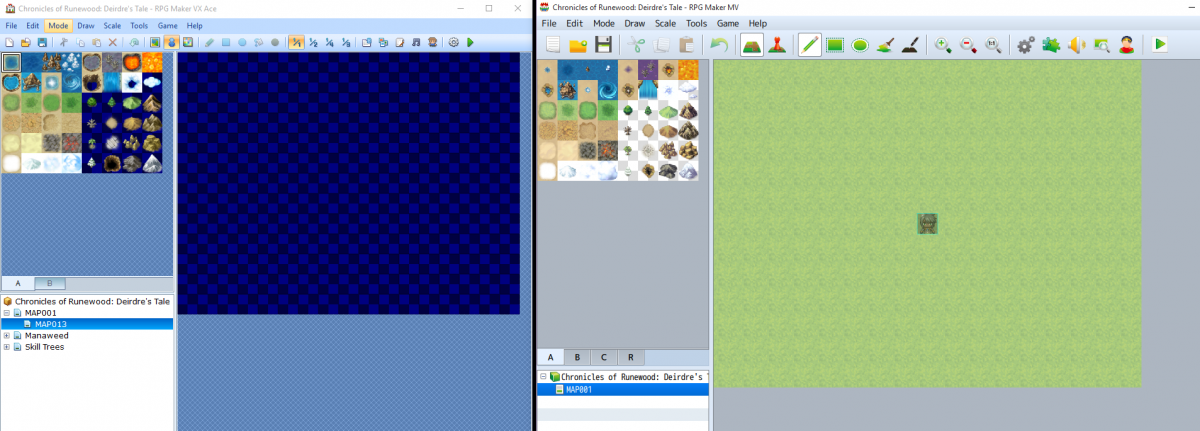
I haven't even started making any games with MV yet, so I can't comment on actual gameplay. I'd like to fix this first.
My System:
Windows 10
Intel Core i5
16 GB RAM
NVidia GTX 980 (OpenGL compatible, 4.4)
Display Size 1920x1080
I wanted to see if anyone had any immediate fixes they knew about, before I add this to the stickied bug report. Thanks so much if you have an idea
Edit: Kirkaz added a screenshot of their MV and it does indeed look different from mine.
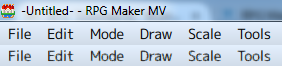
I'm convinced its a setting on my computer somewhere (or in a settings file somewhere), but I'm not sure whee.
Downloads / Referenced Files
RPG Maker Web attachments are mirrored locally when available. Other external links remain hosted by their original creator or third-party service.
- Local mirror: 13842-30c74bbdbb721931351576791a4c750c.png
SHA-256:57360c3d507960563cf5db1afd6622a7fa1c394acbe68b917dadb0183447969e
Original attachment URL: https://forums.rpgmakerweb.com/attachments/mvgraphicissue-png.24875/ - Local mirror: 13845-60c8dc5661d7128a5c068a1fff441c02.png
SHA-256:7f865c93bd22073c72c9bf8538758e8e3a813712d32a3ef02939ca2d96379d71
Original attachment URL: https://forums.rpgmakerweb.com/attachments/rpgmakercompare-png.24878/ - Local mirror: 13865-9f18adb7e5f02165ddf6aa1961ed8be8.png
SHA-256:1a29c3662150d2b57ae8f2f0d6b0845d34532a96abde33b49cfe9f4fe7990e74
Original attachment URL: https://forums.rpgmakerweb.com/attachments/rpgmakercompare2-png.24898/
Referenced Images / Attachments
Creator Claims / Removal
If you are the original creator and want this listing reassigned, edited, or removed, join BMMPlay and contact the moderators with proof that matches the original RPG Maker Web profile, linked GitHub, itch.io page, or another public creator identity.
Replies (0)
No replies yet.
Topic Summary
Loading summary...