public

Rpg Maker Developers Group

Simple enough for a child, powerful enough for a developer

2 Followers

Using Pictures as a 'Multiply' Layer

BMM Archive · July 15, 2026

Preserved forum archive. This topic stores the original first post and locally mirrored RPG Maker Web attachments when available. It is posted by the BMMPlay archive account, not by the original creator.

Original Source

  • Original title: Using Pictures as a 'Multiply' Layer
  • Original author: Morg
  • Original date: April 11, 2015
  • Source thread: https://forums.rpgmakerweb.com/threads/using-pictures-as-a-multiply-layer.38767/
  • Source forum path: Game Development Engines > Legacy Engine Support > RPG Maker VXAce Support

Summary

Hey there, I've been using some custom tilesets in conjunction with Pictures in order to create some interesting lighting effects.  It all worked nicely when I was just using black shadows but now that I'm trying to incorporate colour its gone a bit wrong. My intention was to overlay a gradient as a Multiply layer (which is what I thought the 'add' type was)  But instead it behaved like a photoshop Screen layer. {

Archived First Post

Hey there,

I've been using some custom tilesets in conjunction with Pictures in order to create some interesting lighting effects.  It all worked nicely when I was just using black shadows but now that I'm trying to incorporate colour its gone a bit wrong.

My intention was to overlay a gradient as a Multiply layer (which is what I thought the 'add' type was)  But instead it behaved like a photoshop Screen layer.

Protected download
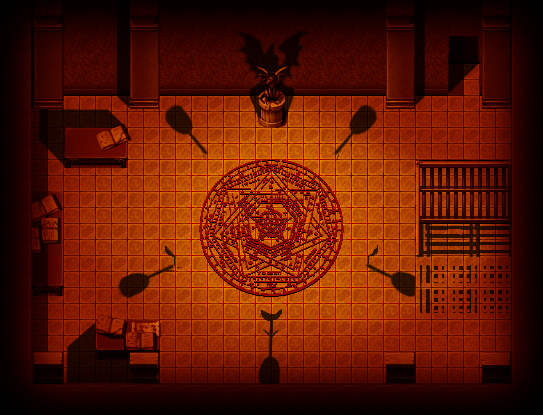
I intended for it to look like this,​
 ​
Protected download
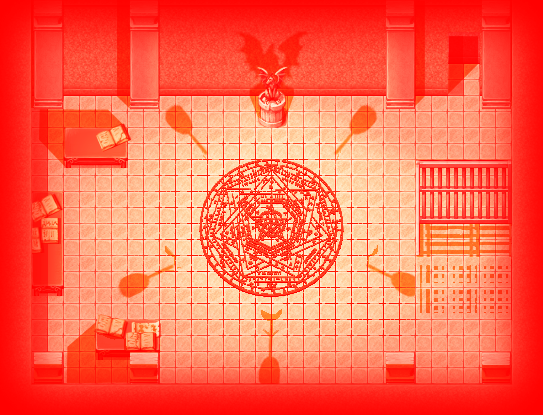
But instead it came out like this.​
 ​
So my question is;

  Is there any way to overlay a picture to behave as a photoshop Multiply layer?

I apologise if I've just missed something really obvious, but I can't seem to find a solution anywhere.

If need be I could resort to a tileset swap or something of that nature but being able to use Multiply layers would be preferable (and useful in the future).

------------------------------------------------------

Ok, I had just finnished writing all of this when I found the solution.  It was fairly simple but wasn't that obvious so I'll explain here incase anyone else faces this trouble.

So, all I had to do was take the layer I wanted to multiply, inverted its colours and then apply it as a Sub layer, rathe than an Add layer.



Downloads / Referenced Files

Log in to download

Log in, then follow the RPG Maker Developers Group to see these download links.

Log in to download

Referenced Images / Attachments

Multiply.png
Multiply.png
Screen.png
Screen.png
Creator Claims / Removal

If you are the original creator and want this listing reassigned, edited, or removed, join BMMPlay and contact the moderators with proof that matches the original RPG Maker Web profile, linked GitHub, itch.io page, or another public creator identity.

#039#rpg-maker-archive#vxace-support

Replies (0)

No replies yet.

0 replies 1 view

Log in to reply.

User Avatar