public

Rpg Maker Developers Group

Simple enough for a child, powerful enough for a developer

2 Followers

Fade Screen In problems

BMM Archive · July 15, 2026

Preserved forum archive. This topic stores the original first post and locally mirrored RPG Maker Web attachments when available. It is posted by the BMMPlay archive account, not by the original creator.

Original Source

  • Original title: Fade Screen In problems
  • Original author: MajoraAndEnvy
  • Original date: October 25, 2015
  • Source thread: https://forums.rpgmakerweb.com/threads/fade-screen-in-problems.47345/
  • Source forum path: Game Development Engines > Legacy Engine Support > RPG Maker MV Support

Summary

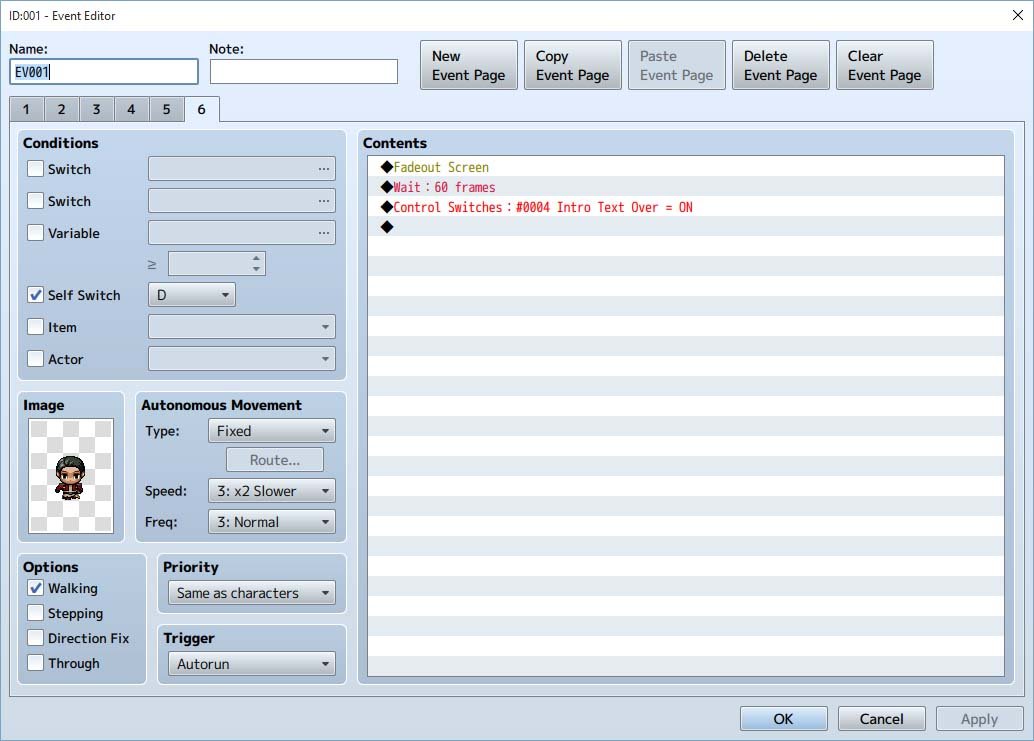
To start:  I have "start transparent" turned on - and I am trying to use a few different events to create a cutscene that plays before the player is allowed to begin roaming around the world. I have two events.  At the end of event A, the screen fades out and a switch (004) is turned on, as so: { "lightbox_close": "Close",

Archived First Post

To start:  I have "start transparent" turned on - and I am trying to use a few different events to create a cutscene that plays before the player is allowed to begin roaming around the world.

I have two events.  At the end of event A, the screen fades out and a switch (004) is turned on, as so:

Protected download

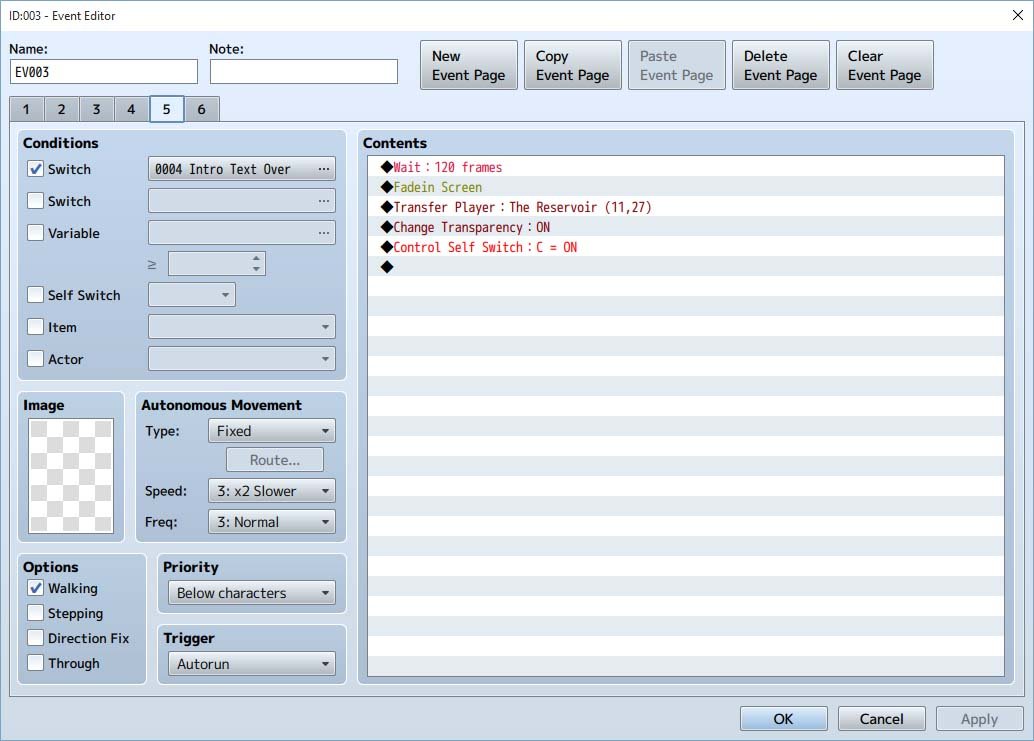
Then, in a separate event on the same screen, Event B, an Event page with the requisite of the switch 004 being turned ON, has the commands "wait 120 seconds" then fade screen in, like htis:

Protected download

Then the player is transfered to the "starting position" and transparency is turned "on"

The self control switch C just takes to a blank page to end the event, and from here, you should be able to begin exploring the world...

The "fade out" works fine - it fades to black.  But it never fades back in...racking my brain here - can't figure it out ?

Downloads / Referenced Files

Log in to download

Log in, then follow the RPG Maker Developers Group to see these download links.

Log in to download

Referenced Images / Attachments

ev001.jpg
ev001.jpg
fadein.jpg
fadein.jpg
Creator Claims / Removal

If you are the original creator and want this listing reassigned, edited, or removed, join BMMPlay and contact the moderators with proof that matches the original RPG Maker Web profile, linked GitHub, itch.io page, or another public creator identity.

#rpg-maker-archive#mv-support

Replies (0)

No replies yet.

0 replies 1 view

Log in to reply.

User Avatar