Preserved forum archive. This topic stores the original first post and locally mirrored RPG Maker Web attachments when available. It is posted by the BMMPlay archive account, not by the original creator.
Original Source
Original title: Wave crashing sprites? + HOW TO REMOVE BOLD LINES IN EDITOR
Source forum path: Game Development Engines > Legacy Engine Support > RPG Maker VXAce Support
Summary
Hey there, I'm trying to make a beach where waves are crashing, pretty much like if there was a storm outside. I've seen many guide on how to make water animation better, but it was always stagnant, no waves ever, and not appropriate for an ocean, only ponds and stuff. And then, thinking about it, I've never seen anything like what I want in an RPG Maker game. Not that it doesn't exist, I just haven't seen anything that I could learn from. I don't know where I should start....
Bmmplay may earn a commission from qualifying purchases made through these links.
Archived First Post
Hey there,
I'm trying to make a beach where waves are crashing, pretty much like if there was a storm outside. I've seen many guide on how to make water animation better, but it was always stagnant, no waves ever, and not appropriate for an ocean, only ponds and stuff.
And then, thinking about it, I've never seen anything like what I want in an RPG Maker game. Not that it doesn't exist, I just haven't seen anything that I could learn from.
I don't know where I should start. Should waves be character sprites, should I use a moving background, a parallax, a script?
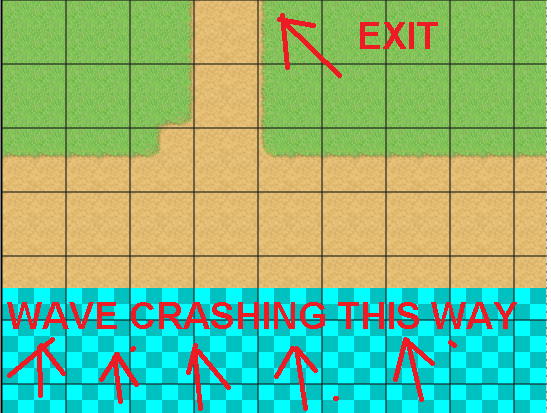
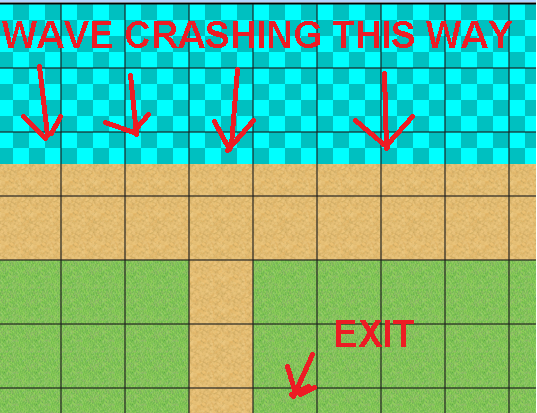
I joined two pictures to illustrate what I mean, of course it was made in 15 seconds, the finished map should be parallaxed etc. But I need something to start, like waves.
Could anybody please point me something out?
Thank you very much!
P.S. If someone could help me removing these pesky bold lines from my RPG Maker editior, as shown in the pictures, that would be great. Thanks!
Protected download
Protected download
Downloads / Referenced Files
Log in to download
Log in, then follow the RPG Maker Developers Group to see these download links.
If you are the original creator and want this listing reassigned, edited, or removed, join BMMPlay and contact the moderators with proof that matches the original RPG Maker Web profile, linked GitHub, itch.io page, or another public creator identity.




 Kingston IronKey Locker+ 50 G2 256GB Encrypted USB Drive
Encrypted USB storage for secure files, travel documents, and work backups.
View on Amazon
Kingston IronKey Locker+ 50 G2 256GB Encrypted USB Drive
Encrypted USB storage for secure files, travel documents, and work backups.
View on Amazon