

Text Issues
BMM_Archive · July 15, 2026

Original Source
- Original title: Text Issues
- Original author: theomegatoast
- Original date: October 24, 2015
- Source thread: https://forums.rpgmakerweb.com/threads/text-issues.46619/
- Source forum path: Game Development Engines > Legacy Engine Support > RPG Maker MV Support
Summary
I apologize if something similar has been posted, but I couldn't find any similar issues that applied to my situation. At first, when I open the editor, everything looks fine. The text is perfectly readable, and everything works. However, once I click on anything aside from the screen itself, all of the text becomes extremely fuzzy, or just disappears entirely. Here's a picture: { "lightbox_close": "Close",
Archived First Post
At first, when I open the editor, everything looks fine. The text is perfectly readable, and everything works. However, once I click on anything aside from the screen itself, all of the text becomes extremely fuzzy, or just disappears entirely. Here's a picture:
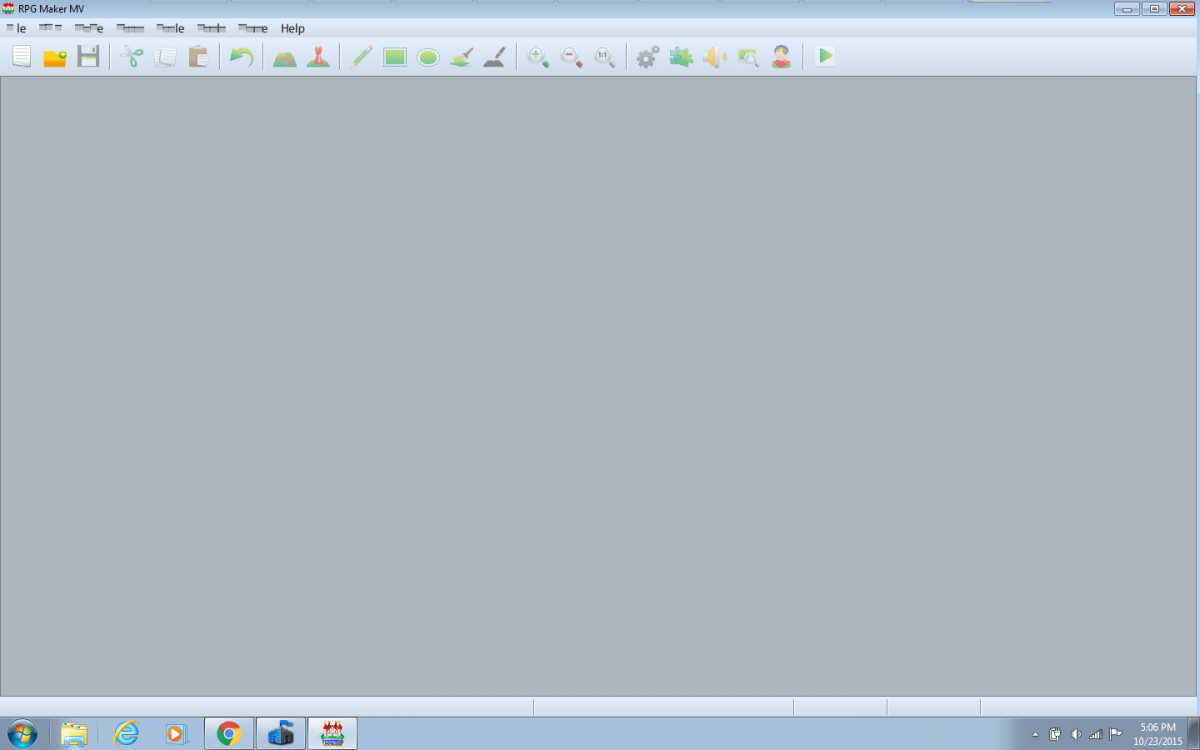
I apologize for the format, but screenshots and forum posts aren't my area of expertise. However, notice how the text is garbled. I've tried running as an admin, moving the directory, restarting the computer, and I've even cross checked my system (crappy as it may be, it still fits all of the requirements) with the minimums. I'm at a loss.
This problem persists in the database when a project is up, and just about any and everywhere there is text. If this problem has already been mentioned and fixed, please let me know.
Downloads / Referenced Files
RPG Maker Web attachments are mirrored locally when available. Other external links remain hosted by their original creator or third-party service.
- Local mirror: 13523-a8e408f1d22469c27a8c049e346aaa03.png
SHA-256:757bd6f295e49ccc00953f2f8c683fbbde769b6e2b24d6ea33efa79db9b35fbf
Original attachment URL: https://forums.rpgmakerweb.com/attachments/rpgmvafter-png.24438/
Referenced Images / Attachments
Creator Claims / Removal
If you are the original creator and want this listing reassigned, edited, or removed, join BMMPlay and contact the moderators with proof that matches the original RPG Maker Web profile, linked GitHub, itch.io page, or another public creator identity.
Replies (0)
No replies yet.
Topic Summary
Loading summary...