Preserved forum archive. This topic stores the original first post and locally mirrored RPG Maker Web attachments when available. It is posted by the BMMPlay archive account, not by the original creator.
Original Source
Original title: Need help with a puzzle event [Solved!]
Source forum path: Game Development Engines > Legacy Engine Support > RPG Maker VXAce Support
Summary
Hey. For a good while now, I've been trying to make this puzzle/riddle event work on my project and have been going over different ways using conditional branches and switches ( I attempted this with variables first and looked for tutorials, but I suppose I didn't look too well.. ) but I've been unable to get it work and I'm running out of ideas. { "lightbox_close": "Close",
Archived First Post
Hey.
For a good while now, I've been trying to make this puzzle/riddle event work on my project and have been going over different ways using conditional branches and switches ( I attempted this with variables first and looked for tutorials, but I suppose I didn't look too well.. ) but I've been unable to get it work and I'm running out of ideas.
Protected download
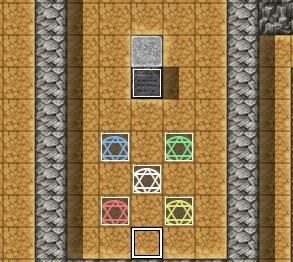
As it can be seen on that image, that there are 5 hexagrams and a tablet thing with a hint to solving this riddle.
The way it's supposed to work is that you have to step on the 4 hexagrams surrounding the middle one in the correct order: Green, Red, Blue, Yellow, and then you step on the middle which triggers an event of completing the riddle.
Once you step on one of the hexagrams, it's supposed to light up, showing that you have activated it and then you proceed to step on another one, however if they are the incorrect ones, they're supposed to return normal.
For example, if you stepped on the Blue hexagram, it should light up. Then if you step on say the Red one, then the Blue one is supposed to return back to being inactive.
Similary, if you step the Green one and Red one in the correct order as you're meant to, then you step on the Yellow one, both of the two are meant to return back to being inactive.
The middle one is merely supposed to give you a message/hint that you're supposed to work with the four other ones surrounding it before you can step on that one.
My problem actually is that when I step on for example the Blue one and it lights up, then say, the Red one, they both light up and continue to do so ( as I have set Repeat on their move route ) but I've been unable to make them go back inactive once lighted up despite attempting to turn off the switch that activates the conditional branch.
I can provide a screenshot of how I've made the event on one of the hexagrams if that's needed.
Any help would be appreciated on this.
Thank you in advance.
Downloads / Referenced Files
Log in to download
Log in, then follow the RPG Maker Developers Group to see these download links.
If you are the original creator and want this listing reassigned, edited, or removed, join BMMPlay and contact the moderators with proof that matches the original RPG Maker Web profile, linked GitHub, itch.io page, or another public creator identity.






 Kingston IronKey Locker+ 50 G2 256GB Encrypted USB Drive
Encrypted USB storage for secure files, travel documents, and work backups.
View on Amazon
Kingston IronKey Locker+ 50 G2 256GB Encrypted USB Drive
Encrypted USB storage for secure files, travel documents, and work backups.
View on Amazon