


Visual Shopkeeper Modification to Yanfly Shop Menu Core Plugin
BMM_Archive · July 15, 2026

Original Source
- Original title: Visual Shopkeeper Modification to Yanfly Shop Menu Core Plugin
- Original author: Guardinthena
- Original date: May 1, 2019
- Source thread: https://forums.rpgmakerweb.com/threads/visual-shopkeeper-modification-to-yanfly-shop-menu-core-plugin.108568/
- Source forum path: Game Development Engines > RPG Maker Javascript Plugins > JS Plugin Requests
Summary
Hello and good day everyone! To cut to the chase, let me dive into the gritty details of what I mean by the title above. Let me start off by stating that what I am looking for is a modification to Yanfly's Shop Menu Core for MV, just so no one is confused later. That stated, by now I would imagine that most of the community is aware of Yanfly's plugins. They are highly popular and often used--and therein is where I am trying to break away a bit but...
Archived First Post
Let me start off by stating that what I am looking for is a modification to Yanfly's Shop Menu Core for MV, just so no one is confused later. That stated, by now I would imagine that most of the community is aware of Yanfly's plugins. They are highly popular and often used--and therein is where I am trying to break away a bit but as I am woefully lacking in javascript know-how I am asking for help. I adore Yanfly's plugins and run for them first thing on a new project, but I am also a nut for visual eye candy in games. Yanfly's provide a lot of that eye candy, such as with the Shop Menu Core Plugin. http://yanfly.moe/2016/01/01/yep-53-shop-menu-core/
But there was another shop overhaul done by Galv back in VXAce called Shop Upgrade. https://galvs-scripts.com/2013/01/05/shopkeeper-graphics/ I adore this script he made and fell in love with the idea of an animated shopkeeper that comments in the Help Window when a purchase is made, or the player leaves without buying, and that there was a background image behind the shopkeeper that can be changed to further deepen the immersion of gameplay. Unfortunately, a little bit of digging revealed that Galv has yet to convert this script to MV, and the last question asked by another curious RPGer on when he could get around to it was back in 2017. Given that we're now in 2019, I'm not sure if Galv has the time or intention to get around to it anytime soon.
So here I am, asking for help from any javascript-savvy RPGer's out there that can modify Yanfly's Shop Menu Core to meld these two wonderful shop concepts together? I've provided three pictures of plausible means below, but the main Visual Shopkeeper traits I would like across them all is as follows:
Visual Shopkeeper Traits:
1. Image of the Shopkeeper
2. Shopkeeper image can change faces when the player buys, sells, equips(Yanfly's Shop Menu Core), or cancels from shop, and maybe based on a given time of inactivity.
3. Shopkeeper 'speaks' to player by popups in the help window when the player makes a purchase, sells, equips, cancels, or is inactive too long. (Ex: Thank you for your patronage!, I can offer you half the value for that..., You look wonderful in that piece!, Have a wonderful day!, Still browsing or has something caught your eye?)
4. A background image, either parallax, picture or both, is displayed behind the shopkeeper
5. (Bonus--not necessary but would be cool) Option to change BGM (background music) for different shops. I guess this could be done by use of plugin commands or comment tags?
Yanfly Shop Mod
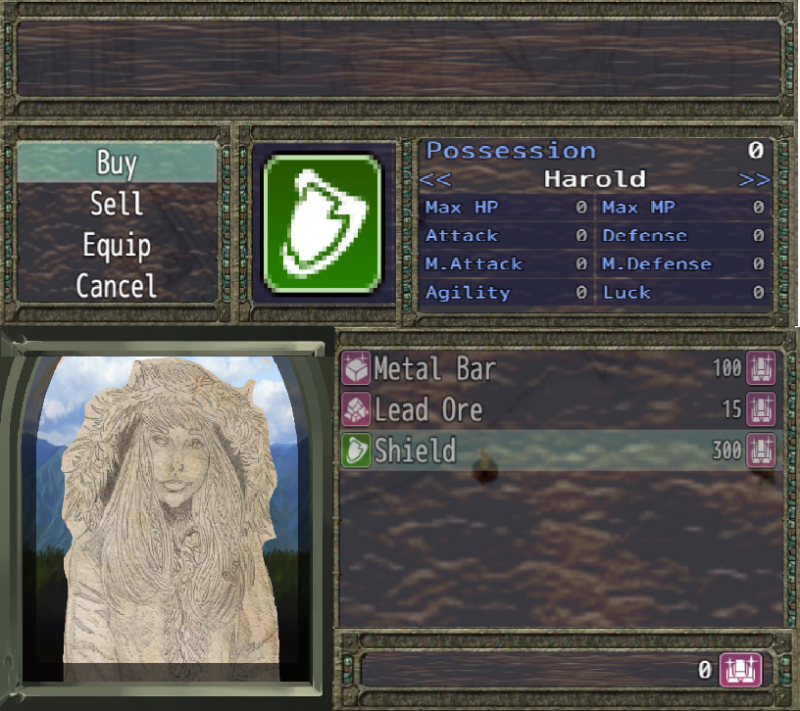
The first spoiler below is a modified Yanfly Shop Menu Core concept. I tried to keep much of the layout the same where I could. In this concept, the Visual Shopkeeper, as one can see, is in the bottom left hand corner. The shop list window had to be moved to the right, and rather than removing the possession window with additional item details altogether--I was thinking--would be moved into the same window as the item window with the item picture. I was thinking that, like how Yanfly had coded it that one could move with the arrow keys between the different members in the party to see how the equipment would affect their stats, that that same system could be used to move between those windows and the original item detail window.
...I hope that made sense! If not, I'll try to clarify better.
Default Shop Mod
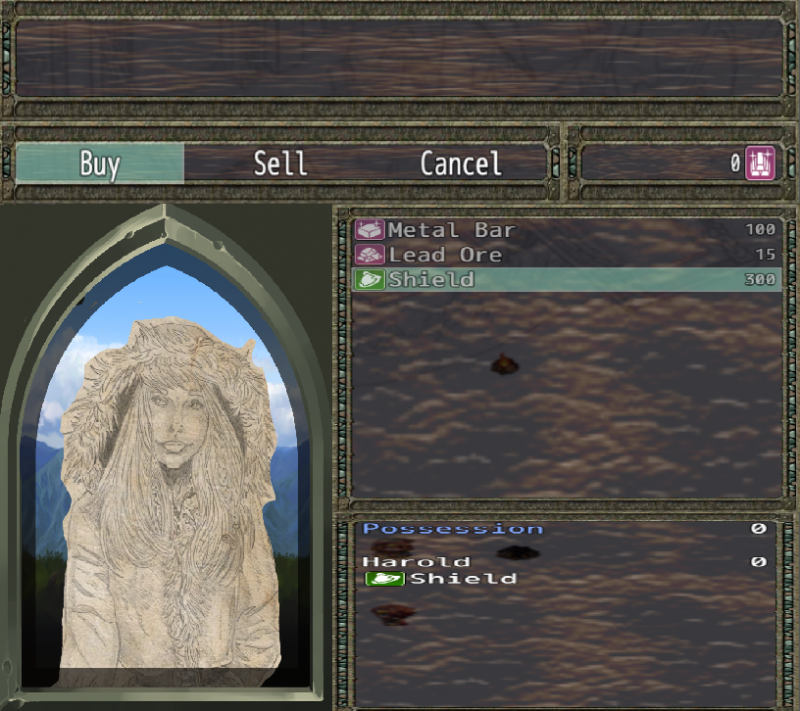
In this second design concept, I wasn't sure how difficult it would be to modify Yanfly's plugins, so the design is based off of the default shop menu from MV. The item list window and possession window have been moved to the right and stacked on top of each other, leaving space to the left for the visual shopkeeper. My original envision for this design featured the arch window (I'm still partial to it! which is why this is featured with the Arched Shopkeeper)
Hybrid Shop Mod
The third concept is what I like to call the Hybrid Design. Unfortunately at this time, the website is not allowing me to upload the image but I will try again at a later time. I will try to explain it as best I can.
In the Hybrid Design, the Categories Window is the same as the default window where it is stretched horizontally across the screen rather than vertically. The Gold window is moved to the bottom right hand corner as with Yanfly's design, leaving space in the Categories to add the 'Equip' option from Yanfly's Shop Menu Core. The Visual Shopkeeper window is the same as in the Arched design I have in the Default Shop Mod in the spoiler tag above (as I mentioned above, I am partial to this design). Because of the arched Visual Shopkeeper though, Yanfly's Item Detail Window (or whatever it is called, I don't actually know) is shortened to the middle-to-right of the screen. The Item list window is sandwiched between that and the gold window at the bottom. As with the Yanfly Shop Mod, the Possession window would be condensed into the Item Detail Window, where the player could change between the scenes using the arrow keys. Personally, I am partial to the Hybrid design the most, as it allows for the arched Visual Shopkeeper I would like and still get to keep the enlarged item picture provided by Yanfly's plugin.
These were the best three concepts I could come up with and I hope I've provided enough detail and explanation to what I am looking for. If any additional clarification is required I am more than willing to provide. Thank you to everyone that read this request through to the end and is giving it consideration!
Downloads / Referenced Files
Log in, then follow the RPG Maker Developers Group to see these download links.
Log in to downloadReferenced Images / Attachments
Creator Claims / Removal
If you are the original creator and want this listing reassigned, edited, or removed, join BMMPlay and contact the moderators with proof that matches the original RPG Maker Web profile, linked GitHub, itch.io page, or another public creator identity.


Replies (0)
No replies yet.
Topic Summary
Loading summary...
