
public

Rpg Maker Developers Group

Simple enough for a child, powerful enough for a developer

2 Followers

"Shake Screen" command not working

BMM Archive · July 15, 2026

Preserved forum archive. This topic stores the original first post and locally mirrored RPG Maker Web attachments when available. It is posted by the BMMPlay archive account, not by the original creator.

Original Source

  • Original title: "Shake Screen" command not working
  • Original author: Gui
  • Original date: November 13, 2014
  • Source thread: https://forums.rpgmakerweb.com/threads/shake-screen-command-not-working.33911/
  • Source forum path: Game Development Engines > Legacy Engine Support > RPG Maker VXAce Support

Summary

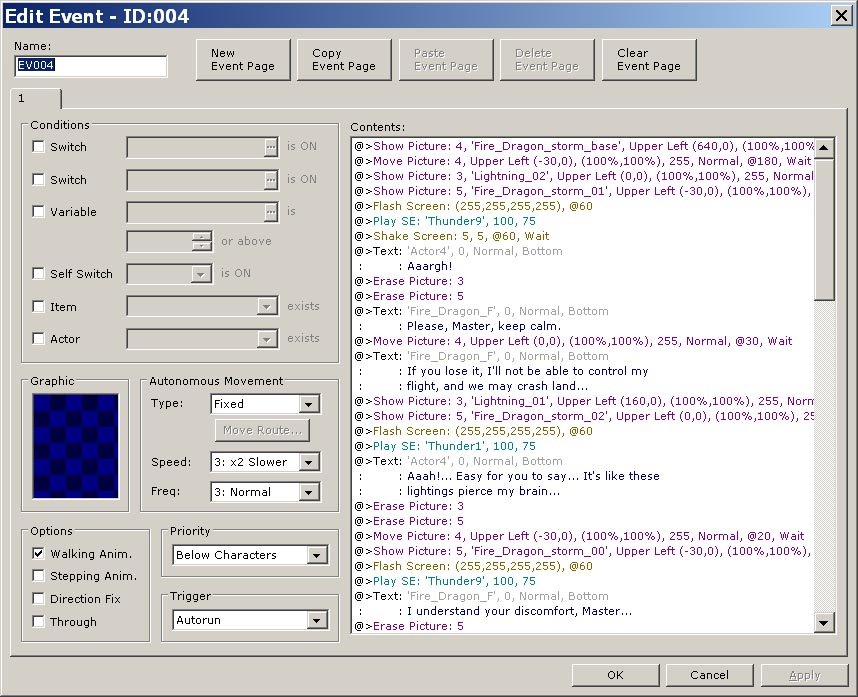
Everything's in the title, or almost – see the screenshot to know the details of my event: { "lightbox_close": "Close", "lightbox_next": "Next",

Archived First Post

Everything's in the title, or almost – see the screenshot to know the details of my event:

Protected download

More info:

- I have no tiles or even parallax pic on this map: the hero is flying through a storm on a dragon, so I use only looping moving pics to simulate the movements of the clouds in the wind as well as the rain; the rest is made of lightning pics, sound effects and flash screen commands.

- following the method given in this topic, I tried to add a "Wait..." event at different lines in the list of commands but with no success.

- the map has the exact size of the display size: 20*15 for a 640*480 size; I tried to use a larger size but nada.

- unless mistaken, no script is called.

Thanks in advance for any help 

Downloads / Referenced Files

Log in to download

Log in, then follow the RPG Maker Developers Group to see these download links.

Log in to download
Referenced Images / Attachments

shake_screen_not_working.jpg
Creator Claims / Removal

If you are the original creator and want this listing reassigned, edited, or removed, join BMMPlay and contact the moderators with proof that matches the original RPG Maker Web profile, linked GitHub, itch.io page, or another public creator identity.

#039#rpg-maker-archive#vxace-support

Replies (0)

No replies yet.

0 replies 1 view

Log in to reply.

User Avatar


