


Adding Custom Stats (or variables) to the character menu
BMM_Archive · July 15, 2026

Original Source
- Original title: Adding Custom Stats (or variables) to the character menu
- Original author: Oryyn
- Original date: October 28, 2014
- Source thread: https://forums.rpgmakerweb.com/threads/adding-custom-stats-or-variables-to-the-character-menu.33413/
- Source forum path: Game Development Engines > Legacy Engine Support > RPG Maker VXAce Support
Summary
Im looking for a way to use a script that keeps track of variables and adds a total amount of the variable to a visible number or graphic that keeps that of that stat for your player in their main menu. For example, if I wanted to make a guild option (similar to the following youtube video RPGVXACE Tutorial Part 19): And then keep track of those numbers for each common event variable and track them visually on the menu, how could I do that? Was thinking of using a...
Archived First Post
http://youtu.be/bK-vcuIwm-w?list=PLJxcybqKV5ZDNZsXhAS0ey4CWvbY81Po8
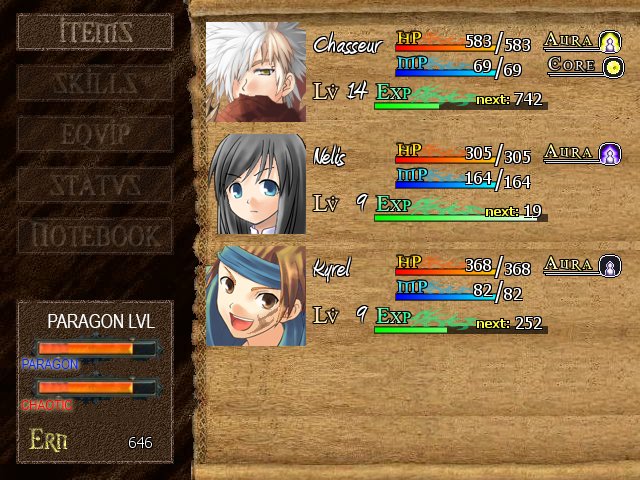
And then keep track of those numbers for each common event variable and track them visually on the menu, how could I do that? Was thinking of using a paragon good/evil system that tracked the total number of points you got to each option and showed them to you in a bar, similar to a level bar (I have a mock up of it on the bottom left corner of the example pic I attached to this post - using a sample menu found from another game on google).
So essentially, you get 1 point for chaotic, and the menu is shown filled a little (with a premade graphic). Get another point, it shows a different graphic (or just a number if I didnt want the graphic). 20 points, and the graphic is full, and so forth.
Through the tutorial, I know how to create common events with variables to do this, but how can I visually keep track of it in-game as the player?
Protected download
Downloads / Referenced Files
Log in, then follow the RPG Maker Developers Group to see these download links.
Log in to downloadReferenced Images / Attachments
Creator Claims / Removal
If you are the original creator and want this listing reassigned, edited, or removed, join BMMPlay and contact the moderators with proof that matches the original RPG Maker Web profile, linked GitHub, itch.io page, or another public creator identity.
Replies (0)
No replies yet.
Topic Summary
Loading summary...

