


Armor/Items/Weapons Icons
BMM_Archive · July 15, 2026

Original Source
- Original title: Armor/Items/Weapons Icons
- Original author: tjaether
- Original date: August 12, 2014
- Source thread: https://forums.rpgmakerweb.com/threads/armor-items-weapons-icons.31008/
- Source forum path: Game Development Engines > Legacy Engine Support > RPG Maker VXAce Support
Summary
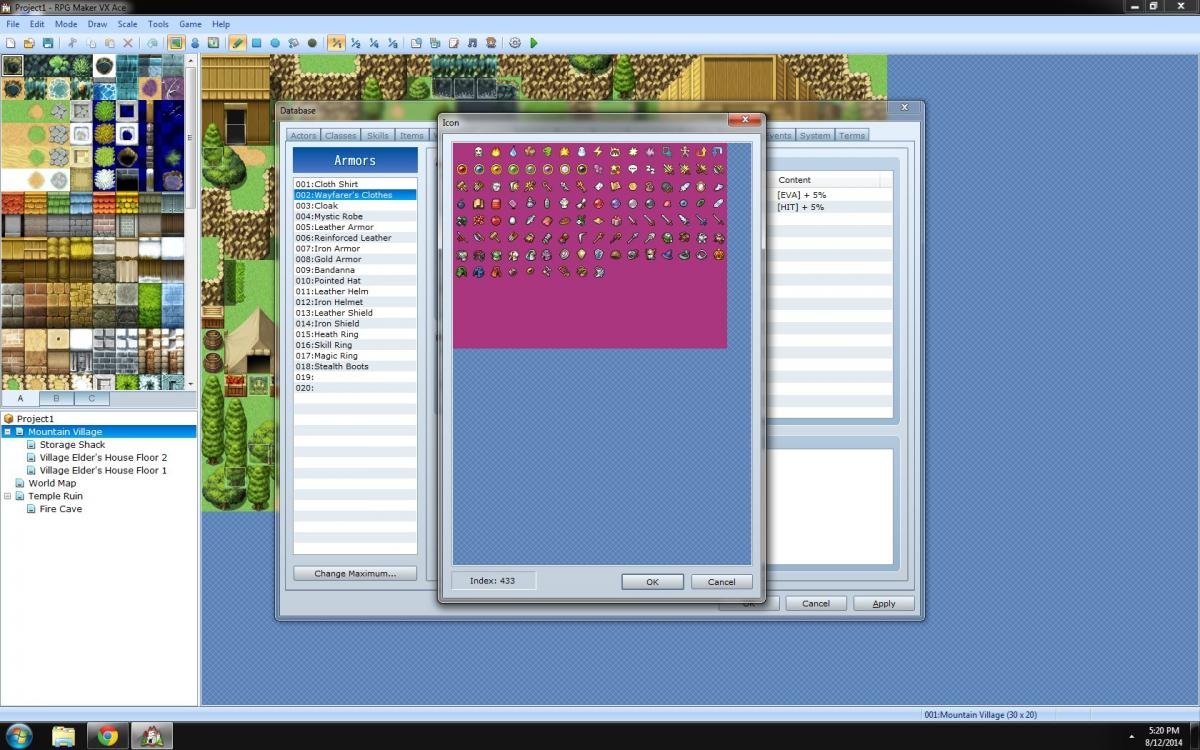
Hello, I'm working through the tutorial and am on part 4 where it's talking about Creating Weapons and Armor and filling out the General Settings of each item. In the example for the General Settings box for the Cloth Shirt when I go to double click on the Icon window to choose what the item will look like, I have a completely different set of icons and do not know how to restore this to the default icons. Anyone know how to fix this? The ones that show up are...
Archived First Post
Thanks,
TJ
Protected download
Downloads / Referenced Files
Log in, then follow the RPG Maker Developers Group to see these download links.
Log in to downloadReferenced Images / Attachments
Creator Claims / Removal
If you are the original creator and want this listing reassigned, edited, or removed, join BMMPlay and contact the moderators with proof that matches the original RPG Maker Web profile, linked GitHub, itch.io page, or another public creator identity.
Replies (0)
No replies yet.
Topic Summary
Loading summary...

