




public

Rpg Maker Developers Group

Simple enough for a child, powerful enough for a developer

2 Followers

Animated image and show text at the same time.

BMM Archive · July 15, 2026

Preserved forum archive. This topic stores the original first post and locally mirrored RPG Maker Web attachments when available. It is posted by the BMMPlay archive account, not by the original creator.

Original Source

  • Original title: Animated image and show text at the same time.
  • Original author: Radlemus
  • Original date: July 1, 2014
  • Source thread: https://forums.rpgmakerweb.com/threads/animated-image-and-show-text-at-the-same-time.29289/
  • Source forum path: Game Development Engines > Legacy Engine Support > RPG Maker VXAce Support

Summary

My goal is to have show text and player choices with an animated image playing on our screen. With some help from Google (and very nice people leaving info) I was able to use an event and five images to make an animated image.  Now I want to have the same animation play but also have show text working that leaves time for our player to read and move on with the action button. Choices should also be useable. I have tried in two ways. The first was to make...

Archived First Post

My goal is to have show text and player choices with an animated image playing on our screen.

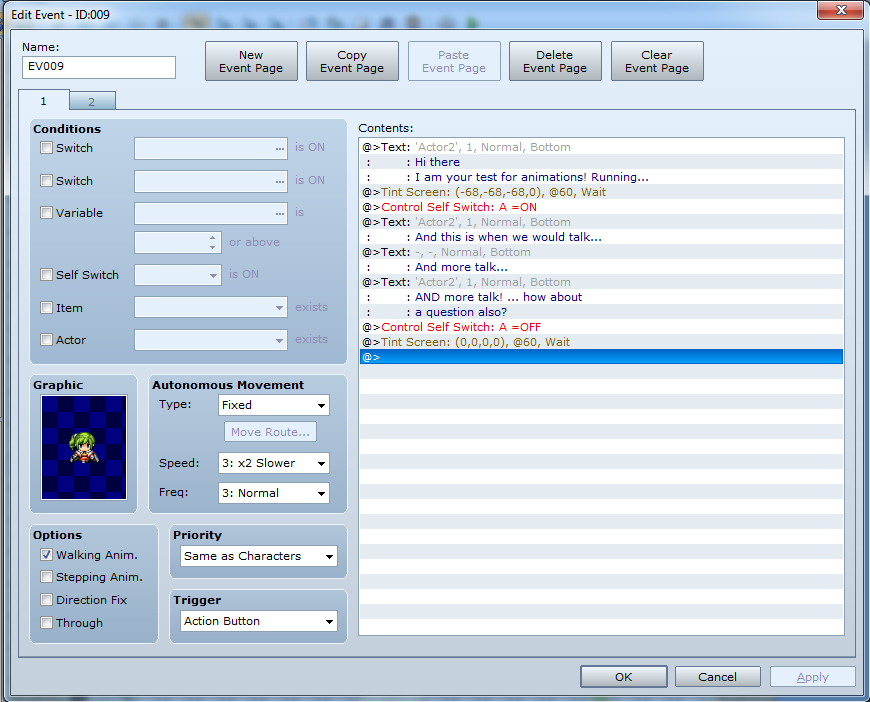
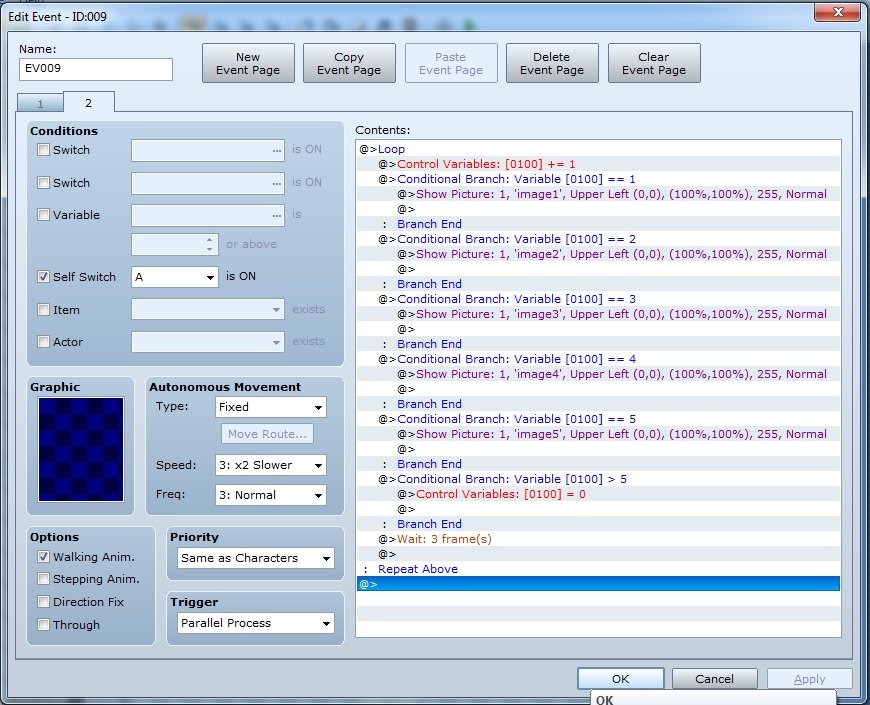
With some help from Google (and very nice people leaving info) I was able to use an event and five images to make an animated image.  Now I want to have the same animation play but also have show text working that leaves time for our player to read and move on with the action button. Choices should also be useable.

I have tried in two ways. The first was to make two events. One held all the animation info in a loop that would turn on with a switch. The npc we talk to would turn that switch on and call the event and keep talking. That did not work... The npc kept talking and the animation never played. The second is to put both event pages on one event. Telling the npc to turn on a self switch, keep talking and at the end turn it off... that also does not work...

New and still learning RPG maker. Any help is great! I will leave some images to help understand what I have done so far.

Protected download
Protected download

Downloads / Referenced Files

Log in to download

Log in, then follow the RPG Maker Developers Group to see these download links.

Log in to download

Referenced Images / Attachments

EventPage1.png
EventPage1.png
EventPage2.jpg
EventPage2.jpg
Creator Claims / Removal

If you are the original creator and want this listing reassigned, edited, or removed, join BMMPlay and contact the moderators with proof that matches the original RPG Maker Web profile, linked GitHub, itch.io page, or another public creator identity.

#rpg-maker-archive#vxace-support

Replies (0)

No replies yet.

0 replies 1 view

Log in to reply.

User Avatar
