


MZ How to remove options from the Main Menu?
BMM_Archive · July 15, 2026

Original Source
- Original title: MZ How to remove options from the Main Menu?
- Original author: SorbetInAPie
- Original date: January 3, 2023
- Source thread: https://forums.rpgmakerweb.com/threads/how-to-remove-options-from-the-main-menu.153723/
- Source forum path: Game Development Engines > RPG Maker Javascript Plugins > JS Plugin Requests
Summary
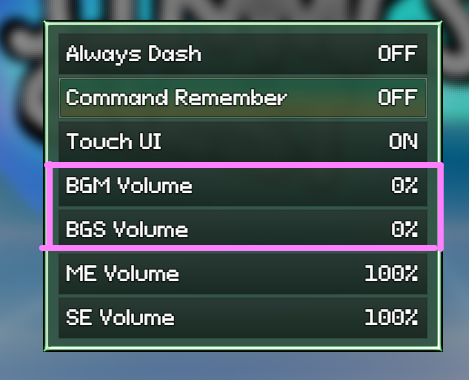
I'm making a system where I use the Background sound track as an extra track for the background music. For example, when you enter a building, one of the tracks gets muted. When you leave the building, the background track's volume is reverted, without pause. This overrides the user's settings for the channel volumes. Can I get a plugin or script that allows me to remove the BGM volume and BGS volume options from the main menu? Or, is this located in the main .js files in the \js directory...
Archived First Post
Alternatively, is there a plugin that does all this without the need to use the Background Sound track to have two music tracks?
Protected download
Downloads / Referenced Files
Log in, then follow the RPG Maker Developers Group to see these download links.
Log in to downloadReferenced Images / Attachments
Creator Claims / Removal
If you are the original creator and want this listing reassigned, edited, or removed, join BMMPlay and contact the moderators with proof that matches the original RPG Maker Web profile, linked GitHub, itch.io page, or another public creator identity.


Replies (0)
No replies yet.
Topic Summary
Loading summary...
