




public

Rpg Maker Developers Group

Simple enough for a child, powerful enough for a developer

2 Followers

MZ Is there a way to bind a fix set of keys/shortcuts to actor battle command window?

BMM Archive · July 15, 2026

Preserved forum archive. This topic stores the original first post and locally mirrored RPG Maker Web attachments when available. It is posted by the BMMPlay archive account, not by the original creator.

Original Source

  • Original title: MZ Is there a way to bind a fix set of keys/shortcuts to actor battle command window?
  • Original author: dragoonwys
  • Original date: August 18, 2022
  • Source thread: https://forums.rpgmakerweb.com/threads/is-there-a-way-to-bind-a-fix-set-of-keys-shortcuts-to-actor-battle-command-window.150576/
  • Source forum path: Game Development Engines > RPG Maker Javascript Plugins > JS Plugin Requests

Summary

Hello! Thank you for reading. I was wondering is there a way to bind a fixed set of keys to the battle command window for actors? For example, if you press 'W' it selects/triggers whatever is in the first option or Index(0) and if you press 'A' it selects whatever is in Index(1) ect regardless of what is there It's suppose to behave like a shortcut alternative to 'press arrow button, then Enter' motion and doesn't change any interaction with sub menus like skills or item if any. Example, if...

Archived First Post

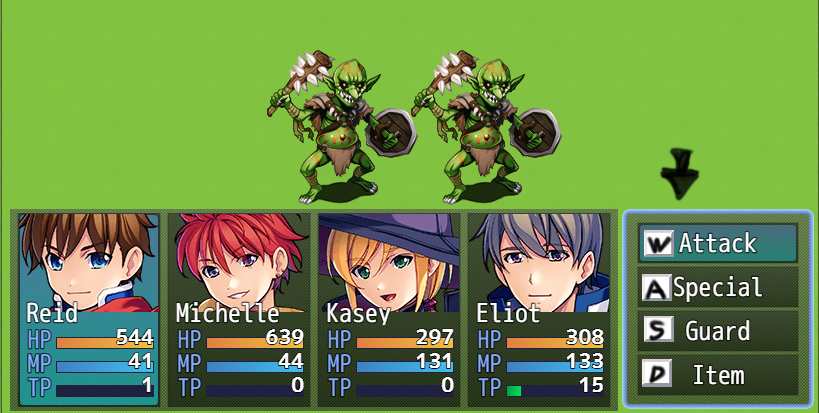
Hello! Thank you for reading. I was wondering is there a way to bind a fixed set of keys to the battle command window for actors?

For example, if you press 'W' it selects/triggers whatever is in the first option or Index(0)
and if you press 'A' it selects whatever is in Index(1) ect regardless of what is there

It's suppose to behave like a shortcut alternative to 'press arrow button, then Enter' motion and doesn't change any interaction with sub menus like skills or item if any. Example, if the first option was Attack, pressing 'W' registers like clicking on it. If the 4th option was Items, pressing 'D' will open up the item menu like usual.


Protected download

Downloads / Referenced Files

Log in to download

Log in, then follow the RPG Maker Developers Group to see these download links.

Log in to download

Referenced Images / Attachments

example.png
example.png
Creator Claims / Removal

If you are the original creator and want this listing reassigned, edited, or removed, join BMMPlay and contact the moderators with proof that matches the original RPG Maker Web profile, linked GitHub, itch.io page, or another public creator identity.

#039#rpg-maker-archive#js-requests

Replies (0)

No replies yet.

0 replies 1 view

Log in to reply.

User Avatar