


Events behaving differently
BMM_Archive · July 15, 2026

Preserved forum archive. This topic stores the original first post and locally mirrored RPG Maker Web attachments when available. It is posted by the BMMPlay archive account, not by the original creator.
Original Source
- Original title: Events behaving differently
- Original author: Napoleon
- Original date: May 25, 2014
- Source thread: https://forums.rpgmakerweb.com/threads/events-behaving-differently.27335/
- Source forum path: Game Development Engines > Legacy Engine Support > RPG Maker VXAce Support
Summary
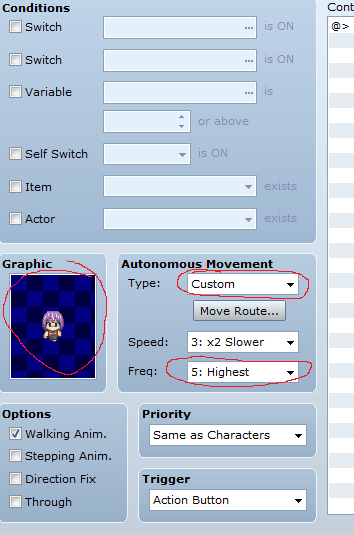
I created a new event in my project and asigned a random character-sprite to it as well as a short test moveroute and set it's freq. to highest. See image: { "lightbox_close": "Close", "lightbox_next": "Next",
Archived First Post
I created a new event in my project and asigned a random character-sprite to it as well as a short test moveroute and set it's freq. to highest. See image:
Protected download
Nothing special so far. But after the event is done walking the animation stays as seen here:
Protected download
Note that, this is a walking frame... That should not be displayed while standing still.
So I created a new project and did the exact same steps. Now it gave me the proper standing frame after the moveroute completed:
Protected download
So I thought that I had a bad script in my project. But I couldn't find a problem anywhere. So I copy-pasted the event from the test project into my own project. The events are now EXACTLY the same (aside from the event_id and location on the map) as the one from my own project. But to my surprise the copy-pasted event works properly while the event that I created from scratch in my own project still bugged.
How is this even possible? What did I do wrong? How can two identical events behave differently?
Version that I use:
Protected download
Nothing special so far. But after the event is done walking the animation stays as seen here:
Protected download
Note that, this is a walking frame... That should not be displayed while standing still.
So I created a new project and did the exact same steps. Now it gave me the proper standing frame after the moveroute completed:
Protected download
So I thought that I had a bad script in my project. But I couldn't find a problem anywhere. So I copy-pasted the event from the test project into my own project. The events are now EXACTLY the same (aside from the event_id and location on the map) as the one from my own project. But to my surprise the copy-pasted event works properly while the event that I created from scratch in my own project still bugged.
How is this even possible? What did I do wrong? How can two identical events behave differently?
Version that I use:
RM Ace Version: 1.02a
Ruby Version 1.9.2
Scintilla Version 2.22
libogg Version 1.2.2
libvorbis Version 1.3.2
libtheora Version 1.1.1
libtheoraplayer Version 1.0
Ruby Version 1.9.2
Scintilla Version 2.22
libogg Version 1.2.2
libvorbis Version 1.3.2
libtheora Version 1.1.1
libtheoraplayer Version 1.0
Downloads / Referenced Files
Log in to download
Log in, then follow the RPG Maker Developers Group to see these download links.
Log in to downloadReferenced Images / Attachments


Creator Claims / Removal
If you are the original creator and want this listing reassigned, edited, or removed, join BMMPlay and contact the moderators with proof that matches the original RPG Maker Web profile, linked GitHub, itch.io page, or another public creator identity.
Replies (0)
No replies yet.
0
replies
7
views
Topic Summary
Loading summary...

