


Sup everyone just made an account,Need Help!
BMM_Archive · July 15, 2026

Original Source
- Original title: Sup everyone just made an account,Need Help!
- Original author: AcePhoenix
- Original date: March 20, 2014
- Source thread: https://forums.rpgmakerweb.com/threads/sup-everyone-just-made-an-account-need-help.25182/
- Source forum path: Game Development Engines > Legacy Engine Support > RPG Maker VXAce Support
Summary
i had to make an account because i'm extremely confused on adding/importing sprites, so many topics I've found but i'm literally new at this and don't know anything. From Scripting all the way down to terms you guys use for specifics. I've learned so much reading the tutorials and other basic's and i know i shouldn't be messing with this part (yet) but it's frustrating me that i don't know and i wanna know lmao. When i try to...
Archived First Post
I've learned so much reading the tutorials and other basic's and i know i shouldn't be messing with this part (yet) but it's frustrating me that i don't know and i wanna know lmao.
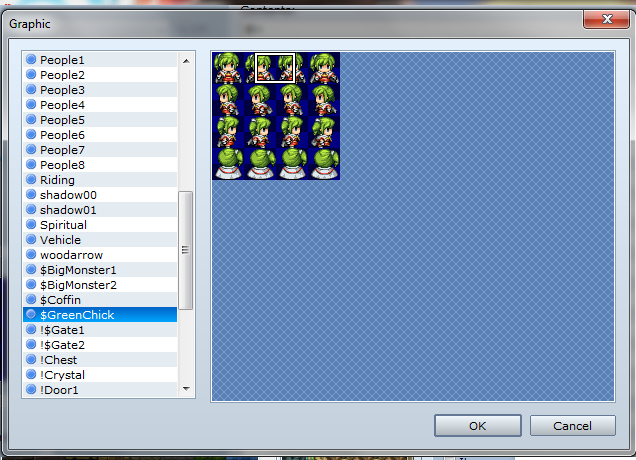
When i try to add a new sprite sheet i find on forums they never fit into the editor/game (RPG maker VX ACE of course) here are a couple of examples of problems i'm having.
so yeah if i can have some assistance i would greatly appreciate it! I wanna have as much fun and learn more about this as I can.
Thank you in advance! Will probably be lurking around the forums trying to learn more @.@.
Downloads / Referenced Files
Log in, then follow the RPG Maker Developers Group to see these download links.
Log in to downloadReferenced Images / Attachments

Creator Claims / Removal
If you are the original creator and want this listing reassigned, edited, or removed, join BMMPlay and contact the moderators with proof that matches the original RPG Maker Web profile, linked GitHub, itch.io page, or another public creator identity.
Replies (0)
No replies yet.
Topic Summary
Loading summary...

