Greetings, I am only two days in to using RPG Maker VX Ace (and this is a first time with RPG Maker) so I am very new to all this. I am attempting to follow Touchfuzzy's tutorials. In Making Your Own Game Tutorial VI:Creating Encounters Part 1, page 5, I came across a default "Minimum Total Experience to Level" graphic which I cannot find within the application -- I went to Database --> Classes and clicked the three dots but I have a table with 99 levels and corresponding experience...
Greetings,
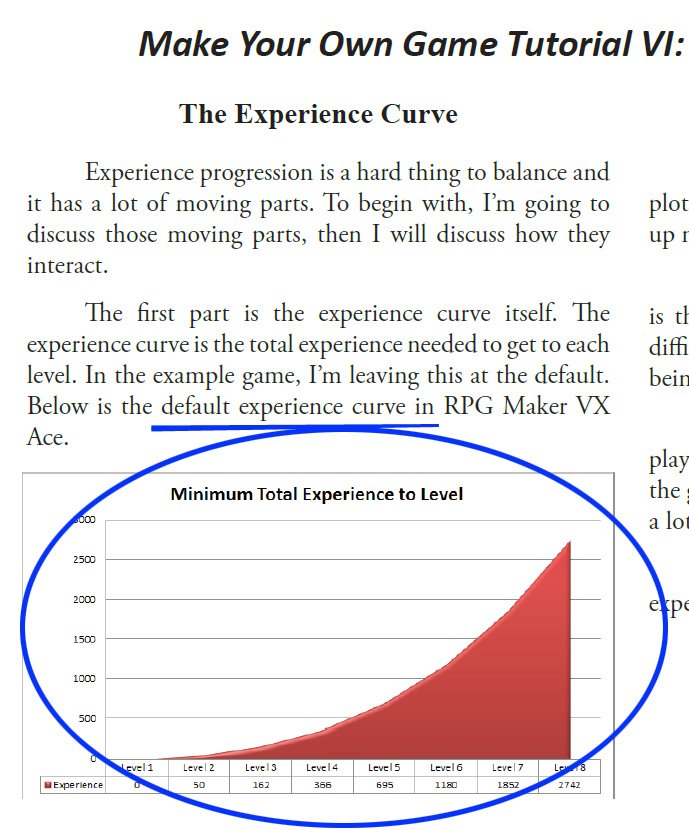
I am only two days in to using RPG Maker VX Ace (and this is a first time with RPG Maker) so I am very new to all this. I am attempting to follow Touchfuzzy's tutorials. In Making Your Own Game Tutorial VI:Creating Encounters Part 1, page 5, I came across a default "Minimum Total Experience to Level" graphic which I cannot find within the application -- I went to Database --> Classes and clicked the three dots but I have a table with 99 levels and corresponding experience numerical progression -- but no graphic.
- Where can I find the default red "Minimum Total Experience to Level" graphic as illustrated in Touchfuzzy's tutorial?
- Once found, how do I adjust the graphic to limit it to 8 levels?
- I created a class "Swordsman" but cannot seem to limit class to Level 8 (I can limit actor to Level 8, but there does not seem a way to call up any corresponding experience graphic.
- As mentioned, I am new and do not want to get into any scripting functions -- it appears though there is a way to adjust, without scripting, the experience curve (wherever that is?) and limit the levels.
Thank you in advance to anyone out there who can assist with these questions!.
Cheers!
(please see attachment of graphic I cannot yet find or generate in RPG Maker VX Ace)
Protected download



 PlayStation DualSense Wireless Controller - White
Extra DualSense controller for couch co-op, backup play, or PC and mobile sessions.
View on Amazon
PlayStation DualSense Wireless Controller - White
Extra DualSense controller for couch co-op, backup play, or PC and mobile sessions.
View on Amazon
