


tile stacking question
BMM_Archive · July 15, 2026

Preserved forum archive. This topic stores the original first post and locally mirrored RPG Maker Web attachments when available. It is posted by the BMMPlay archive account, not by the original creator.
Original Source
- Original title: tile stacking question
- Original author: xcom
- Original date: March 1, 2014
- Source thread: https://forums.rpgmakerweb.com/threads/tile-stacking-question.24360/
- Source forum path: Game Development Engines > Legacy Engine Support > RPG Maker VXAce Support
Summary
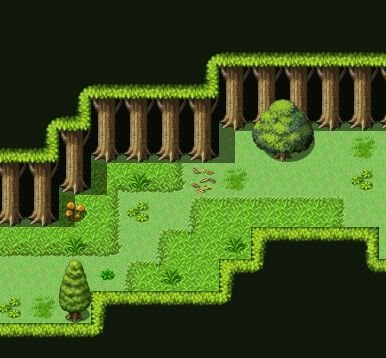
So I'm trying to design a forest map. I was looking at the default "LOST FOREST" premade map that comes with VX Ace. There's something they did in that premade map that I can't seem to figure out how to reproduce that effect. The premade forest map that comes with VX Ace: Spoiler {
Archived First Post
So I'm trying to design a forest map. I was looking at the default "LOST FOREST" premade map that comes with VX Ace. There's something they did in that premade map that I can't seem to figure out how to reproduce that effect.
The premade forest map that comes with VX Ace:
In this example you can see how the edges of the tall grass "tucks under the edge" of what's I could call the top of the trees. That's the effect I'm trying to copy here.
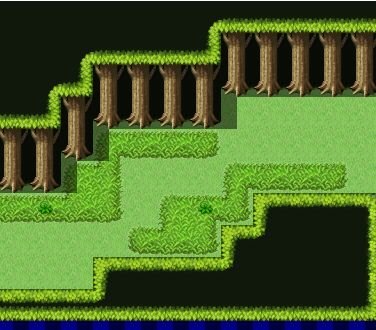
This is how it's coming out for me.
Every time I try to do it. I always end up getting that little gap between the tall grass and the tree tops.
I'm using the exact same map and settings (at least I believe I have it the same) yet I'm getting a different effect.
I would greatly appropriate any help in explaining what I am doing wrong here.
Thanks!
Protected download
Protected download
The premade forest map that comes with VX Ace:
Protected download
This is how it's coming out for me.
Protected download
I'm using the exact same map and settings (at least I believe I have it the same) yet I'm getting a different effect.
I would greatly appropriate any help in explaining what I am doing wrong here.
Thanks!
Protected download
Protected download
Downloads / Referenced Files
Log in to download
Log in, then follow the RPG Maker Developers Group to see these download links.
Log in to downloadReferenced Images / Attachments
Creator Claims / Removal
If you are the original creator and want this listing reassigned, edited, or removed, join BMMPlay and contact the moderators with proof that matches the original RPG Maker Web profile, linked GitHub, itch.io page, or another public creator identity.
Replies (0)
No replies yet.
0
replies
9
views
Topic Summary
Loading summary...

