


Using an event as scenery - Help
BMM_Archive · July 15, 2026

Original Source
- Original title: Using an event as scenery - Help
- Original author: TheDeadYoshi
- Original date: February 28, 2014
- Source thread: https://forums.rpgmakerweb.com/threads/using-an-event-as-scenery-help.24302/
- Source forum path: Game Development Engines > Legacy Engine Support > RPG Maker VXAce Support
Summary
Hi there, so I know this is pretty simple stuff but I am using the Old School Modern resource pack and in the read me file the creator states that in order to use the PC monitors or any object that is in Tileset D, you should set it up on top of other tiles using an event. However when I try this (importing Tileset D amongst my characters etc) it won't let me select just one tile. The cursor spans two tiles and it looks pretty awful. Would anyone...


Archived First Post
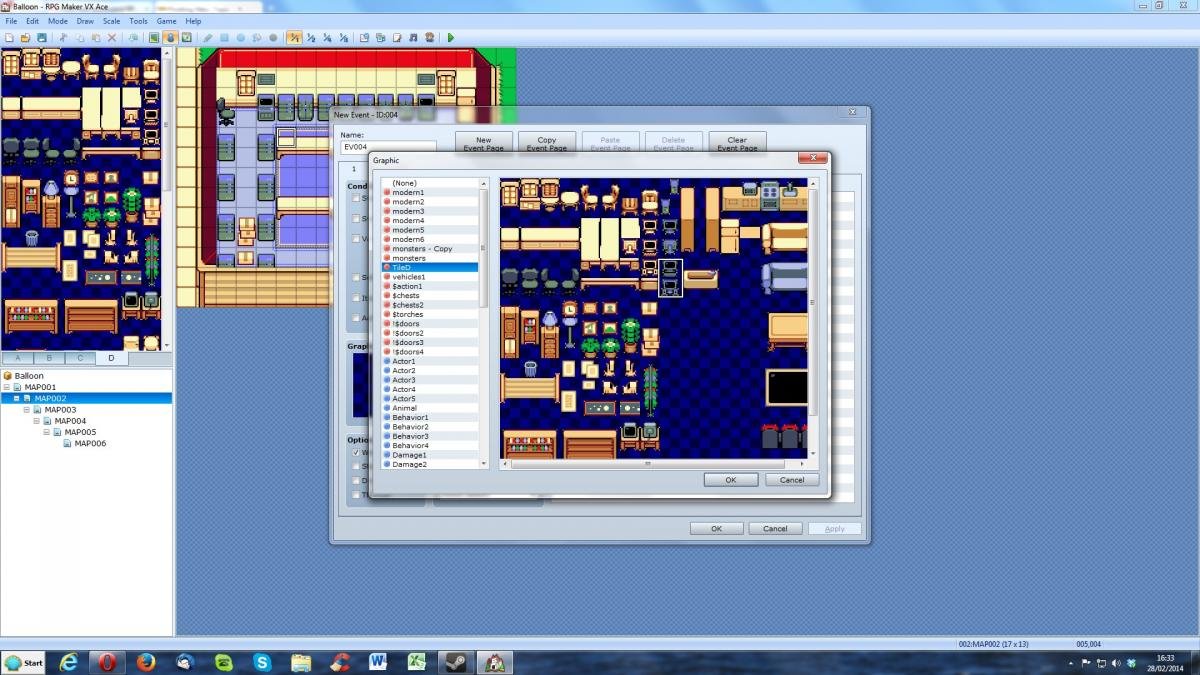
so I know this is pretty simple stuff but I am using the Old School Modern resource pack and in the read me file the creator states that in order to use the PC monitors or any object that is in Tileset D, you should set it up on top of other tiles using an event.
However when I try this (importing Tileset D amongst my characters etc) it won't let me select just one tile. The cursor spans two tiles and it looks pretty awful. Would anyone know where I am going wrong?
Thank you very much,
Chris.
Protected download
Downloads / Referenced Files
Log in, then follow the RPG Maker Developers Group to see these download links.
Log in to downloadReferenced Images / Attachments
Creator Claims / Removal
If you are the original creator and want this listing reassigned, edited, or removed, join BMMPlay and contact the moderators with proof that matches the original RPG Maker Web profile, linked GitHub, itch.io page, or another public creator identity.
Replies (0)
No replies yet.
Topic Summary
Loading summary...
