public

Rpg Maker Developers Group

Simple enough for a child, powerful enough for a developer

2 Followers

Black Backgrounds of Eeeevil

BMM Archive · July 15, 2026

Preserved forum archive. This topic stores the original first post and locally mirrored RPG Maker Web attachments when available. It is posted by the BMMPlay archive account, not by the original creator.

Original Source

  • Original title: Black Backgrounds of Eeeevil
  • Original author: Robert-Developer_of_Bis
  • Original date: February 8, 2014
  • Source thread: https://forums.rpgmakerweb.com/threads/black-backgrounds-of-eeeevil.23525/
  • Source forum path: Game Development Engines > Legacy Engine Support > RPG Maker VXAce Support

Summary

 First off, sorry for the ridiculous name. Second, I'm having a fair amount of trouble with exactly what the title says. Black backgrounds. Whenever I import a tileset that I've gotten from across the internet, the background is always black. I have attempted multiple times to set those black areas to 'Transparent', and it seems to work, though instead of the usual blue checkerboard background, it is black. After I set up the tilesets in the Database, I went to place something, and much to my annoyance, the black background...

Archived First Post

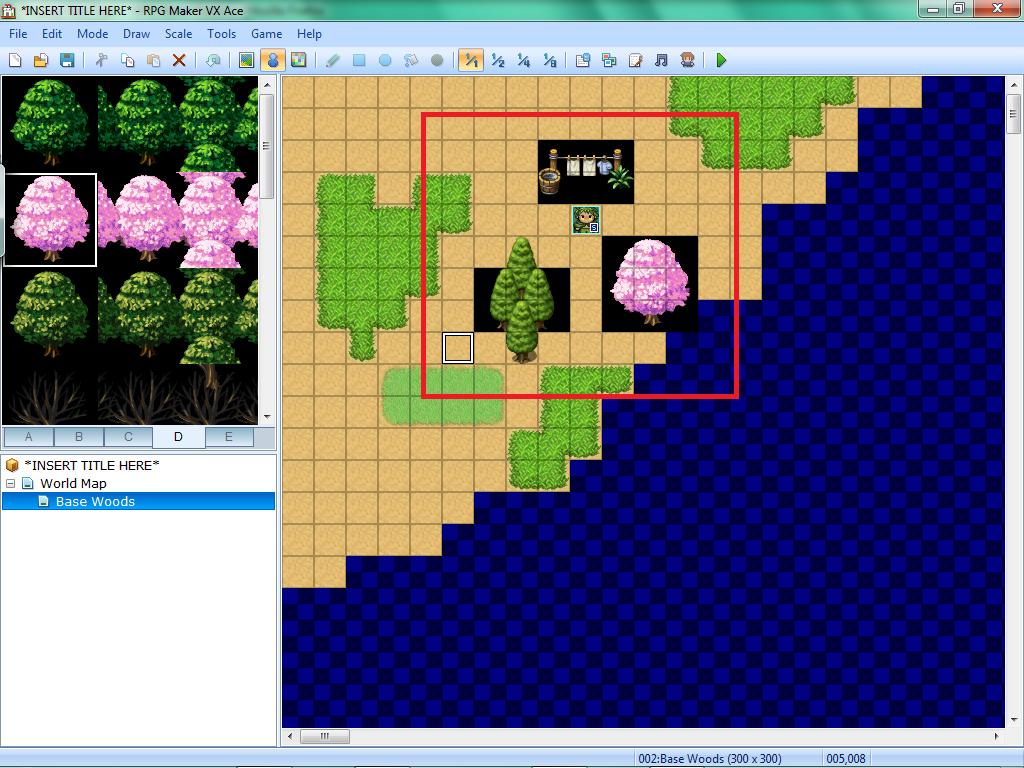
 First off, sorry for the ridiculous name. Second, I'm having a fair amount of trouble with exactly what the title says. Black backgrounds. Whenever I import a tileset that I've gotten from across the internet, the background is always black. I have attempted multiple times to set those black areas to 'Transparent', and it seems to work, though instead of the usual blue checkerboard background, it is black. After I set up the tilesets in the Database, I went to place something, and much to my annoyance, the black background is treated as part of the tile, and covers the tiles around it.

Example 1: Placed cherry tree. Tree had square black shape around it.

Example 2: Placed clothesline. Clothesline was visible, though the ground behind it was not. Instead, large black shape surrounds it.

Example 3: Place clump of small trees. Any trees from the imported textures have black backgrounds behind them. All original textures have no black shapes.

Here is a picture to help clarify:

I added a red square around the problematic area. This was not present in-game, nor in the game maker. Anyone know what's causing the Black Squares of Doom?! ;_;

Protected download

Downloads / Referenced Files

Log in to download

Log in, then follow the RPG Maker Developers Group to see these download links.

Log in to download

Referenced Images / Attachments

Example 1.png
Example 1.png
Creator Claims / Removal

If you are the original creator and want this listing reassigned, edited, or removed, join BMMPlay and contact the moderators with proof that matches the original RPG Maker Web profile, linked GitHub, itch.io page, or another public creator identity.

#039#rpg-maker-archive#vxace-support

Replies (0)

No replies yet.

0 replies 1 view

Log in to reply.

User Avatar