


Small change to Yanfly augment plugin
BMM_Archive · July 15, 2026

Preserved forum archive. This topic stores the original first post and locally mirrored RPG Maker Web attachments when available. It is posted by the BMMPlay archive account, not by the original creator.
Original Source
- Original title: Small change to Yanfly augment plugin
- Original author: ZankokuNoYami
- Original date: March 26, 2020
- Source thread: https://forums.rpgmakerweb.com/threads/small-change-to-yanfly-augment-plugin.119458/
- Source forum path: Game Development Engines > RPG Maker Javascript Plugins > JS Plugin Requests
Summary
I feel this should be a simple request, hopefully I am right, haha. This is what it looks like right now when I go to equip an augment: { "lightbox_close": "Close",
Archived First Post
I feel this should be a simple request, hopefully I am right, haha.
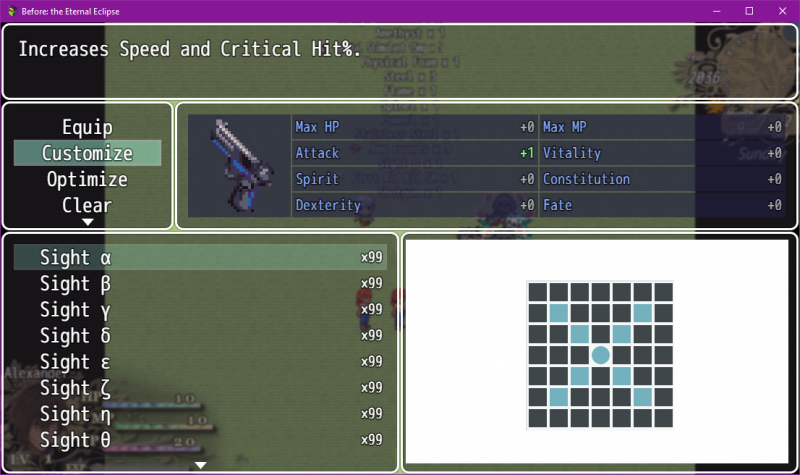
This is what it looks like right now when I go to equip an augment:

What I want is this: if you go to equip an augment named "Sight" or "Scope" the useless data on the right is instead replaced with an image showing the area of affect for your sights or scopes.
Some sights and scopes can be used on multiple weapons, so I would need a small area I can customize in the plugin, in a note, or in the script itself. Like Pistol, Shotgun and Magnum all use the same sights, but each one gets a different area of affect. So I would just need to go 'if item ID 5 on armor ID 2 = pistolscopeA.png' or something.
Protected download
 www.yanfly.moe
Naturally, if you don't already have this and are willing to edit the script for me, I can send it to you (so you can avoid paying for it).
Thank you!
This is what it looks like right now when I go to equip an augment:
What I want is this: if you go to equip an augment named "Sight" or "Scope" the useless data on the right is instead replaced with an image showing the area of affect for your sights or scopes.
Some sights and scopes can be used on multiple weapons, so I would need a small area I can customize in the plugin, in a note, or in the script itself. Like Pistol, Shotgun and Magnum all use the same sights, but each one gets a different area of affect. So I would just need to go 'if item ID 5 on armor ID 2 = pistolscopeA.png' or something.
Protected download
Attachable Augments (YEP) - Yanfly.moe Wiki
www.yanfly.moe
Naturally, if you don't already have this and are willing to edit the script for me, I can send it to you (so you can avoid paying for it).
Thank you!
Downloads / Referenced Files
Log in to download
Log in, then follow the RPG Maker Developers Group to see these download links.
Log in to downloadReferenced Images / Attachments
Creator Claims / Removal
If you are the original creator and want this listing reassigned, edited, or removed, join BMMPlay and contact the moderators with proof that matches the original RPG Maker Web profile, linked GitHub, itch.io page, or another public creator identity.
Replies (0)
No replies yet.
0
replies
6
views
Topic Summary
Loading summary...

