




public

Rpg Maker Developers Group

Simple enough for a child, powerful enough for a developer

2 Followers

Imported character but only shows part of him

BMM Archive · July 15, 2026

Preserved forum archive. This topic stores the original first post and locally mirrored RPG Maker Web attachments when available. It is posted by the BMMPlay archive account, not by the original creator.

Original Source

  • Original title: Imported character but only shows part of him
  • Original author: Zelda0909
  • Original date: August 7, 2013
  • Source thread: https://forums.rpgmakerweb.com/threads/imported-character-but-only-shows-part-of-him.16594/
  • Source forum path: Game Development Engines > Legacy Engine Support > RPG Maker VXAce Support

Summary

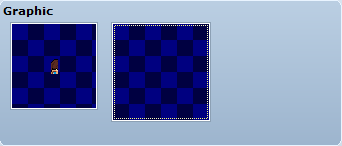
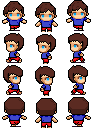
So I spent like forever on this character and he looked okay but for some reason it only shows half his face and when I move in the playtest its just diffrent parts of his body and face. He's smaller than normal characters but I didnt think that would be a problem since they have child sprites (The main characters a kid). Anyway sorry if this has been posted before but I kept searching this site and google and couldnt find anything. I found something similar but not it and...

Archived First Post

So I spent like forever on this character and he looked okay but for some reason it only shows half his face and when I move in the playtest its just diffrent parts of his body and face. He's smaller than normal characters but I didnt think that would be a problem since they have child sprites (The main characters a kid). Anyway sorry if this has been posted before but I kept searching this site and google and couldnt find anything. I found something similar but not it and it didnt help. I just started useing RPG Maker so I wont understand anything too complicated that isnt exsplained... I still havent figured out variables I cant find a good tutorial. He looks fine in the characters section but when I click on him the box isnt over the image and its really small.

posted some pictures.

Protected download

Protected download

Downloads / Referenced Files

Log in to download

Log in, then follow the RPG Maker Developers Group to see these download links.

Log in to download

Referenced Images / Attachments

Brocken 1.png
Brocken 1.png
Jhonsprite.png.png
Jhonsprite.png.png
Creator Claims / Removal

If you are the original creator and want this listing reassigned, edited, or removed, join BMMPlay and contact the moderators with proof that matches the original RPG Maker Web profile, linked GitHub, itch.io page, or another public creator identity.

#039#rpg-maker-archive#vxace-support

Replies (0)

No replies yet.

0 replies 1 view

Log in to reply.

User Avatar
