




public

Rpg Maker Developers Group

Simple enough for a child, powerful enough for a developer

2 Followers

Image swap plugin request

BMM Archive · July 15, 2026

Preserved forum archive. This topic stores the original first post and locally mirrored RPG Maker Web attachments when available. It is posted by the BMMPlay archive account, not by the original creator.

Original Source

  • Original title: Image swap plugin request
  • Original author: Martin
  • Original date: August 24, 2016
  • Source thread: https://forums.rpgmakerweb.com/threads/image-swap-plugin-request.67309/
  • Source forum path: Game Development Engines > RPG Maker Javascript Plugins > JS Plugin Requests

Summary

Hello. Starting with a reference to this post: Request: A script to change a image events reads from. This can be a powerful tool for everyone, so I encourage someone to look into it

Archived First Post

Hello.


Starting with a reference to this post:


Request:


A script to change a image events reads from. This can be a powerful tool for everyone, so I encourage someone to look into it


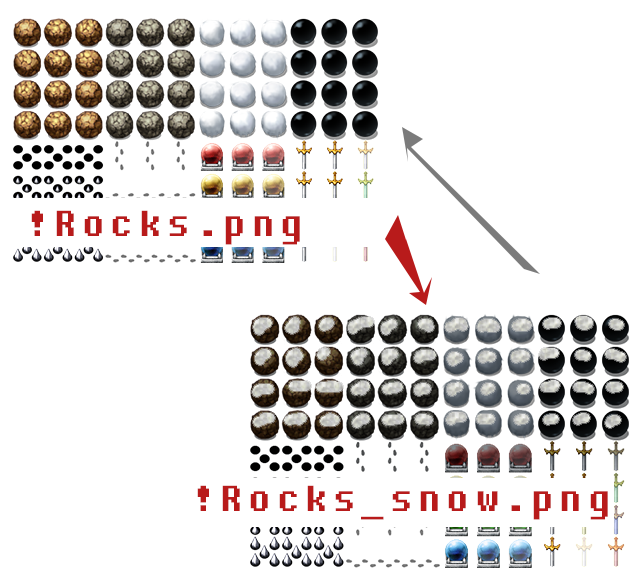
The script Intention is to swap the image.png with image2.png. So that in-game Events on plugin-command reads from the other picture instead.
For example: If I want to add a snowy area to my game. I can add a new picture to img/character with snow on and just add a plugin command on that map.


Protected download


EDIT: I have the possibility to donate a small sum to the coder. Anyways, this script would go perfect with the upcomming rpgmakerZeldaMV engine!


EDIT:


For example. Temprature.
We have our objects created in rpgmaker based on image outside_normal.png.


If the temprature variable drops to 0 i would swap the whole reference image from "outside_normal" to "outside_snow.png".
If the temprature is above 170, we use "Outside_Heatwave.png"
Same with seasons, if switch season-spring is activated swap to "Outside_spring"


Plugin command: Outside_normal to Outside_Snow


That way we can add seasons and special scenes with much less effort.
Leaving variable settings in our events to other things than animation and graphics settings for objects.

The plugin will only update on command so it wont cause any lag.

Downloads / Referenced Files

Log in to download

Log in, then follow the RPG Maker Developers Group to see these download links.

Log in to download

Referenced Images / Attachments

scriptrequest.png
scriptrequest.png
Creator Claims / Removal

If you are the original creator and want this listing reassigned, edited, or removed, join BMMPlay and contact the moderators with proof that matches the original RPG Maker Web profile, linked GitHub, itch.io page, or another public creator identity.

#rpg-maker-archive#js-requests

Replies (0)

No replies yet.

0 replies 1 view

Log in to reply.

User Avatar