

Any 'Quick Equip' HUDs out there?
BMM_Archive · July 15, 2026

Original Source
- Original title: Any 'Quick Equip' HUDs out there?
- Original author: gibbotron09
- Original date: January 15, 2016
- Source thread: https://forums.rpgmakerweb.com/threads/any-quick-equip-huds-out-there.55011/
- Source forum path: Game Development Engines > RPG Maker Javascript Plugins > JS Plugin Requests
Summary
Hi everyone! I've been working on a new project and I've come to a point where I am trying to make the experience as fluid as possible. I was wondering if a plugin has been created to display a 'quick equip' bar where the player can hit a key of the keyboard, or click on the icon in the bar and equip that item. For those of you familiar with Falcao's Pearl ABS, the ability bar in that system is sort of the gist of the idea, but that system...
Archived First Post
I've been working on a new project and I've come to a point where I am trying to make the experience as fluid as possible. I was wondering if a plugin has been created to display a 'quick equip' bar where the player can hit a key of the keyboard, or click on the icon in the bar and equip that item. For those of you familiar with Falcao's Pearl ABS, the ability bar in that system is sort of the gist of the idea, but that system is for RPG Maker VX, and there is far more to it than what I am looking for, which is just that 'quick equip' bar.
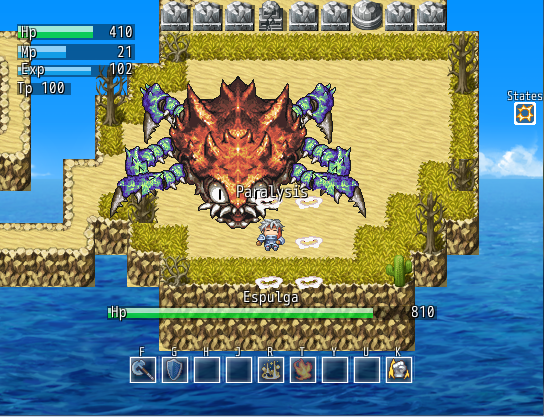
The bar at the bottom is pretty much what I'm looking for aesthetically. The user can go into his/her inventory and add things to this bar and then equip/swap/unequip as necessary.
In the worst case, I can create the bar myself with photo overlay, but if a plugin exists it would be much easier and likely the most fluid application of this idea. And I'm not sure how the key assigning to each piece of equipment would work anyway, so this would not solve the problem alone.
Thanks to anyone who can guide me to a plugin with this function or has idea of how to implement it!
Downloads / Referenced Files
RPG Maker Web attachments are mirrored locally when available. Other external links remain hosted by their original creator or third-party service.
- Local mirror: 16584-f1798ba30b754207ce6b7fc149e8cda2.png
SHA-256:af0399d9a317b8d583d7e4a31fe36574e82f96ae688f3f6dfc5ea9914f35a056
Original attachment URL: https://forums.rpgmakerweb.com/attachments/pearl-v3-version-png.28821/
Referenced Images / Attachments
Creator Claims / Removal
If you are the original creator and want this listing reassigned, edited, or removed, join BMMPlay and contact the moderators with proof that matches the original RPG Maker Web profile, linked GitHub, itch.io page, or another public creator identity.
Replies (0)
No replies yet.
Topic Summary
Loading summary...