

Jump onto seating only when you walk into it
BMM_Archive · July 15, 2026

Original Source
- Original title: Jump onto seating only when you walk into it
- Original author: ContentUnavailable
- Original date: May 7, 2025
- Source thread: https://forums.rpgmakerweb.com/threads/jump-onto-seating-only-when-you-walk-into-it.177500/
- Source forum path: Game Development Engines > RPG Maker MZ Support
Summary
I am wanting to set it so that when I am on the tile next to the seating, you can jump into it by walking into that direction. How I have it set up right now: I have an event surrounding the seating from each side so that if you are facing it you would jump onto it. The example picture is if you are approaching from below. Currently It works if i set the trigger to Action Button, but I want it to work when walking into it, not...
Archived First Post
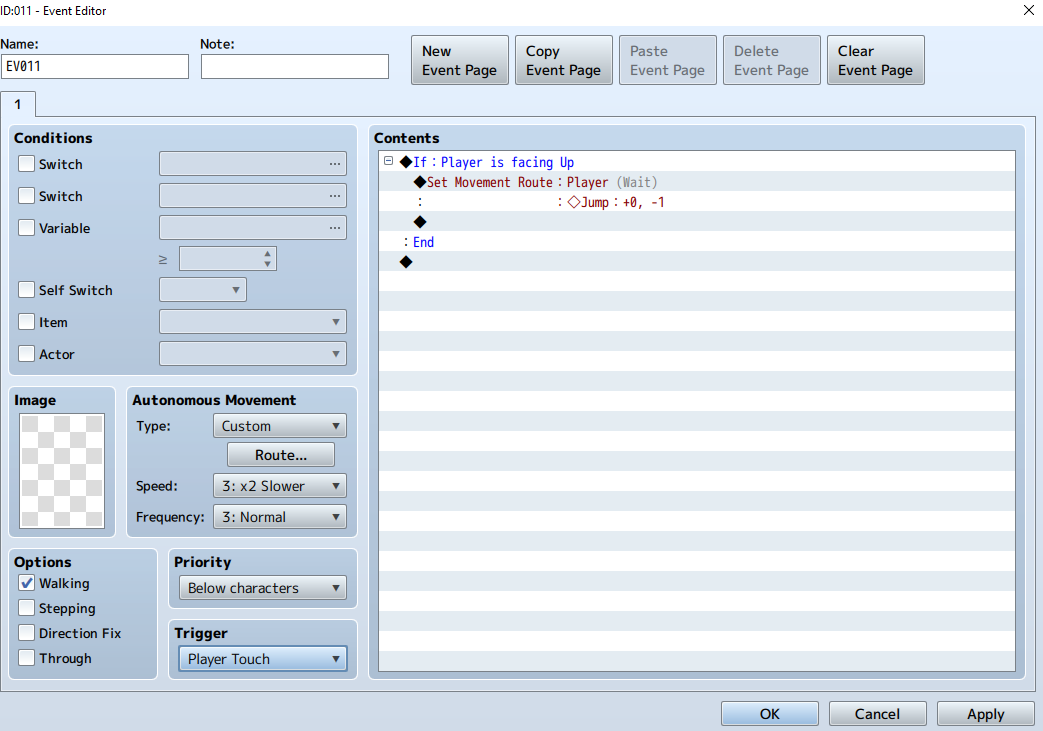
How I have it set up right now:
I have an event surrounding the seating from each side so that if you are facing it you would jump onto it. The example picture is if you are approaching from below.
Currently It works if i set the trigger to Action Button, but I want it to work when walking into it, not when interacting with it.
If i set it to Player/Event Touch:
If i approach from the correct direction, it activates when i walk onto the tile next to the seating immediately, not when i walk towards it.
If i approach from the wrong direction, the event will not activate at all.
I have tried placing the event on the seating as well, but i could not get it to work that way at all.
I don't see any other conditional options to make this work better.
This seems like something i should be able to do with the available commands, but would I need to use some actual scripting to get this to work?
Downloads / Referenced Files
RPG Maker Web attachments are mirrored locally when available. Other external links remain hosted by their original creator or third-party service.
- Local mirror: 318890-f607a328c76ad543bad8c4e4beb39611.png
SHA-256:8aa7fe580e138fe58c94e156837cceb98dd5a92489a89c7cf760a52f5c91a7a7
Original attachment URL: https://forums.rpgmakerweb.com/attachments/screenshot_2-png.339810/
Referenced Images / Attachments
Creator Claims / Removal
If you are the original creator and want this listing reassigned, edited, or removed, join BMMPlay and contact the moderators with proof that matches the original RPG Maker Web profile, linked GitHub, itch.io page, or another public creator identity.
Replies (0)
No replies yet.
Topic Summary
Loading summary...