

Walk "under" walls
BMM_Archive · July 15, 2026

Original Source
- Original title: Walk "under" walls
- Original author: Castagna
- Original date: November 5, 2015
- Source thread: https://forums.rpgmakerweb.com/threads/walk-under-walls.49479/
- Source forum path: Game Development Engines > RPG Maker Javascript Plugins > JS Plugin Requests
Summary
Hello In this rpg maker version, I can't set walls as star fields (or maybe I don't know how to do it?), so i can't walk under them, or use their tile as event to move under it. I'm using an event that make the character able to walk through walls and sets its opacity to 20 when he has to move under a wall, and removes these effects after he passed, but it's really boring to set an event like this every time I put a wall or...
Archived First Post
In this rpg maker version, I can't set walls as star fields (or maybe I don't know how to do it?),
so i can't walk under them, or use their tile as event to move under it.
I'm using an event that make the character able to walk through walls and sets its opacity to 20 when he has to move under a wall, and removes these effects after he passed, but it's really boring to set an event like this every time I put a wall or a building in the map!
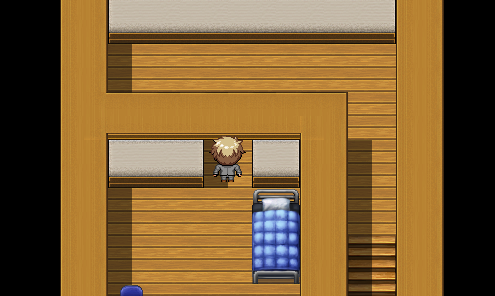
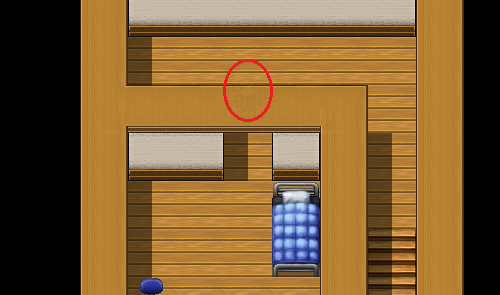
The idea is to have a script that changes your opacity to 20 and lets you walk through walls were a region (for example, 10) is set.
If it is hard to make the player move directly to this kind of region (because this region would be on a wall), then there could be another one (for example, 9) that lets you pass through a wall and changes your opacity to 255, a region (for example, 10) that changes your opacity to 20 (it will be changed back to 255 when the player quits region 10 / enters region 9) and a region (for example, 8) where a player can't walk even if he can go through walls.
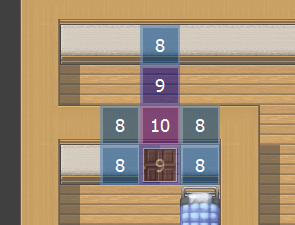
It would also be great if the opacity could be set as a parameter in the plugin manager.
I still don't know enough about Javascript, otherwise I would have made this script on my own...
Thanks for reading this, help me (and other people with this issue) if you can
Downloads / Referenced Files
RPG Maker Web attachments are mirrored locally when available. Other external links remain hosted by their original creator or third-party service.
- Local mirror: 14324-3af4ce31d1f47e9da9902bd4a72106d9.png
SHA-256:6e0ccd1d1cc3eb3249af6a92073a90475382171cacb0f8e6edf95bf819d697ad
Original attachment URL: https://forums.rpgmakerweb.com/attachments/wall1-png.25596/ - Local mirror: 14325-d7f40714eaef29b8097128ff0885b354.png
SHA-256:dd08fb36100bdc14b0bb66a2cebdccb1f4eb1ac480c8ab5ce5444ff5c2a55785
Original attachment URL: https://forums.rpgmakerweb.com/attachments/wall2-png.25597/ - Local mirror: 14326-feccb1c0e440e80bec101435a9cf8ba7.png
SHA-256:f5c5d46b3f3d1273fc1f9b154be64534a73c179b213a9453167ae71b46841843
Original attachment URL: https://forums.rpgmakerweb.com/attachments/wall3-png.25598/
Referenced Images / Attachments
Creator Claims / Removal
If you are the original creator and want this listing reassigned, edited, or removed, join BMMPlay and contact the moderators with proof that matches the original RPG Maker Web profile, linked GitHub, itch.io page, or another public creator identity.
Replies (0)
No replies yet.
Topic Summary
Loading summary...