

Transition Cutscene not working
BMM_Archive · July 15, 2026

Original Source
- Original title: Transition Cutscene not working
- Original author: TakkaMori
- Original date: December 21, 2024
- Source thread: https://forums.rpgmakerweb.com/threads/transition-cutscene-not-working.174079/
- Source forum path: Game Development Engines > RPG Maker MZ Support
Summary
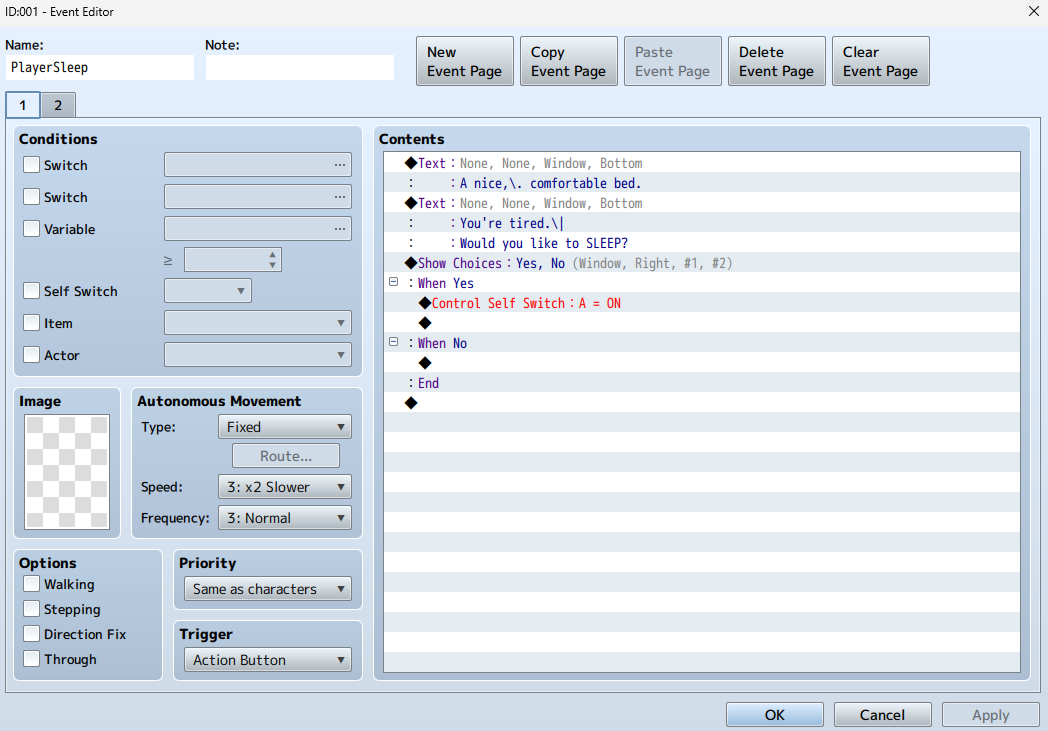
I'm making a bed that the player can sleep in to access more areas. However, during the movie cutscene transition, the screen just goes black after the movie plays. I've tried it again without the fadeout and the player just gets stuck and can't move. I'm still relatively new to RPGMaker MZ so it may be a simple fix that I didn't catch. The event is shown below: Page 1 {
Archived First Post
The event is shown below:
Page 1
Page 2
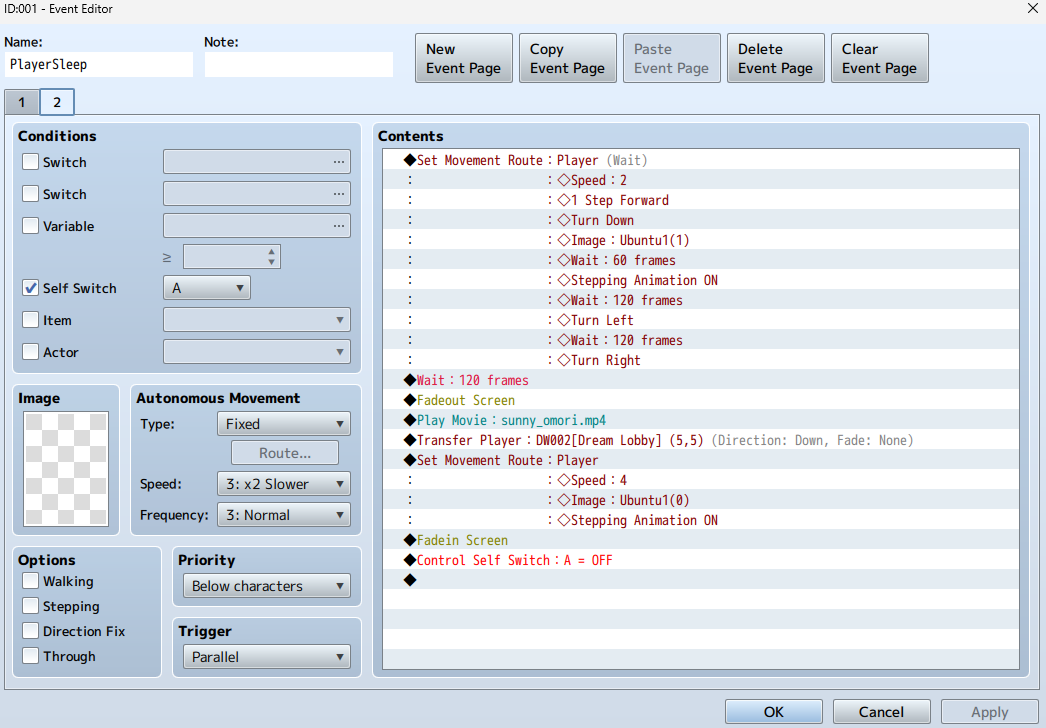
Note that the "sunny_omori.mp4" Movie is just a placeholder for the actual animation that I'll later draw out. Also, the change image line "Ubuntu1(1)" is just the sprite animation for the player character sleeping and the "Ubuntu(0)" line is the default walking sprite.
Downloads / Referenced Files
RPG Maker Web attachments are mirrored locally when available. Other external links remain hosted by their original creator or third-party service.
- Local mirror: 305603-c7e92537ff1f88570aeefe4ae77cbb06.png
SHA-256:92a9de83009d7a891dbf68cd1fcdbb745c8a922e91347b68fb0aed1e9b0c91d1
Original attachment URL: https://forums.rpgmakerweb.com/attachments/screenshot-2024-12-21-175104-png.326523/ - Local mirror: 305604-fe23f16c63f700de9fb8083858f37a0b.png
SHA-256:5e2f5a278c614bc75e4653e4931a293b31625432095317dac8218562fcbc4868
Original attachment URL: https://forums.rpgmakerweb.com/attachments/image_2024-12-21_175308531-png.326524/
Referenced Images / Attachments
Creator Claims / Removal
If you are the original creator and want this listing reassigned, edited, or removed, join BMMPlay and contact the moderators with proof that matches the original RPG Maker Web profile, linked GitHub, itch.io page, or another public creator identity.
Replies (0)
No replies yet.
Topic Summary
Loading summary...