

Can't get Steam achievements to work in RMMZ
BMM_Archive · July 15, 2026

Original Source
- Original title: Can't get Steam achievements to work in RMMZ
- Original author: LaCipolla
- Original date: August 10, 2024
- Source thread: https://forums.rpgmakerweb.com/threads/cant-get-steam-achievements-to-work-in-rmmz.170981/
- Source forum path: Game Development Engines > RPG Maker MZ Support
Summary
Okay ... I have been trying this for literal months now. T_T I suspect there might be a logical error, or I don't get some necessary basics, so please let me guide you through my process and through what I already tried. If you read ANYTHING you find strange, please interject! xD' I'm aware this thread is a lot! Even though I'm not the most tech-savvy, I put a LOT of research into the topic and would be immensely thankful to anyone who takes a closer look! =] Version: RPG...
Archived First Post
I suspect there might be a logical error, or I don't get some necessary basics, so please let me guide you through my process and through what I already tried. If you read ANYTHING you find strange, please interject! xD'
I'm aware this thread is a lot! Even though I'm not the most tech-savvy, I put a LOT of research into the topic and would be immensely thankful to anyone who takes a closer look! =]
Version: RPG Maker MZ
Game: Vom Drachentöten. German only for now, but that should be irrelevant for this thread.
Plugin: NekoGakuen. I also tried this option before, but to no avail.
Important (?) context: The game uses only RTP assets and no other plugins at all. (It was a first experiment in minimalism.) It was already online when I started trying out achievements, so after a few failed attempts, I set up the playtest version I'm using right now. It's identical to the steam version online, and that one didn't work either.
Step 1.
In the RPG Maker, I installed the plugin and set it up as follows.
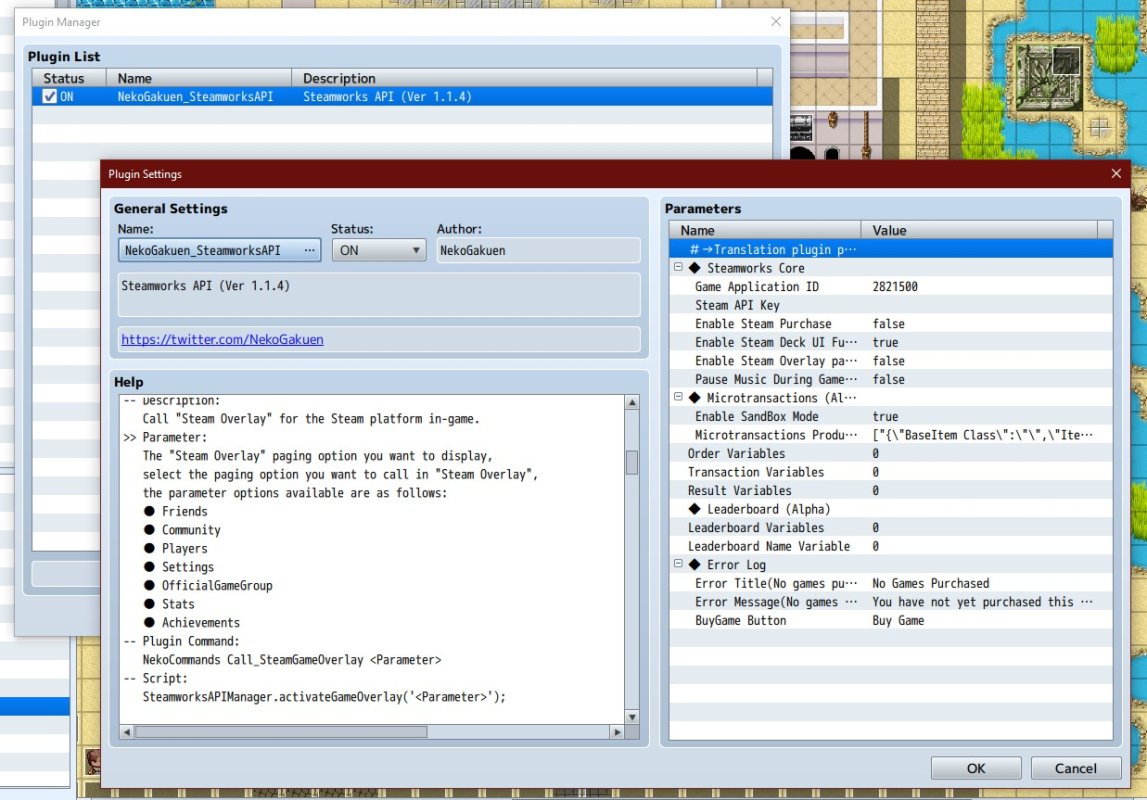
(This is the ID of the playtest version, the actual game online has a different one.)
Step 2.
To test out achievements, I set up a few in steam and added a testing event in the game, using the Plugin Commands by NekoGakuen.
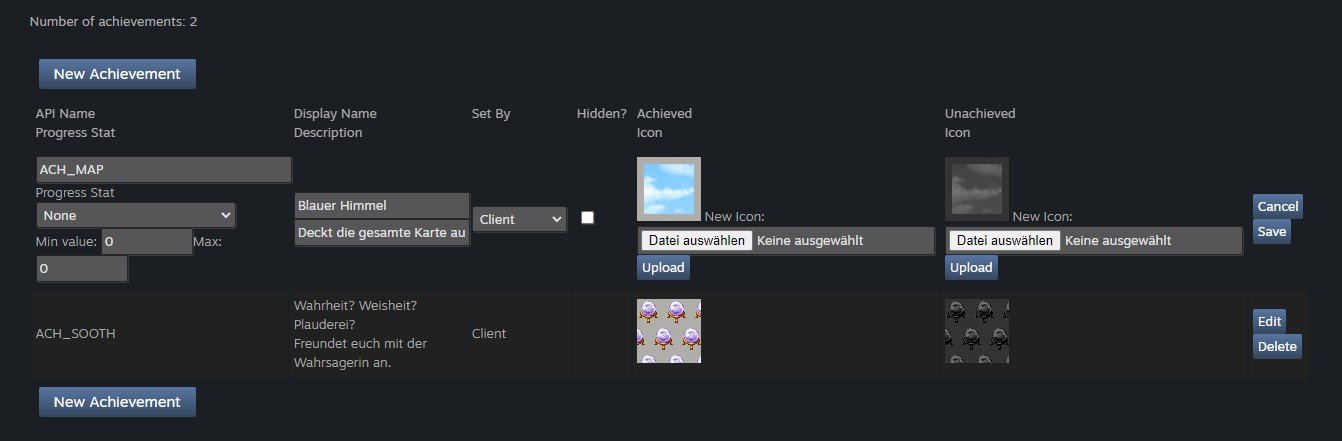
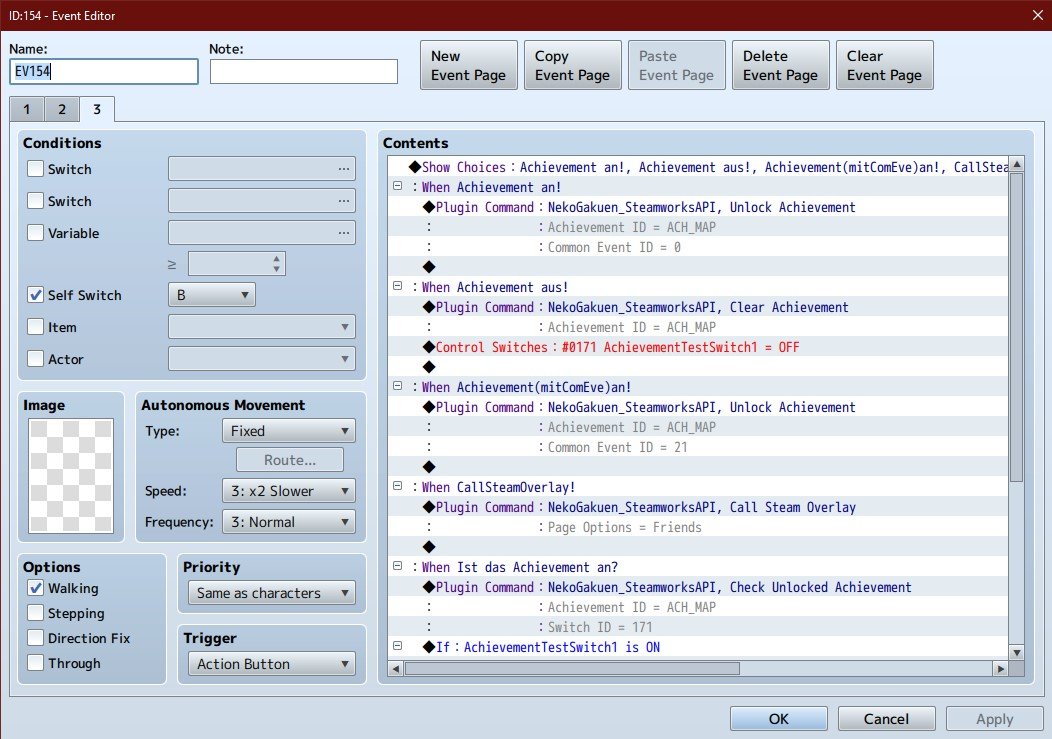
I tried out the Command with a common event as well as the one without. I also added a switch that checks if the achievement has been called. (Never got back a positive!)
The achievements do show up on the steam page (of the playtest)!
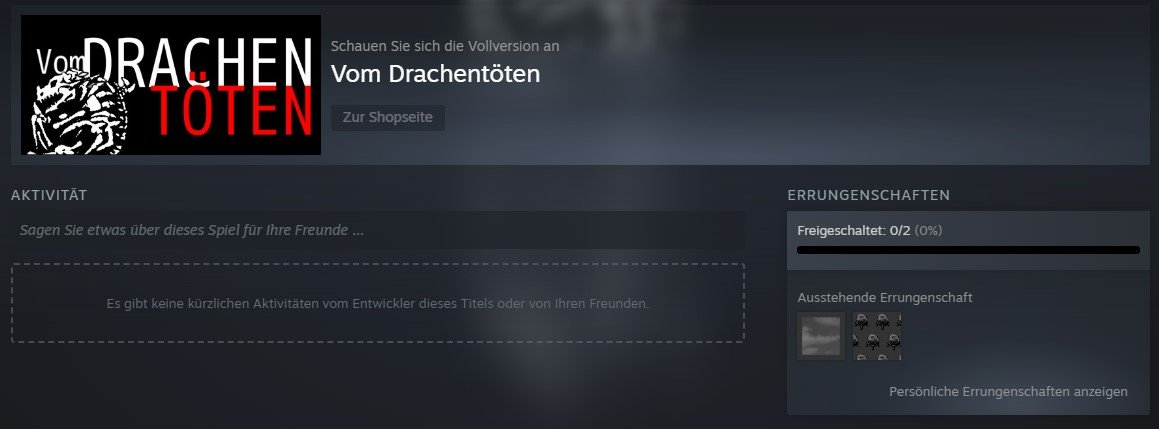
Step 3.
NekoGakuen has a very handy guide in their download files. Following that, I got all the stuff I need and set it up accordingly. (More about the versions in a moment!)
The relevant folders and documents look like that:
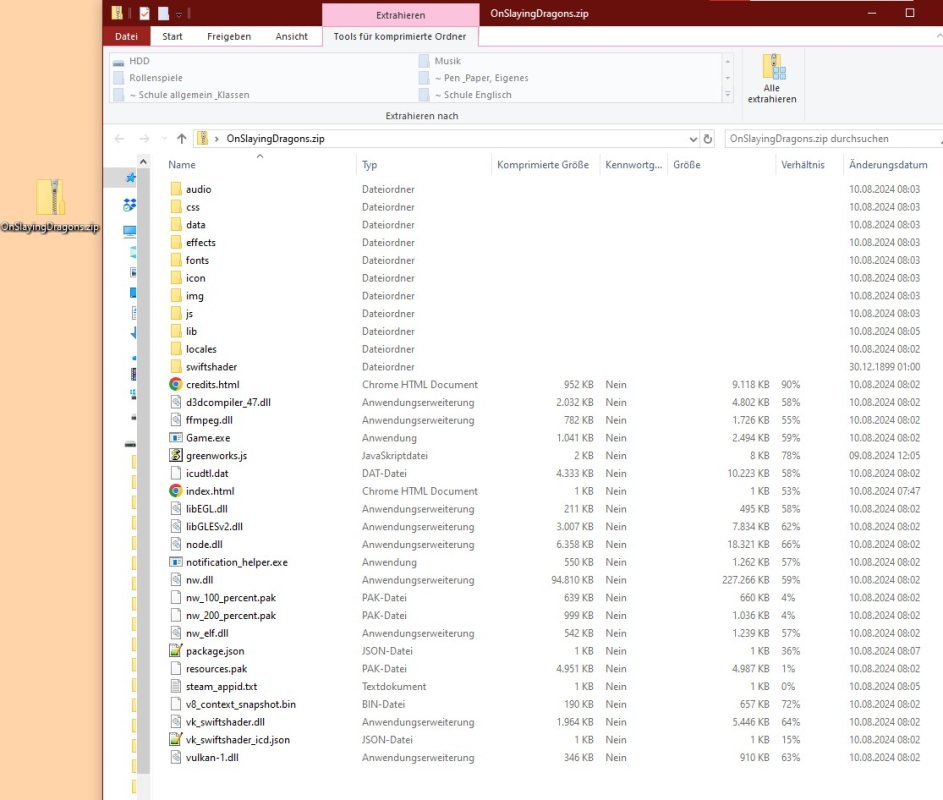
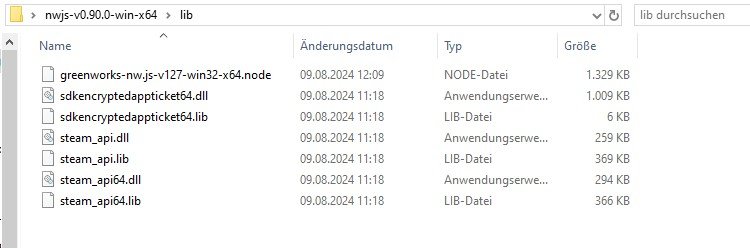
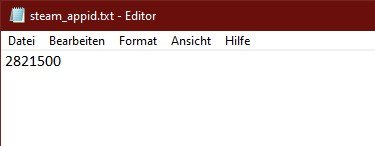
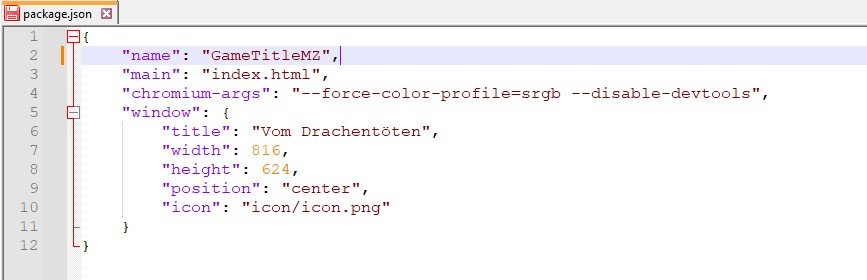
Now, crawling threads online, I'm aware that different versions of this stuff are the most likely source of error.
Greenworks.js and the SDK have been downloaded only the day before yesterday, but I also tried with versions from a few months ago.
When it comes to the versions of the greenworks nodes and NW.js, I have tried A LOT of combinations, among else the following ones:
- The recent version of nw.js and the fitting node: v0.90.0 + v127
- The versions NekoGakuen uses in the TEXT of their guide: 0.49.1 + v83
- The versions NekoGakuen uses in the PICTURES of their guide: 0.62.2 + v102 (instead of v99 which has been cycled out it seems)
- The versions that fit the RMMZ's own NW.js best: v48.04 + v83
Step 4.
I set up the launch options of the game on steam, according to the guide.
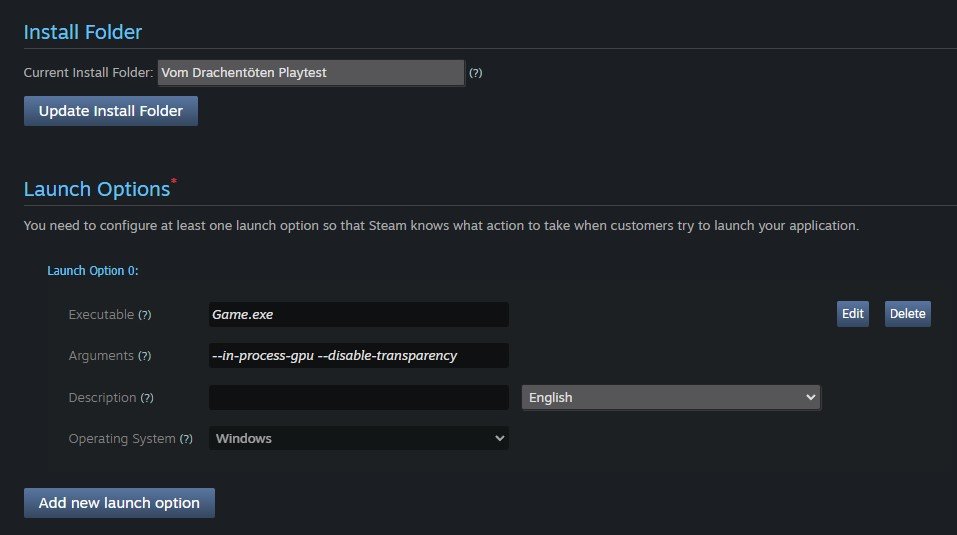
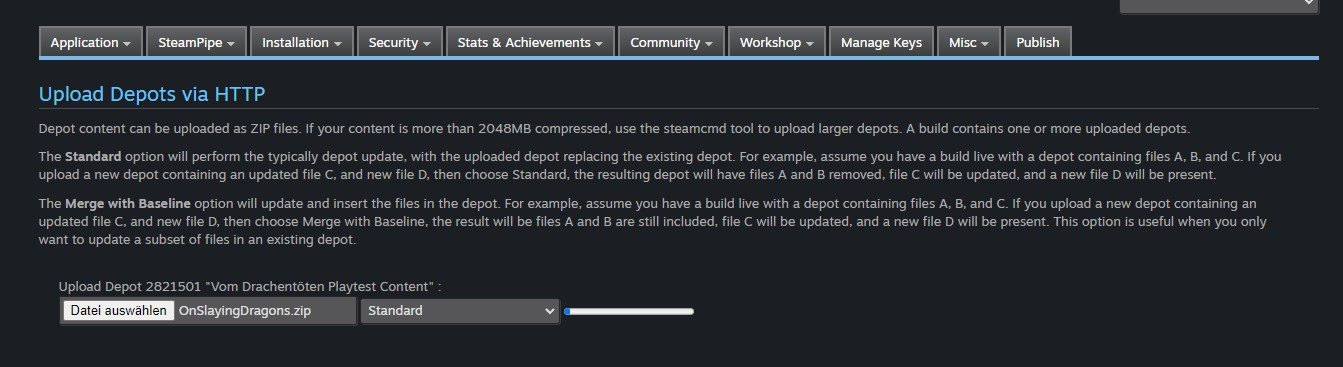
Now, what might be important here: I'm using the direct upload function of steamworks, not the complex content builder. (My game is small and has, for now, only one version.) Uploading looks as following, and in the end, this is my extensive build history ...
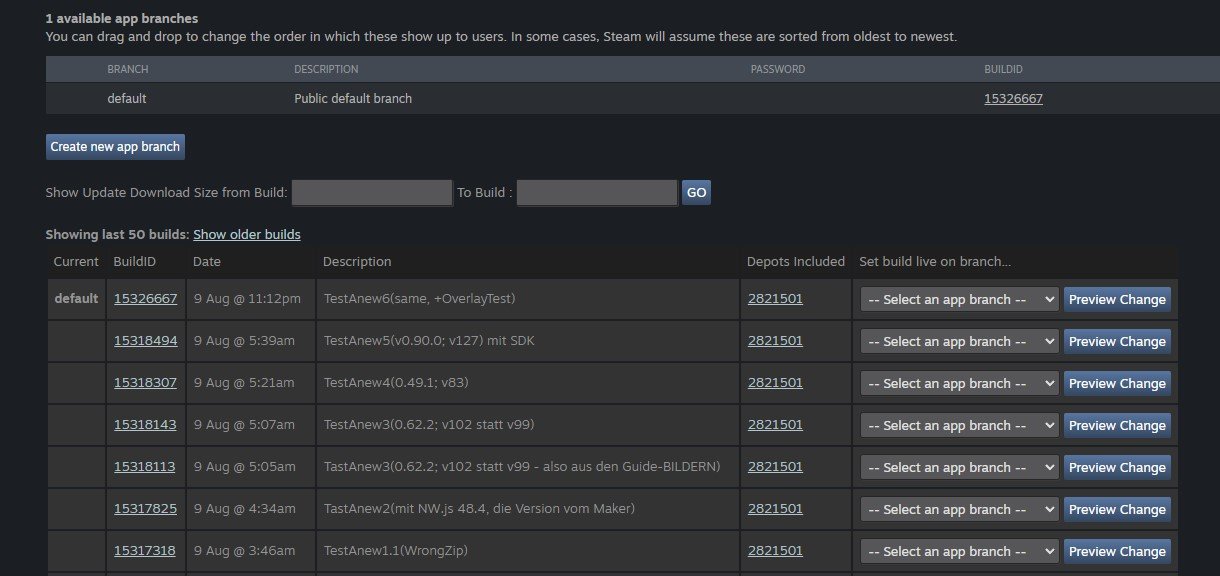
Just in case somebody asks, I DID publish the changes. ^^
Results.
There are no results. (duh!) I tried out the event in any order, but there was never any action with the achievements, in any version I tried out.
Also interesting: I do not have a steam overlay, in general. The game works fine through steam (I never got any complaints, and there are a lot of nice reviews!), but there seems to be no connection at all?
I also read that you can use the NW.js versions "with SDK" to get developer tools, but that doesn't work either. SHOULD I be able to open a console when I play on steam, using the DevTools-version of NW.js?
Accordingly, the following is only from the rpg maker directly, before the steam integration.
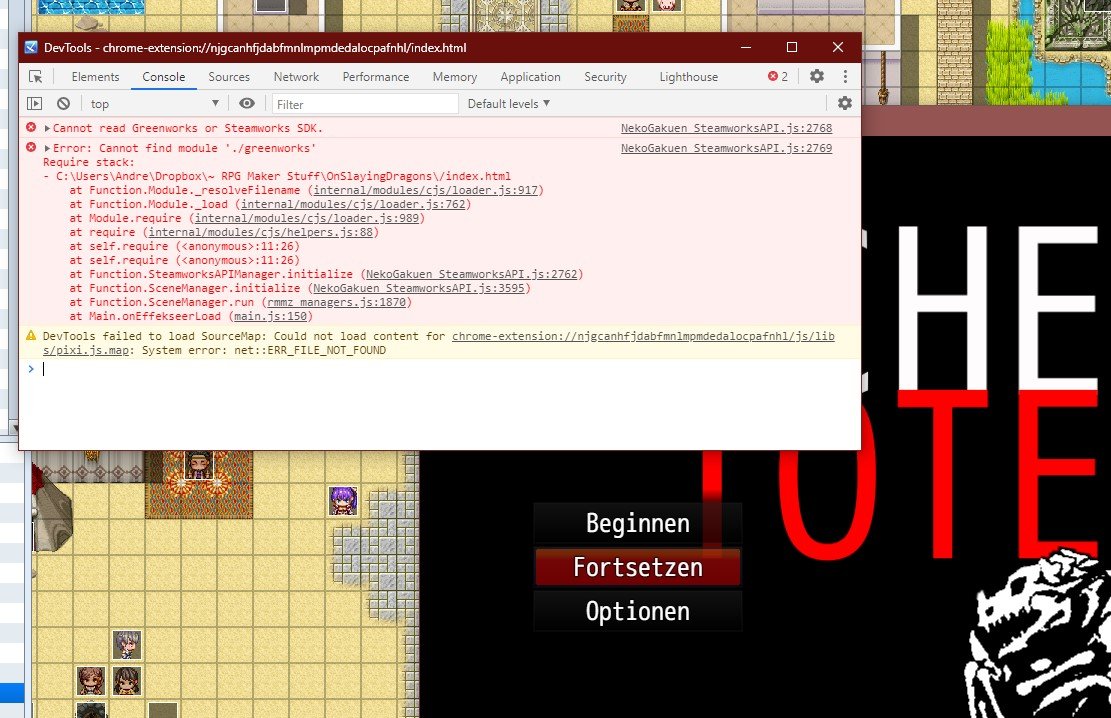
The following one pops up if I try to call the steam achievement overlay with a NekoGakuen Plugin Command. (Which makes sense because the version does not yet have steam integration, I guess ...?)
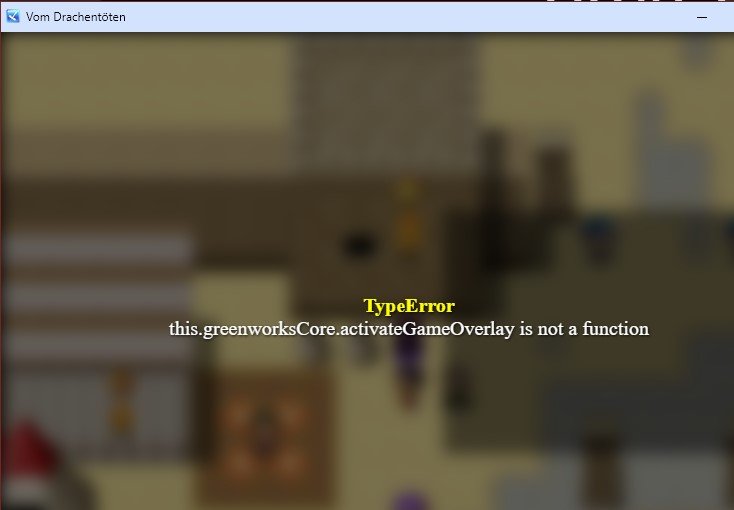
Now, the last idea I haven't tried is using the content builder instead of the direct upload, but to be honest, that would kind of overkill and I AM quite intimidated by anything that looks too much like programming ... xD' (But I'm also ready to engage, of course.) So if you think that might help or have other ideas, thanks a lot in advance! =]
And thanks for reading... !!!
Downloads / Referenced Files
RPG Maker Web attachments are mirrored locally when available. Other external links remain hosted by their original creator or third-party service.
- Download: NekoGakuen
- Local mirror: 293310-80feed344df77896223fb676f6037fbc.jpg
SHA-256:916fbda913f1425e9732198ce52dcb9051d5a4b96c17e7b8533ed911bc319d96
Original attachment URL: https://forums.rpgmakerweb.com/attachments/nek1-jpg.314230/ - Local mirror: 293317-7107e4e65b44ecc5638b72454a244ea0.jpg
SHA-256:d268bf6cf2a07b0d591cd2af45c265c1bdc4078c04fb0fec637e64ea577b2b8f
Original attachment URL: https://forums.rpgmakerweb.com/attachments/nek8-jpg.314237/ - Local mirror: 293311-a0bbf8b3a9825a1caaf89b155d4752d8.jpg
SHA-256:92664f36124f4cb82efb38e9f96797cf47b6cfac29eb0c87d7a4fb2e3e314221
Original attachment URL: https://forums.rpgmakerweb.com/attachments/nek2-jpg.314231/ - Local mirror: 293318-0d6b115856f91b169872a0d404d2b390.jpg
SHA-256:3bba17b5b8726d32d6a8b4a1b23ba8ee9ca25c4f92a4c826d1b9b7d71f8db28f
Original attachment URL: https://forums.rpgmakerweb.com/attachments/nek9-jpg.314238/ - Local mirror: 293319-7f75f8ff81b3cb3034db3e0e3471a39a.jpg
SHA-256:7a43e0ba42a64cc9e881f5728d5d763ac90ea73c08ebd20fc2c48f2f0e4a9559
Original attachment URL: https://forums.rpgmakerweb.com/attachments/nek10-jpg.314239/ - Local mirror: 293313-ad46149f0360517be9eca962422ee943.jpg
SHA-256:215c8d9268d44361d3d828db7938700e888973100075e79c6451b68ff6030304
Original attachment URL: https://forums.rpgmakerweb.com/attachments/nek4-jpg.314233/ - Local mirror: 293314-b7ccc952a174c8a292348f0d6eb2c841.jpg
SHA-256:bb4877f67ec6c5195231afa003cdd23aac494b2ad61225e061221313729fda9c
Original attachment URL: https://forums.rpgmakerweb.com/attachments/nek5-jpg.314234/ - Local mirror: 293315-6dc6bef935818b249712e9890e9b0d30.jpg
SHA-256:50d2400139735c8e509fd406fe4fa017c81fab2173dd67bcd195f6889588d950
Original attachment URL: https://forums.rpgmakerweb.com/attachments/nek6-jpg.314235/ - Local mirror: 293316-f6889df92ececaa0f4f9b7a30b130be0.jpg
SHA-256:7a7c0f1bdaf17417e0ac08cd0cbd67375435bec35b0a84d89efc9f149a58b72b
Original attachment URL: https://forums.rpgmakerweb.com/attachments/nek7-jpg.314236/ - Local mirror: 293320-0ea22fa3bd3d6737790e803067bf3542.jpg
SHA-256:7dfc78eecd1d08c3383e2a120ba27b178bcc5249f4a3c30cd9745d6b01dd2746
Original attachment URL: https://forums.rpgmakerweb.com/attachments/nek11-jpg.314240/ - Local mirror: 293321-db0888c62a68d1b223a222b742c19d1c.jpg
SHA-256:e3c090c12503941d16cea1e6b367022ab65ad7b68f595b1f9ffb79359ea8613c
Original attachment URL: https://forums.rpgmakerweb.com/attachments/nek12-jpg.314241/ - Local mirror: 293329-f129fbab62a3ff8f045ae4dc79a18afc.jpg
SHA-256:a02c47a17189136982d6b1f79445931d90c1effb860802bf1bc4beab1840022f
Original attachment URL: https://forums.rpgmakerweb.com/attachments/nek14-jpg.314249/ - Local mirror: 293322-4d2c99cb55ba908feb130a340c782dac.jpg
SHA-256:e5edd9cc7853841252d6f8d5599398b50c5454578ba33a73b588c967e8502ad2
Original attachment URL: https://forums.rpgmakerweb.com/attachments/nek13-jpg.314242/
Referenced Images / Attachments
Creator Claims / Removal
If you are the original creator and want this listing reassigned, edited, or removed, join BMMPlay and contact the moderators with proof that matches the original RPG Maker Web profile, linked GitHub, itch.io page, or another public creator identity.
Replies (0)
No replies yet.
Topic Summary
Loading summary...