


[VX Ace] Tsukihime's Collision Maps DLL Crashing; Needs Recompiling?
BMM_Archive · July 15, 2026

Original Source
- Original title: [VX Ace] Tsukihime's Collision Maps DLL Crashing; Needs Recompiling?
- Original author: Robert-Developer_of_Bis
- Original date: September 22, 2020
- Source thread: https://forums.rpgmakerweb.com/threads/vx-ace-tsukihimes-collision-maps-dll-crashing-needs-recompiling.127733/
- Source forum path: Game Development Engines > Ruby Game System (RGSS) Scripts > RGSSx Script Support
Summary
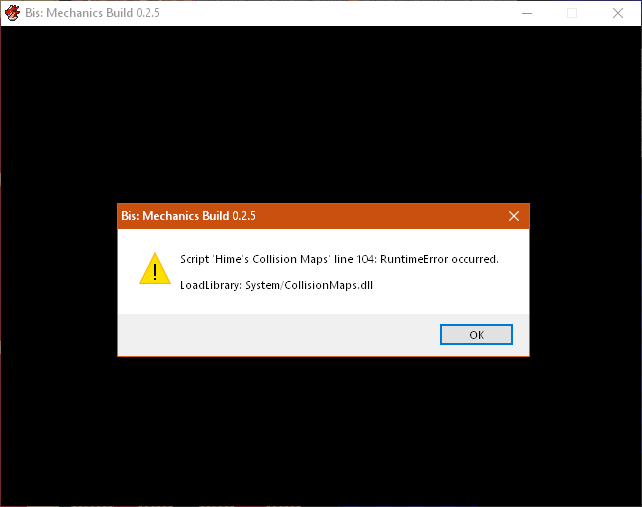
Hello. I haven't been here in a long while, having just come back from a long hiatus, so please forgive me if I make a mistake here or there. Let's start from last night. I loaded up my game wanting to work on it for the first time since January. I made a few modifications, and went to test it. However, it immediately crashed with this error, referencing the DLL from Tsukihime's Collision Maps script and DLL. { "lightbox_close": "Close",
Archived First Post
Let's start from last night. I loaded up my game wanting to work on it for the first time since January. I made a few modifications, and went to test it. However, it immediately crashed with this error, referencing the DLL from Tsukihime's Collision Maps script and DLL.
Protected download
This isn't the first time I've seen this bug before. I actually came across it in a different thread, a long time ago. It's on this page, for a different collision script by nOBodY. They encountered that same issue with that script's DLL, where it would only run on certain versions of Windows. Now, I haven't changed versions, but I DID reinstall Windows 10 just a couple of weeks ago, so I suspect the change might have occurred then.
Now, they did come across a solution. Another user recompiled nOBodY's DLL, with some slight line changes, and it began to work for everyone. I believe that would also be the solution here. However, there are two main issues. First and foremostly, I have no idea how to do that, which is why I've returned here. Secondly, I've been told previously by Shaz that you cannot reverse engineer a DLL to modify it as that is against the rules of the forum, interestingly. I don't know, however, if recompiling counts as a modification. So I'm not giving up.
I hear you asking: "Robert, why don't you just use the recompiled script and DLL from that link?". Well, unfortunately, I have a custom script I've commissioned that makes use of Tsukihime's collision script and DLL to function. In addition, I'm using GaryCXJk's Free Movement script, which has built-in compatibility with Tsukihime's script, but not nOBodY's. This is, obviously, an issue.
I'm not sure if anyone even CAN help me with this, but if you can, it would be much appreciated. Thanks for reading, and as always, thank you in advance for any help you can give.
Downloads / Referenced Files
Log in, then follow the RPG Maker Developers Group to see these download links.
Log in to downloadReferenced Images / Attachments
Creator Claims / Removal
If you are the original creator and want this listing reassigned, edited, or removed, join BMMPlay and contact the moderators with proof that matches the original RPG Maker Web profile, linked GitHub, itch.io page, or another public creator identity.
Replies (0)
No replies yet.
Topic Summary
Loading summary...

